

Transport Planning UX: A Checklist for Dispatch Boards Planners Trust
Transport planning UX for logistics product managers: build dispatch boards planners trust, handle exceptions faster, and cut planning errors in Singapore.
App DevTech

Direct answer: A transport planner does not fail because the routing algorithm is mathematically weak. The plan fails because the dispatch interface obscures the single critical exception that jeopardizes the day. Good transport planning UX organizes orders, vehicles, drivers, and constraints into an actionable operational workflow, making exceptions visible first, exposing the explicit cost of every replan, and allowing dispatchers to approve, adjust, or undo changes without re-entering data.
For logistics product managers, this distinction is fundamental: you are not purchasing an interactive map—you are building a mission-critical decision terminal. While a driver mobile application can prioritize simple, sequential tasks, a transport planning screen must manage dozens of concurrent routes, strict delivery time windows, and vehicle capacity constraints, enabling an operational dispatcher under intense time pressure to make defensible, cost-effective decisions in minutes.
If your team is evaluating or rebuilding an operational transport management system (TMS), explore JUHENZA's custom software development practice to discover how we scope, architect, and deliver high-concurrency enterprise logistics platforms.
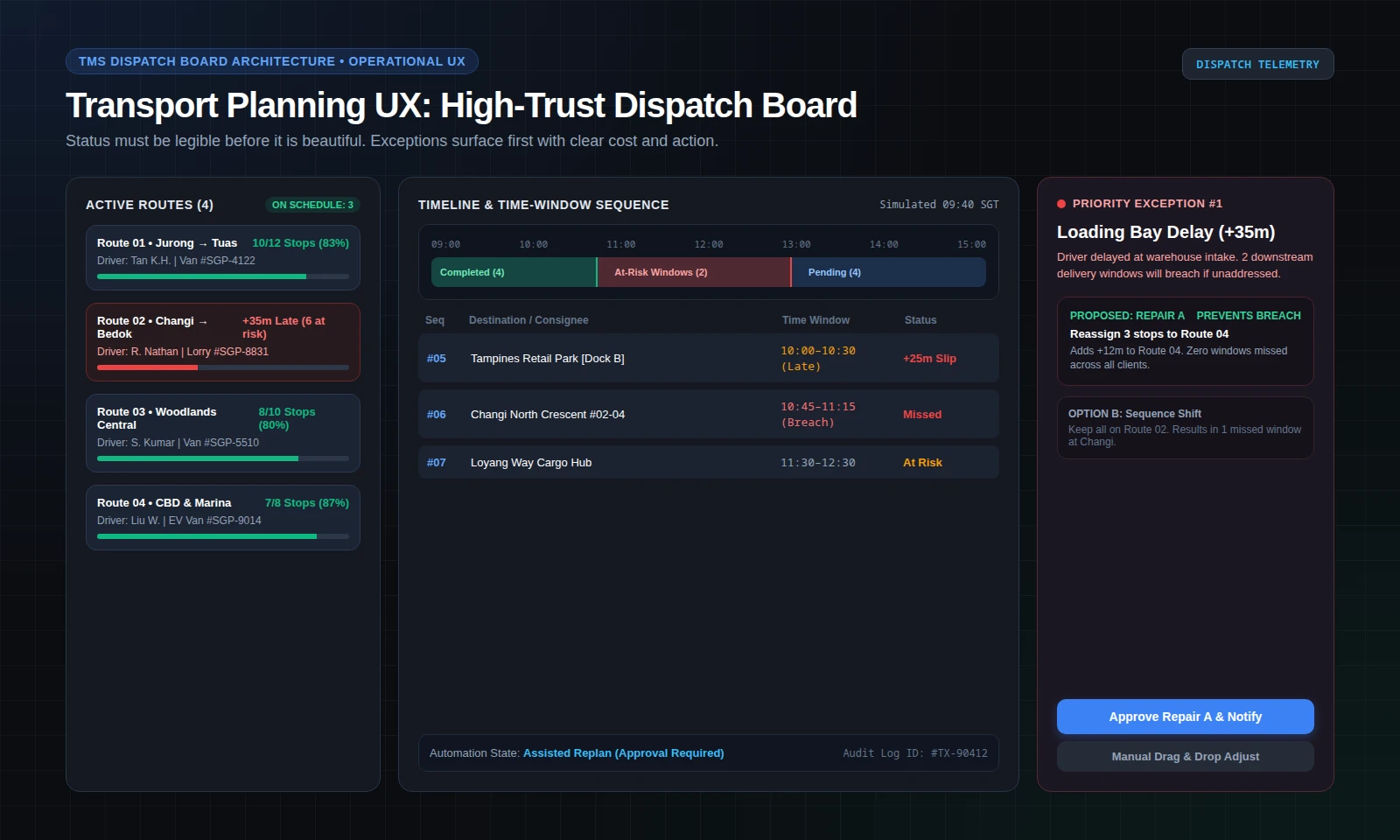 A high-trust dispatch board surfaces exceptions first, highlights the business impact, and presents clear next actions rather than unranked map markers.
What transport planning UX actually covers
Transport planning UX encompasses the entire operational planning lifecycle, extending far beyond geographic map visualizations. It orchestrates order intake, constraint validation, baseline plan generation, dispatcher approval, digital dispatch, live exception handling, in-transit replanning, proof of delivery (POD), and settlement reconciliation.
Whether within an enterprise Transportation Management System or a focused fleet dispatch portal, the core UX challenge remains identical: can an operator instantly identify what changed, evaluate trade-offs, and execute a correction without destabilizing the broader schedule?
The domain model revolves around five core entities: orders, stops, vehicles, drivers, and constraints. Orders transform into stops; stops cluster into routes; routes map to assigned vehicles and drivers under rigid constraints including delivery time windows, vehicle volumetric limits, driver shift regulations, and regional access curfews. An effective interface presents these entities in the sequence a dispatcher evaluates them, rather than reflecting database schema structures.
Three views form the backbone of a resilient planning workspace:
- The Plan View: Illustrates the committed daily baseline as sequential routes, stops, and schedules.
- The Exception View: Isolates deviations, sorting them by operational and financial impact.
- The Change View: Previews the exact downstream effects and costs of a proposed replan before the dispatcher commits.
When any of these three views is absent or difficult to navigate, planners abandon the software in favor of offline spreadsheets, manual phone calls, and whiteboard notes.
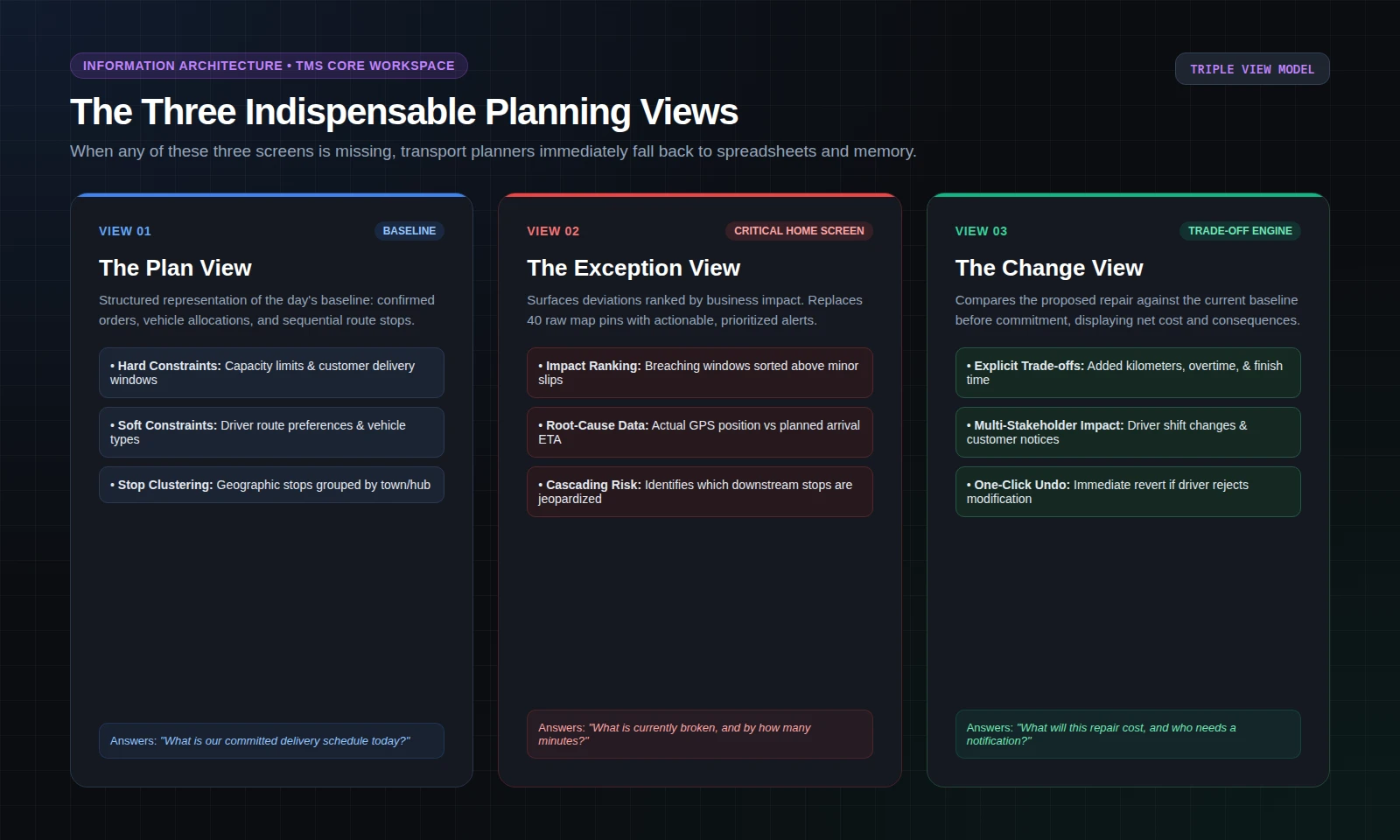 The triple-view architecture: the Plan View for committed schedules, the Exception View for active risks, and the Change View to audit replan costs before committing.
The planner's day: the job the screen must serve
A transport planner's workday consists of three distinct phases, each demanding a specialized operational focus:
1. Morning baseline creation
The initial objective is establishing a workable baseline plan. The dispatcher reconciles confirmed customer orders against vehicle availability and driver rosters. The interface must clearly delineate hard constraints (non-negotiable delivery windows, hazardous material rules, vehicle weight limits) from soft constraints (driver territory preferences, optimal vehicle fuel economy). When the interface fails to clarify this distinction, dispatchers waste valuable time manually re-checking constraints the system should enforce.
2. Midday live operational defense
Midday shifts from strategic scheduling to tactical defense. Traffic congestion, warehouse loading bay delays, failed delivery attempts, urgent ad-hoc pickups, and vehicle mechanical issues arrive simultaneously. The planner does not require a full global re-optimization of all 200 stops—a total re-optimization would disrupt every driver's day. Instead, they require the smallest viable repair: swapping two adjacent stops, reassigning a delivery to a route with spare slack, or pushing a delivery window by fifteen minutes.
3. End-of-day reconciliation and learning
The closing phase reconciles planned versus executed performance. The planner audits planned versus actual arrival times, reviews proof-of-delivery signatures and exception notes, and logs why routes diverged. If logging reasons for route overrides is friction-heavy, dispatchers skip documentation, causing tomorrow's planning algorithms to inherit identical blind spots.
Because dispatch offices are environments of constant interruption, every screen must answer three foundational questions within five seconds:
- What is the committed baseline schedule?
- What deviation has occurred?
- What immediate decision is required from me right now?
A practical framework: 7 checks for transport planning UX
Logistics product managers and engineering leads can utilize this seven-point framework to audit any transport dispatch workspace:
1. Surface exceptions first
The default home screen must prioritize active exceptions rather than a neutral, empty map. Highlight late stops, at-risk delivery windows, overloaded vehicle axles, and unassigned urgent orders in an impact-sorted alert queue. Each exception must present an explicit next action. Displaying forty unranked red pins across a map induces cognitive overload rather than operational clarity.
2. Expose the cost of every change
Every automated suggestion must present its business trade-off in plain language before commitment. The interface should quantify added travel minutes, extra kilometers, affected customer stops, and newly compromised time windows. When dispatchers cannot inspect the cost of a suggestion, they reject it; when cost implications are transparent, trust and adoption increase.
3. Maintain human-in-the-loop control
Automation requires clearly delineated operational tiers:
- Level 1 (Suggest): The system calculates optimal repairs and requires explicit planner confirmation.
- Level 2 (Auto-apply with undo): The system resolves minor, non-disruptive schedule shifts, providing immediate single-click undo.
- Level 3 (Autonomous execution): Reserved strictly for low-risk, reversible internal updates.
High-risk changes—such as dropping an order, reassigning across third-party fleets, or breaching a tier-1 customer SLA—must mandate human authorization, accompanied by a tamper-proof audit trail capturing user ID, timestamp, and rationale.
4. Align with real-world mental models
Software should utilize the vocabulary of the dispatch office. A delivery location is a stop, not a "graph node"; a driver's daily manifest is a route, not a "polyline sequence." Related metadata—consignee name, dock access requirements, gate security codes, and contact numbers—must reside in a single contextual drawer. This follows established usability principles outlined in Nielsen Norman Group's 10 Usability Heuristics, which emphasize matching system concepts to real-world operational workflows.
5. Make high-density data scannable
Planners scan dense matrices; they do not read exhaustive prose. Use typographical weight to highlight the primary decision field (e.g., delivery window countdown or delay margin). Combine color with distinct iconography (e.g., amber warning triangles and red breach octagons) so status remains instantly recognizable in glare-heavy dispatch depot environments. Keep one row per delivery stop, with secondary detail available on demand.
6. Design for warehouse floor environments
Transport applications are rarely operated on pristine dual-4K office monitors. They run on ruggedized tablets in noisy cross-dock depots, laptops with low-resolution displays, and mobile devices under bright outdoor glare. Conduct UX testing with realistic data: complex multi-unit industrial addresses, duplicate customer company names, and high-latency cellular connections.
7. Enforce error prevention with seamless recovery
Prevent standard operational errors automatically: assigning a driver whose legal driving hours will expire, dispatching an oversized vehicle into a low-clearance residential zone, or saving an unassigned priority manifest. When an error is unavoidable, display an actionable dialogue that explains the conflict and suggests immediate resolutions. Replace generic "Are you sure?" prompts with explicit consequence summaries (e.g., "Approving this swap moves 3 stops to Route 04 and delays Delivery #12 by 18 minutes").
| Check | Score 0 (Failing) | Score 1 (Marginal) | Score 2 (High-Trust) |
|---|---|---|---|
| 1. Exceptions first | Buried in sub-menus | Listed, but unranked & without action | Ranked by impact with one-click repair actions |
| 2. Cost transparency | Suggests routes blindly | Shows distance only | Quantifies minutes, kilometers, and SLA impact |
| 3. Planner control | Rigid automation or fully manual | Basic confirmation dialogues | Tiered automation, full undo, and audit logging |
| 4. Domain terminology | Technical database jargon | Mixed terminology | Pure dispatch vocabulary matching operational reality |
| 5. Density & scanning | Cluttered or sparse spacing | Legible on desktop only | High-density scannable grid with dual color/shape coding |
| 6. Field resilience | Fails on mobile/glare | Usable with high bandwidth | Resilient under sunlight, low connectivity, and touch |
| 7. Error prevention | Silent validation crashes | Generic warning popups | Guardrail validations with explicit consequence previews |
Exception handling: the test that decides trust
Exception resolution is where transport management software either earns lifelong operational adoption or gets permanently bypassed. Implement this standardized five-step resolution pipeline:
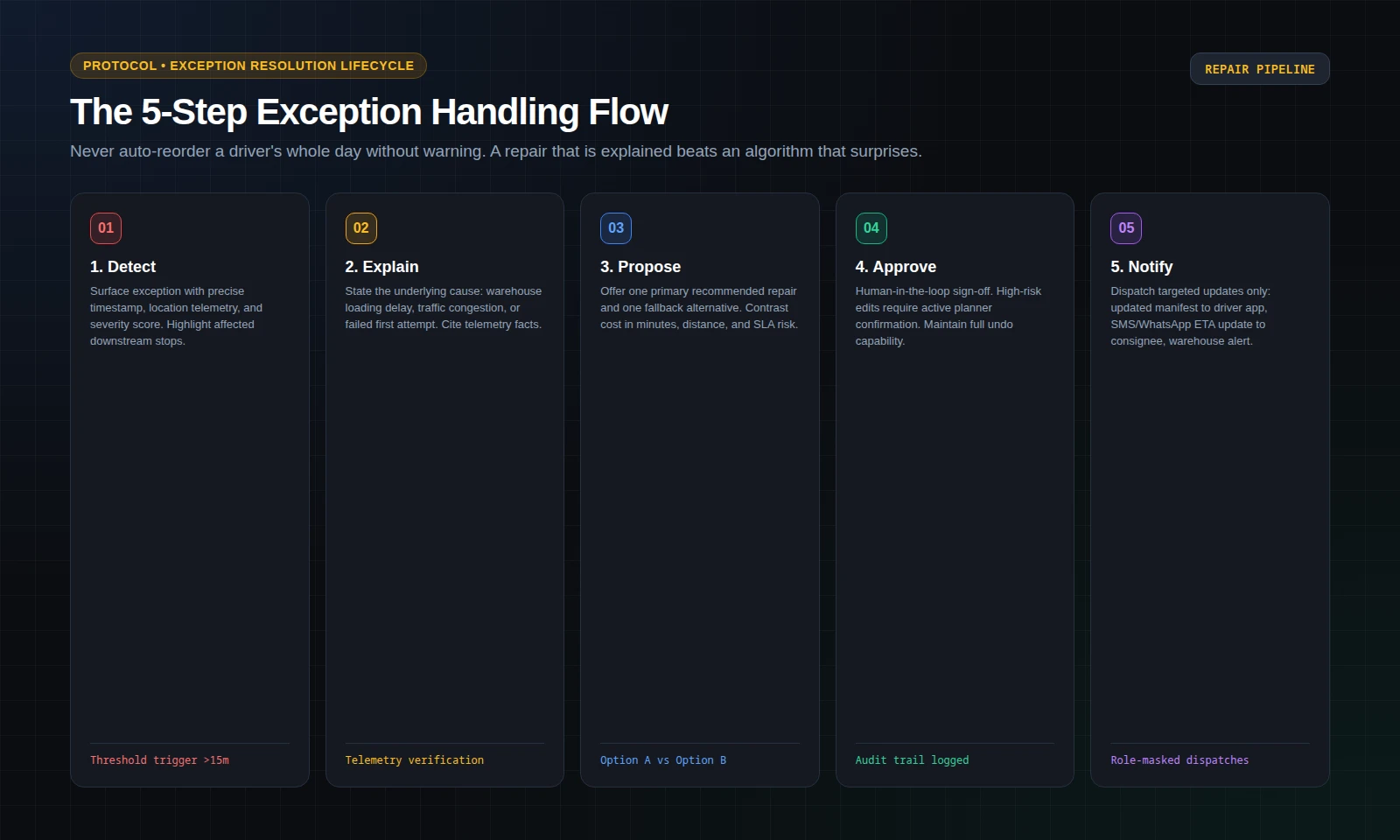 Never auto-reorder a driver's whole day without warning. The 5-step repair flow ensures transparency, planner oversight, and targeted notifications.
- Detect: Isolate the deviation with telemetry, identifying the vehicle, location, and delay magnitude.
- Explain: Articulate the root cause using verified facts: Driver delayed at warehouse intake dock (+35 min), calculated arrival at next stop pushed past window boundary.
- Propose: Surface two distinct options: a primary recommended repair (e.g., reassigning two downstream stops to an adjacent vehicle with excess slack) and an alternative fallback (re-sequencing the delayed driver's afternoon).
- Approve: Keep the current route layout side-by-side with the proposed repair, allowing the planner to review differences before applying changes.
- Notify: Upon confirmation, dispatch scoped updates exclusively to affected parties: update the driver's mobile manifest, trigger an automated WhatsApp delivery ETA to the consignee, and alert the cross-dock warehouse team.
Establishing clear operational thresholds is critical. Minor delays under fifteen minutes should adjust arrival ETAs quietly without triggering disruptive alarm states. For architectural strategies on designing high-throughput operational interfaces, consult our guide on fixing broken SME dashboards in Singapore.
The Singapore layer: dense, time-windowed, PDPA-aware
Deploying transport planning software within urban centers like Singapore introduces three specialized constraints:
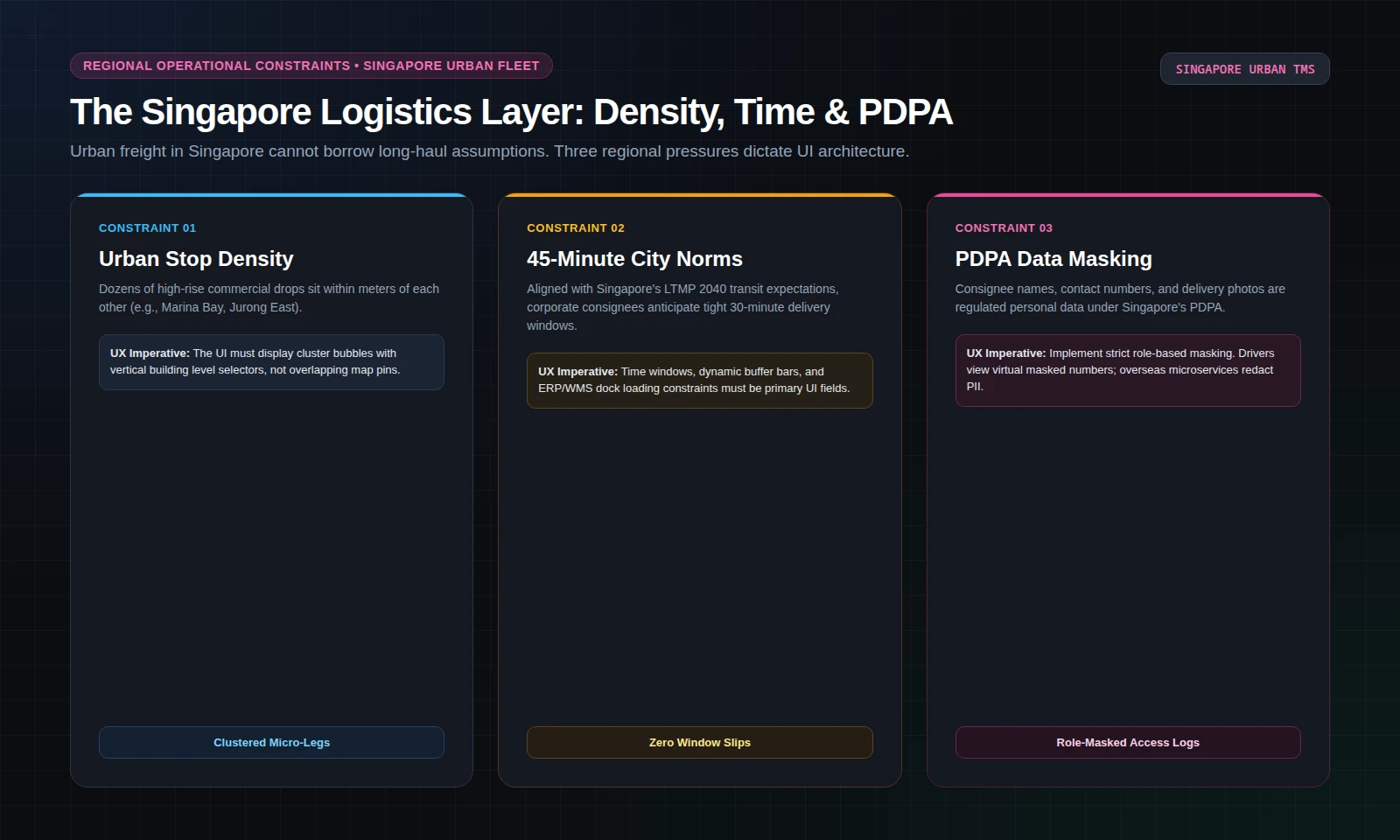 Singapore urban dispatch requires building-level stop clustering, strict buffer management, and role-based consignee PII masking.
1. High-rise urban stop density
Commercial zones such as Marina Bay, Jurong East, and Changi North feature multiple delivery consignees within the same physical building or industrial complex. A traditional geographic map view plots overlapping pins that become unclickable. Transport planning UX must feature stop clustering: aggregating multi-tenant drops by building address, displaying loading dock bay availability, and presenting vertical floor/unit delivery sequences.
2. Tight time windows and transit expectations
Singapore's national transport vision, outlined in the Ministry of Transport Land Transport Master Plan 2040, targets a 45-Minute City connectivity benchmark. In B2B and retail logistics, corporate consignees demand strict 30-to-60-minute delivery time windows. Dispatch screens must treat time buffers and traffic congestion patterns across expressways (PIE, CTE, AYE) as dynamic, first-class variables.
3. Personal data protection (PDPA) compliance
Customer names, personal mobile numbers, delivery unit addresses, gate access codes, and proof-of-delivery photos constitute regulated personal data under the Singapore Personal Data Protection Act. Transmitting or processing logistics data through overseas servers requires establishing legally enforceable protection standards, as detailed in the Personal Data Protection Regulations 2021. In application design, this mandates:
- Role-based data masking: Displaying customer telephone numbers only through virtual masking proxies in driver mobile applications.
- Controlled access logs: Ensuring foreign microservices and international cloud endpoints redact personal identifiable information (PII) before storage.
How to measure whether the UX works
Avoid evaluating transport planning software through unverified marketing claims or generic percentage statistics. Measure performance directly against your own operational baseline:
- Time to first baseline plan: Measure the minutes elapsed from order freeze to final dispatcher sign-off.
- Time to resolve one exception: The elapsed time from an exception alert to an approved and dispatched repair. This metric reflects the effectiveness of the five-step resolution pipeline.
- Manual override rate: The percentage of automated optimization suggestions rejected or manually adjusted by planners. An override rate exceeding 30% indicates either algorithmic mistrust or inaccurate constraint inputs.
- Breached window percentage: The frequency of missed delivery time windows following an in-transit replan.
- Qualitative planner confidence score: Weekly survey metrics assessing whether dispatchers feel in control during peak disruption windows.
Benchmark these metrics with identical order batches before and after introducing new interface modifications. Introduce design refinements iteratively—testing the exception queue, the optimization solver, and driver communications in distinct phases.
Illustrative example: a live morning replan
Consider a mid-sized urban fleet scenario:
A dispatcher manages 42 deliveries distributed across four commercial vans. At 9:40 AM, Driver 02 reports a 35-minute delay due to a congested warehouse loading bay.
The Exception View identifies that two downstream deliveries (Stops #06 and #07) will breach their committed 10:30 AM client delivery windows if Driver 02 remains on their original sequence. The system calculates two alternative repairs:
| Repair Scenario | Operational Adjustment | Cost & Trade-off | Resulting SLA Status |
|---|---|---|---|
| Repair A (Recommended) | Reassign 3 nearby stops to Route 04 (operating with surplus slack) | Adds 12 minutes to Route 04; driver finishes on schedule | 100% On-Time: All delivery windows preserved |
| Repair B (Alternative) | Re-sequence Driver 02's afternoon manifest, skipping to stop #08 | Zero extra kilometers across other vehicles | 1 Window Breached: Stop #06 delayed by 28 minutes |
The dispatcher reviews the Change View, confirms that Route 04 possesses sufficient volumetric capacity, and clicks Approve Repair A. Driver manifests update automatically on their mobile terminals, customer notifications dispatch seamlessly, and the decision is permanently recorded in the audit log. The entire decision takes under three minutes.
Common UX mistakes in logistics software
- Treating the initial plan as static: A morning dispatch plan is merely a draft. Architect the real-time replanning workflow with greater priority than the morning generation flow.
- Hiding critical alerts beneath a full-screen map: Full-screen satellite maps impress in executive demonstrations but hinder daily operations. The ranked exception list is the true home screen.
- Autonomous replans that surprise drivers: Automatically rearranging a driver's active route without explanation destroys driver trust, leading to delivery resistance and missed pickups.
- Uniform interfaces across disparate roles: Dispatchers require high-density data grids; drivers need glanceable, high-contrast action cards; operations directors need macro SLA summaries. Never force all three roles into a single interface.
- Borrowing consumer navigation patterns: Consumer navigation apps optimize a single vehicle traveling from Point A to Point B. Logistics software optimizes hundreds of interdependent vehicles, tight time windows, and complex volumetric constraints simultaneously.
Limitations and when to involve a specialist
Transport planning UX design addresses operational ergonomics and decision velocity; it does not replace core vehicle routing problem (VRP) algorithms, telematics IoT integrations, or regulatory compliance protocols. If your operations involve hazardous materials handling, cold-chain pharmaceutical monitoring, cross-border customs declarations, or statutory tachograph limits, engage logistics domain specialists and legal advisors early in product development.
Furthermore, if dispatchers persistently override system suggestions, the root cause frequently resides in flawed input data rather than interface design: inaccurate geocodes, outdated service duration assumptions, or incorrect vehicle height ratings. High-fidelity data inputs are essential for any high-performing logistics platform.
FAQ
What is transport planning UX?
Transport planning UX is the specialized user experience design of software used by dispatchers and fleet managers to build, optimize, dispatch, and dynamically repair transport schedules. It encompasses order aggregation, constraint configuration, real-time exception resolution, and proof-of-delivery tracking.
What should an effective transport planning screen display first?
It should present a ranked queue of active operational exceptions—such as delayed drivers, impending time-window breaches, and unassigned urgent orders—prioritized by business impact, accompanied by explicit one-click resolution actions.
How should dynamic replanning function in transport software?
Dynamic replanning should adhere to a structured five-step lifecycle: Detect, Explain, Propose, Approve, and Notify. The system should present primary and fallback repair options, clearly display cost and schedule implications, and require human-in-the-loop authorization for high-risk edits.
When is full auto-replanning appropriate?
Autonomous replanning should be restricted to low-risk, reversible internal shifts that fall within pre-approved operational thresholds agreed upon with fleet leadership. High-impact adjustments that risk customer SLAs must require dispatcher confirmation.
How should logistics teams test transport planning UX prior to production rollout?
Evaluate workflows using production-grade historical data and authentic disruption scenarios rather than sanitized demo datasets. Measure task completion speed for exception repairs, dispatcher override frequencies, and post-replan delivery failure rates across controlled test cohorts.
Does transport planning UX differ for Singapore logistics operations?
Yes. Singapore's extreme commercial density, high-rise delivery clusters, tight delivery window expectations, and statutory PDPA personal data regulations demand building-level stop grouping, dynamic expressway buffer calculations, and strict role-based consignee data masking.
Where this fits
This guide belongs to JUHENZA's enterprise software engineering library under Custom Software and Product Development > Logistics and Supply Chain Software. It establishes technical and design benchmarks for teams building mission-critical fleet management tools.
To discover how our engineers design and build full-stack enterprise web and mobile applications, review our application development practice. For specialized guidance on scoping an operational software platform tailored to your fleet workflows, contact JUHENZA to submit your project brief.
Conclusion
Exceptional transport planning UX is not defined by decorative map styling. It is realized when an operational dispatcher can instantly identify a live exception, evaluate its precise business cost, approve a safe repair, and communicate changes across the fleet in minutes.
If your organization is scoping a custom dispatch system or modernizing an existing logistics tool, submit your project brief on our contact page to initiate an architectural review with our engineering team.
