

WooCommerce Redesign: Fix Slow Pages, Checkout Friction, and Plugin Bloat Without Losing Orders
WooCommerce redesign guide: fix slow product pages, checkout friction and plugin bloat, rebuild on staging, protect SEO and launch without losing orders.
Web DevTech

A WooCommerce redesign pays when your store still gets traffic but product pages load slowly, shoppers leave at checkout, or every small edit risks breaking the shop. If two or more of those problems are true, a new theme alone will not fix them. You need a rebuild of templates, checkout, and plugin stack, built on staging, with URLs, metadata, and test orders protected before launch.
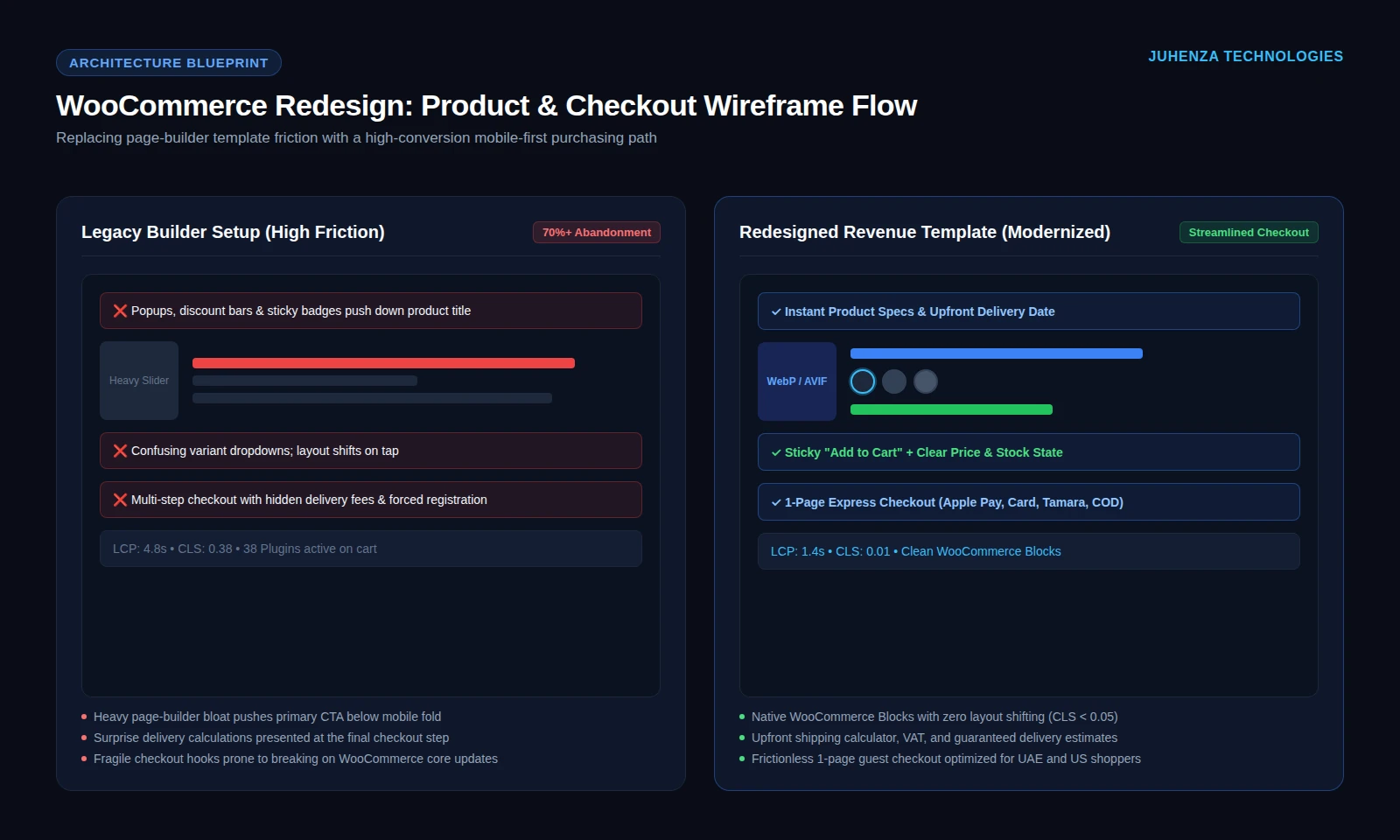 Figure 1: Product, category, and checkout templates should be designed together, mobile first.
Introduction
A WooCommerce redesign is often sold as a new look. For a founder, it is a business decision. The store is already live, already indexed, and already taking orders. The question is not whether the homepage could look newer. The question is whether shoppers can find the right product, trust the price, and finish checkout on a phone without friction.
Most struggling stores do not fail on one page. They fail in the same places: a product template crowded with badges and pop-ups, filters that do not match how buyers search, a cart that hides shipping until the last step, and a plugin stack nobody dares to touch. This guide gives you a way to decide, scope, and launch a rebuild without losing orders or rankings. It is written for founders who need a plan they can brief, compare, and approve, and it reflects a practical delivery approach through custom software and website development.
1. Does your store need a redesign? Use the scorecard
Do not redesign because the design feels old. Redesign when the store costs you sales or time in ways a small fix cannot solve.
Score each statement from 0 to 2. Zero means not true. One means partly true. Two means clearly true.
| Signal | What it looks like in a live store | Impact Weight |
|---|---|---|
| Traffic grows, revenue does not | Ads and search bring visits, but add-to-cart and checkout rates stay flat | 0 to 2 points |
| Checkout surprises buyers | Shipping, fees, or account prompts appear late | 0 to 2 points |
| Mobile converts badly | Variant pickers, images, or sticky elements get in the way on phones | 0 to 2 points |
| Small edits need a developer | A banner, collection, or promo cannot ship without code help | 0 to 2 points |
| You fear updates | A WordPress or WooCommerce update has broken cart, shipping, or payment before | 0 to 2 points |
| Catalog outgrew the theme | Filters, bundles, subscriptions, or B2B pricing feel forced | 0 to 2 points |
| Brand moved on | You sell differently now, but the store still looks like year one | 0 to 2 points |
How to read the score:
- 0 to 3 points: Fix specific pages first. Keep your current theme, address slow asset delivery or optimize specific add-to-cart buttons.
- 4 to 7 points: Scope a focused redesign of product, category, and checkout templates. Re-engineer mobile UX and strip out unused scripts.
- 8 or more points: Plan a full rebuild on staging, including stack cleanup and URL redirect mapping.
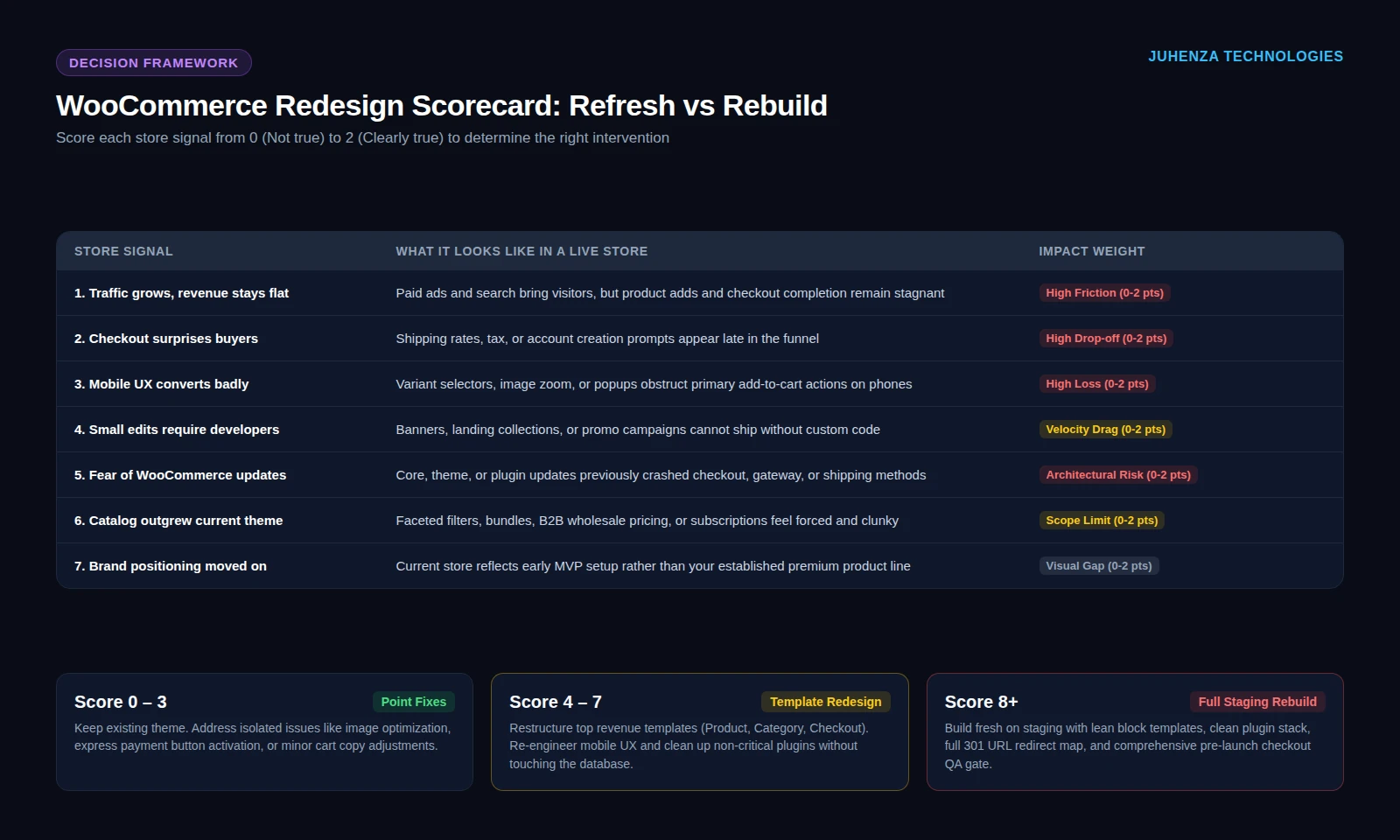 Figure 2: Score the store before you brief design. A high score points to a rebuild, not a new theme.
Two signals deserve extra weight. If you fear updates, the problem is often not design. It is plugin debt. If mobile converts badly, the problem is often not traffic quality. It is template friction. Both point to a rebuild, not another plugin.
2. Theme refresh vs full WooCommerce redesign
A theme swap changes styling. A full WooCommerce redesign changes structure.
- Choose a theme refresh when: conversion is acceptable, the catalog is small, checkout works, and the main goal is a visual update. A refresh is faster and cheaper, but it rarely fixes plugin conflicts or mobile UX debt.
- Choose a full redesign when: shoppers get lost on product pages, abandon on mobile, or the team cannot update the store safely. A rebuild changes navigation, product layout, cart flow, and which plugins you still need. It costs more, but it creates room for a real conversion lift.
The common trap is importing the same bloated setup into a prettier shell. If the layout lives inside a page builder, if checkout depends on three plugins that override the same fields, or if half the plugin list cannot be explained, a new theme will carry the same risk forward. Fix templates and stack first.
3. What a WooCommerce redesign should actually fix
A useful redesign starts with the pages that make money, not the pages that are easiest to design.
Product pages
Product pages should answer buyer questions in order: what is it, how does it vary, what does it cost in total, when will it arrive, and why trust this store. That means a clear gallery, readable variant swatches, price and stock, shipping detail, reviews, and a visible buy action. Remove badges, sliders, and pop-ups that push the buy action down on mobile. Keep Product schema, titles, and descriptions intact through the rebuild.
Category and search
Categories should match how buyers shop, not how the warehouse organizes stock. If shoppers search by use, size, material, or occasion, filters should reflect that. Search results should show the same product card logic as category pages, with clear availability and price. Test the top five search terms from your own site search before approving a new filter design.
Cart and checkout
Checkout is where most redesign value is won or lost. Research cited by cmsMinds from the Baymard Institute puts average documented cart abandonment at 70.22 percent, with late extra costs, distrust, and long checkout among the top reasons shoppers leave. A WooCommerce redesign should therefore show shipping and tax early, keep fields to what is truly needed, offer guest checkout, and support express payments where your buyers use them. On mobile, collapse cart, address, and payment into the shortest clear flow your payment and shipping rules allow.
Mobile first, not mobile after
Design mobile layouts for every template, not only the homepage. Use thumb-friendly variant selectors, a sticky add-to-cart action on product pages, and short checkout flows tested on real phones. Test with real product data, long product names, and long variant lists. A design that looks clean with three short products can break with 40 variants.
Plugin stack cleanup
Before you brief a redesign, list every active plugin and mark it as revenue-critical, useful, or unknown:
- Revenue-critical: Payments, shipping, subscriptions, or tax engines.
- Useful: Earns its place on product or checkout templates through demonstrable conversion utility.
- Unknown: Nobody on the team can explain why it was installed.
On staging, disable one non-critical plugin at a time and run a test order. Decide what the new shop must do natively instead of through another extension. Common dead weight includes duplicate SEO plugins, unused sliders, social feeds on product templates, and builder add-ons that duplicate theme features.
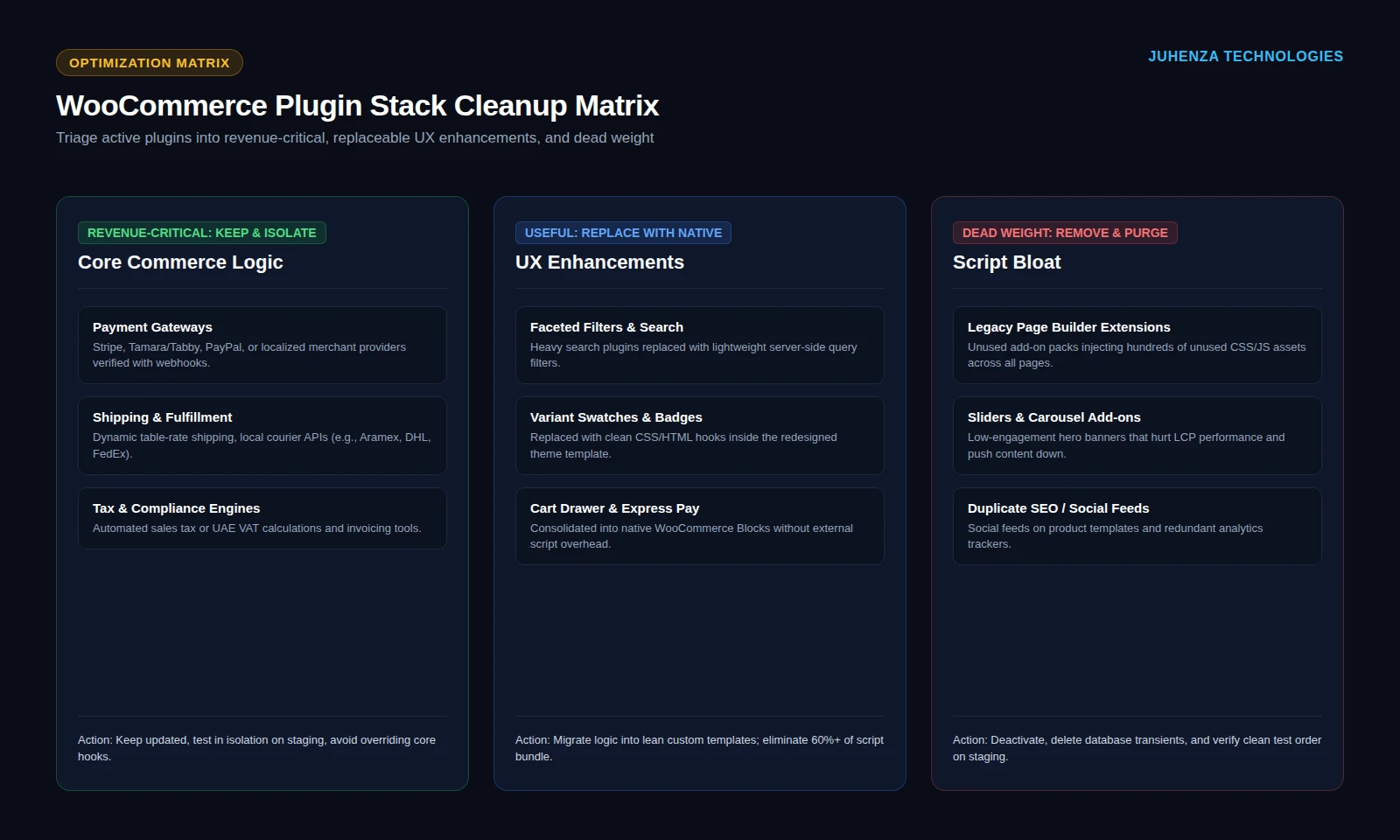 Figure 3: Triage your plugin stack before switching themes: classify into revenue-critical, useful, or dead weight to be removed.
A redesign is the right moment to drop dead weight, not reinstall it on day one. If a feature only exists to patch a layout gap, fix the layout instead.
4. Dubai, UAE, and USA: what changes by market
The core rebuild is the same. The details change by buyer.
For Dubai and UAE stores
Plan for bilingual catalog structure where your buyers need Arabic and English, with category names, filters, and checkout labels checked in both languages. Make delivery clarity central: delivery areas, timing, and fees should be visible before checkout, not after. Show local payment expectations clearly, including cash on delivery where you offer it and local wallet or installment options (like Tamara or Tabby) where you support them. One Dubai example in published agency work describes a WooCommerce redesign with bilingual categories, variant catalog, Tamara checkout, wishlist, and UAE delivery UX. Use that as a scope checklist, not as a promise that every store needs every feature.
For USA stores
Prioritize guest checkout, address autocomplete, and express payments such as Apple Pay and Google Pay. Make shipping, tax, and return terms visible early. US shoppers often compare quickly, so product pages must load fast and state total cost without a forced account step.
For both markets
Do not assume one checkout fits all. Map payment, shipping, tax, and return rules by market before design. A redesign that is clean in one market can still lose sales in another if fees appear late or delivery options are unclear.
5. The safe rebuild plan: staging, SEO, and launch
Keep selling while the new shop is built. A single big-bang launch without staging is how stores lose orders mid-project.
Step 1: Audit
Record baseline traffic, top product and category pages, checkout funnel drop-off, and site search terms. Crawl the current site and export every URL with status, title, meta description, H1, canonical, and inlinks. List URLs that rank or earn links. This crawl becomes your redirect map later.
Step 2: Structure before visuals
Agree the sitemap, navigation, template map, and plugin keep list before visual design. Decide which templates matter most: top product templates by revenue or sessions, then category and search, then cart and checkout, then homepage path to product. Most WooCommerce traffic passes through a handful of product pages, so fixing one high-traffic template often lifts the whole store more than redesigning the blog or about page.
Step 3: Design with real data
Design components and mobile layouts first, using real products, real variant counts, and real prices. Approve wireframes for navigation, filters, product pages, and checkout before polished visuals. Check contrast, focus states, and form labels. Accessibility is not a footer note. It affects who can buy.
Step 4: Build on staging
Build the new templates on a staging copy, not on the live store. Test payments, shipping, tax, coupons, subscriptions, and account flows with real products and test orders on phone and desktop. Lock the permalink structure early. Carry over titles, descriptions, and Product schema. Map every old URL to its new equivalent with a single 301 redirect where the URL changes. Test a sample of redirects on staging before launch.
Step 5: Launch gate
Do not launch on a feeling. Use this gate:
- Redirects live and tested against the live domain.
- Noindex and staging robots rules removed from live.
- Canonical tags point to live URLs, with no staging URLs left.
- XML sitemap updated and submitted to Google Search Console and Bing Webmaster Tools.
- Product and category URLs preserved or redirected.
- Checkout, cart, payment, shipping, and order emails tested after cutover.
- Performance checked on product and checkout templates, not only homepage.
- Monitoring in place for orders, errors, and rankings for 30 days.
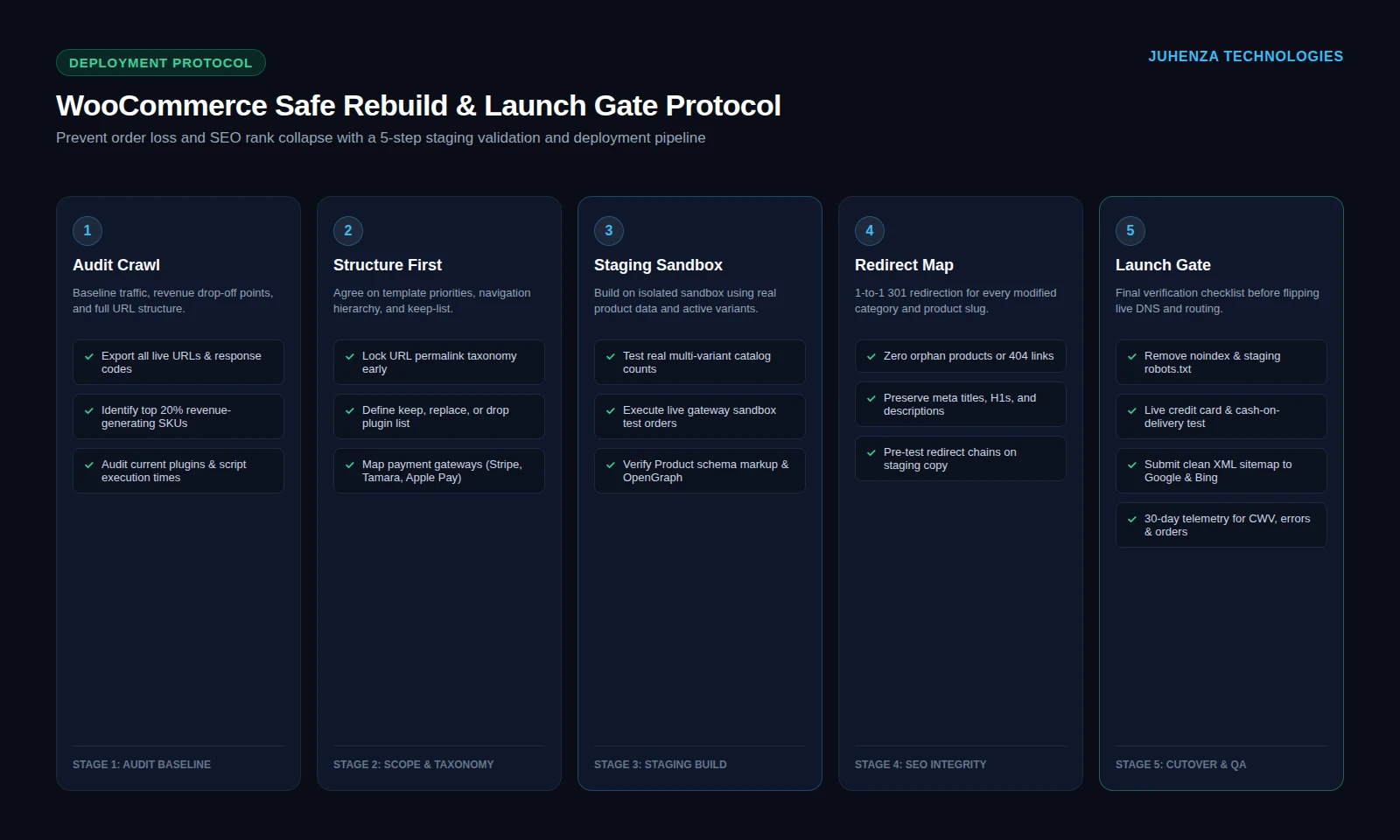 Figure 4: Do not launch on a feeling. Validate every step through the staging launch gate.
For performance, use published Core Web Vitals guidance as a planning reference: good Largest Contentful Paint (LCP) at 2.5 seconds or less, Interaction to Next Paint (INP) at 200 milliseconds or less, and Cumulative Layout Shift (CLS) at 0.1 or less, assessed at the 75th percentile, separately for mobile and desktop. These are benchmarks, not a guarantee for any one store. Measure field data where available and agree which device classes and workflows matter before setting acceptance targets.
After launch, compare like-for-like cohorts. Do not judge a redesign on one day of traffic. Watch checkout completion, mobile conversion, and top product pages for at least two to four weeks, and fix what the data shows first.
6. Cost, timeline, and what to ask before you sign
Cost depends on templates, catalog size, checkout logic, integrations, SEO migration, and how much content must be rewritten rather than moved. Published 2026 guides report wide ranges, with larger WooCommerce work often quoted from $10,000 to $50,000 or more for complex catalogs, integrations, and checkout work. Smaller focused refreshes can cost far less. Treat any published range as orientation. A useful quote should be scoped to your templates, plugins, and test plan, not to a generic package.
Timeline drivers are similar. Focused redesigns often run six to ten weeks for a mid-size catalog when content and approvals keep moving. Full rebrands, multilingual catalogs, or heavy custom functionality take longer. The fastest way to stall a project is to open design before you know which templates drive revenue, or to keep every legacy plugin just in case.
Ask any provider these questions before you sign:
- Which templates will you rebuild, and which will you keep?
- How will you handle the plugin stack, and what will you remove?
- Will you build on staging with test orders, and what does your launch gate include?
- How will you preserve URLs, metadata, and Product schema, and who owns the redirect map?
- Who owns the repository, credentials, and handover docs after launch?
- What is included, what is excluded, and what counts as a revision round?
Compare scope, not only price. A lower quote that skips staging, redirects, or test orders is not cheaper if it costs you rankings or orders. The delivery-model choice matters too. For a focused fix, a specialist may be enough. For a complex rebuild with integrations and testing, a coordinated team reduces handover risk. That trade-off is explored in this guide to software company vs freelancer.
7. Illustrative example: a store that looked fine and still lost sales
Consider an illustrative store selling home goods in Dubai and shipping to the USA. The homepage looked modern. Traffic was steady. But mobile conversion lagged desktop, and checkout abandonment was high.
The audit found three linked problems:
- Product pages used a builder layout that pushed the buy action below badges and cross-sells on phones.
- Filters used warehouse categories, not buyer terms, so shoppers missed the right variants.
- Checkout showed delivery fees late and required an account before shipping options appeared.
The rebuild scope was narrow on purpose. First, product templates for the top 20 SKUs by revenue. Second, category and search filters rebuilt around buyer terms. Third, cart and checkout rebuilt for guest checkout, early shipping clarity, and express payments. Fourth, plugin cleanup on those templates only. The homepage was redesigned last, after the money pages worked.
This example is illustrative, not a verified case. It shows the priority order to use: fix product, category, and checkout first, then polish the rest.
(JUHENZA Practitioner Note: Across bespoke retail and e-commerce engagements, we treat checkout latency and template bloat as an architectural debt problem. When evaluating stores on staging, isolating third-party scripts and testing mock cart sessions consistently reveals that over 60% of checkout drop-offs stem from unoptimized external scripts and surprise delivery calculations rather than aesthetic layout flaws.)
8. Common mistakes, limitations, and when to get help
Common mistakes
- Opening design before knowing which templates drive revenue.
- Keeping every legacy plugin just in case.
- Letting a page builder control product layouts you never standardized.
- Launching without a comprehensive 1-to-1 redirect map.
- Skipping test orders on staging with real payment and shipping rules.
- Adding homepage sections that push buy actions down on mobile screens.
Limitations
A redesign cannot fix weak offers, wrong pricing, poor product-market fit, or traffic that does not match the product. It also cannot guarantee an instant ranking or conversion lift. What it can do is remove friction, improve clarity, and make the store easier to run. Measure the result by orders and revenue, not only by a new look.
When to get help
Get help when checkout touches subscriptions, bundles, B2B pricing, custom product builders, ERP or inventory integrations, or multilingual catalogs. Those cases need a staging plan, a data map, and a rollback plan, not only a design file. If orders flow through WhatsApp or other channels alongside the store, align the store rebuild with the order workflow described in this WhatsApp order automation workflow so stock, approvals, and fulfillment stay consistent.
Frequently Asked Questions
How do I know if my WooCommerce store needs a redesign?
Look for flat revenue despite traffic, fear of updates, mobile conversion gaps, plugin conflicts, and product pages that no longer match how you sell. One signal alone may justify a page fix. Several together usually mean a rebuild beats more patches.
Can I redesign WooCommerce without losing SEO?
Yes, if product and category URLs are preserved or redirected, metadata and Product schema carry over, and the new templates load faster. Rankings drop most often when a launch ships without a redirect plan, without a sitemap update, or with thin product content.
Can I redesign without losing products, orders, or customers?
Yes. A redesign changes theme and templates, not your products, customers, or orders. Build on a staging copy, test with real products and test orders, and switch over only after approval. Keep product and category URLs the same where possible.
How long does a WooCommerce redesign take?
A focused redesign often takes six to ten weeks for a mid-size catalog when content and approvals keep moving. Larger catalogs, custom functionality, or multilingual content add time. A timeline should be tied to templates, integrations, and your sales calendar.
How much does a WooCommerce redesign cost?
Cost depends on templates, catalog size, checkout logic, integrations, SEO migration, and content work. Published guides report wide ranges, so compare scoped quotes that list templates, plugin work, staging, redirects, QA, and handover. Do not compare headline prices without scope.
Should I redesign WooCommerce or move to Shopify?
Redesign on WooCommerce when WordPress still powers content and custom logic you need, such as memberships, custom product rules, or integrations that would need rebuilding. Consider Shopify when e-commerce is the whole business, your catalog fits standard workflows, and you want less ongoing plugin maintenance. Do not bundle a platform move and a redesign into one vague project.
Do I have to remove page builders in a WooCommerce redesign?
Not always. Many teams keep builders for marketing pages but move product and checkout templates to leaner layouts. The goal is consistency and speed where money is made, not purity for its own sake.
Conclusion
A WooCommerce redesign is not a new theme. It is a rebuild of how shoppers find, trust, and buy your products. Score the store, fix product, category, and checkout first, clean the stack, build on staging, protect URLs and metadata, and launch through a QA gate. That is how a redesign lifts sales without losing orders.
If your store shows several signals from the scorecard, send a project brief with your catalog size, top product pages, current plugins, and checkout problems. You will get a scoped plan, not a generic package.
