

Surat Grocery Billing Software: Build-or-Buy Checklist for Independent Stores
Surat grocery billing software checklist: offline billing, delivery dispatch and UPI reconciliation for independent stores to decide build vs buy today.
App DevTech

The counter should not stop when the internet does.
Direct answer: For most independent Surat grocery and dairy stores, buy packaged Surat grocery billing software first, then build only the custom dispatch or reconciliation workflow that packaged tools cannot handle. Start with offline-first billing, distinct bill number series per counter, one dedicated merchant QR per station, and a 10-minute nightly UPI close. Add delivery dispatch next. Build custom software only when your local delivery routes, credit ledger (khata), or multi-counter rules are genuinely unique and your business can own long-term technical maintenance.
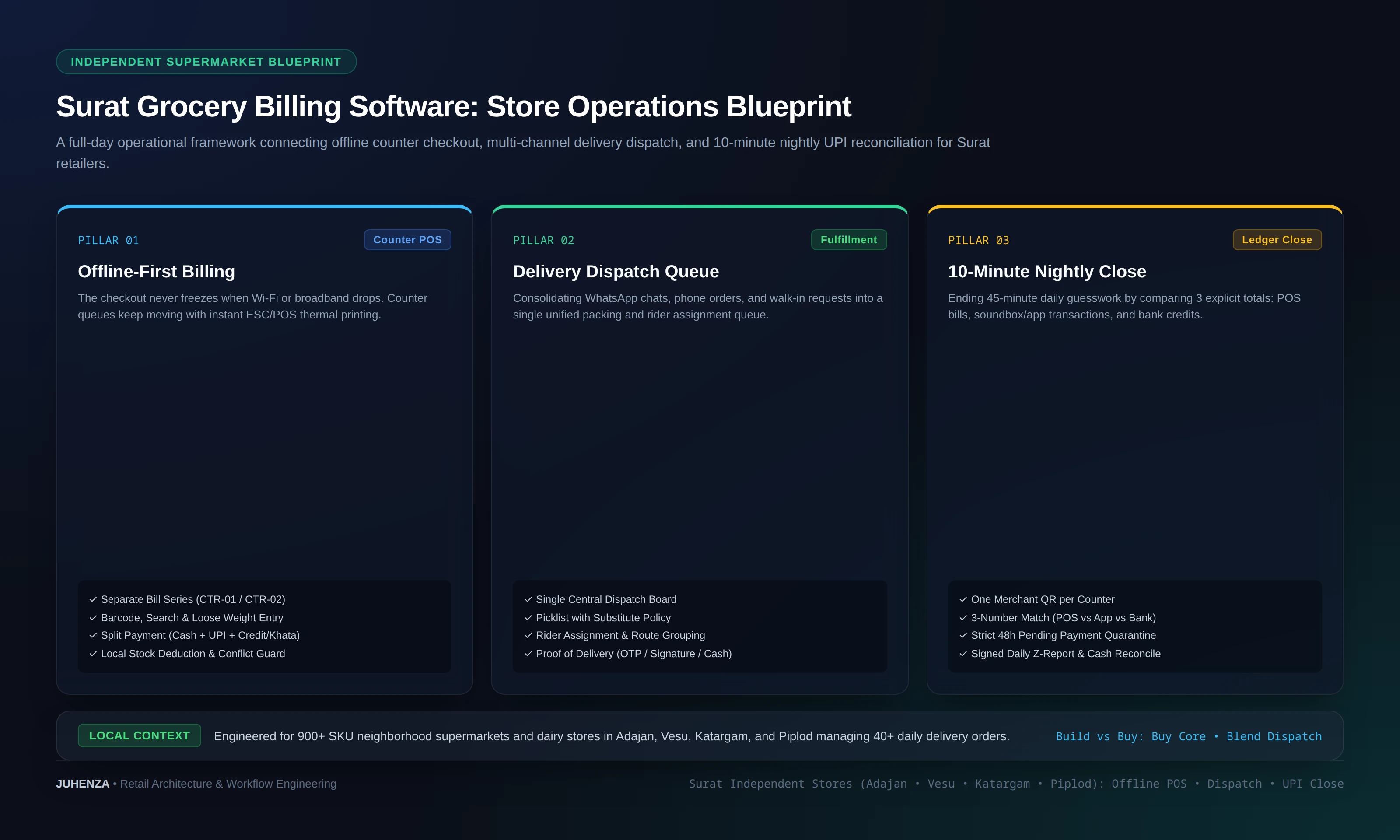 Figure 1: The three-pillar daily operating framework for independent Surat grocery and dairy retailers.
If you run an independent supermarket, provision store, or dairy in Surat, software procurement is not about flashy feature lists. It is about surviving one high-pressure operating day.
A customer stands at the billing desk expecting instant barcode scanning, another messages a 12-item order on WhatsApp, a delivery boy waits at the counter for packed bags, and at 10:30 PM the cash drawer and UPI merchant app must balance to the exact rupee.
This guide provides a practical, field-tested checklist for Surat grocery billing software across that full operating day, followed by an objective build-versus-buy scoring framework to prevent overspending on unnecessary technology.
The 3 systems that must work together
Billing, dispatch, and reconciliation are not three independent software purchases. They are three sequential links in a single commercial transaction:
[Counter / WhatsApp Order] ──> [Offline-First POS Billing]
                                        │
                                        ▼
[Customer Doorstep POD]    <── [Delivery Dispatch Queue]
                                        │
                                        ▼
[10-Minute Nightly Close] <── [3-Number UPI Reconciliation]- Billing creates the truth: It establishes the official inventory reduction, prices, and owed amount.
- Dispatch moves the goods: It ensures the customer receives what was billed, when promised, with documented proof of delivery.
- Reconciliation proves the money arrived: It verifies that every billed rupee actually settled into your commercial bank account.
If counter billing is flawed, dispatch staff pack the wrong items. If delivery dispatch is chaotic, accounting cannot determine whether an unpaid order was delivered or returned. If reconciliation is neglected, silent UPI payment drops eat away store margins.
Before evaluating vendor software, map your store's daily reality: How many counters operate at peak hours? How many delivery orders arrive through WhatsApp, phone calls, and walk-in counter drops? Who packs the bags? Who delivers? Who balances the till at night?
This operational checklist is engineered specifically for stores managing 500 to 2,500 SKUs across grocery, dairy, and household essentials in dense commercial and residential neighborhoods like Adajan, Vesu, Katargam, Varachha, or Piplod.
1. Offline billing: the counter must never stop
Offline billing means the checkout counter continues scanning items, applying discounts, and printing thermal receipts when the broadband drops or mobile signals fade, synchronizing cleanly once connectivity restores. It does not mean running a disconnected standalone database that never syncs with central stock.
Ask every software vendor how their offline engine operates under stress. If their answer is simply "it works offline," treat that as unproven sales talk.
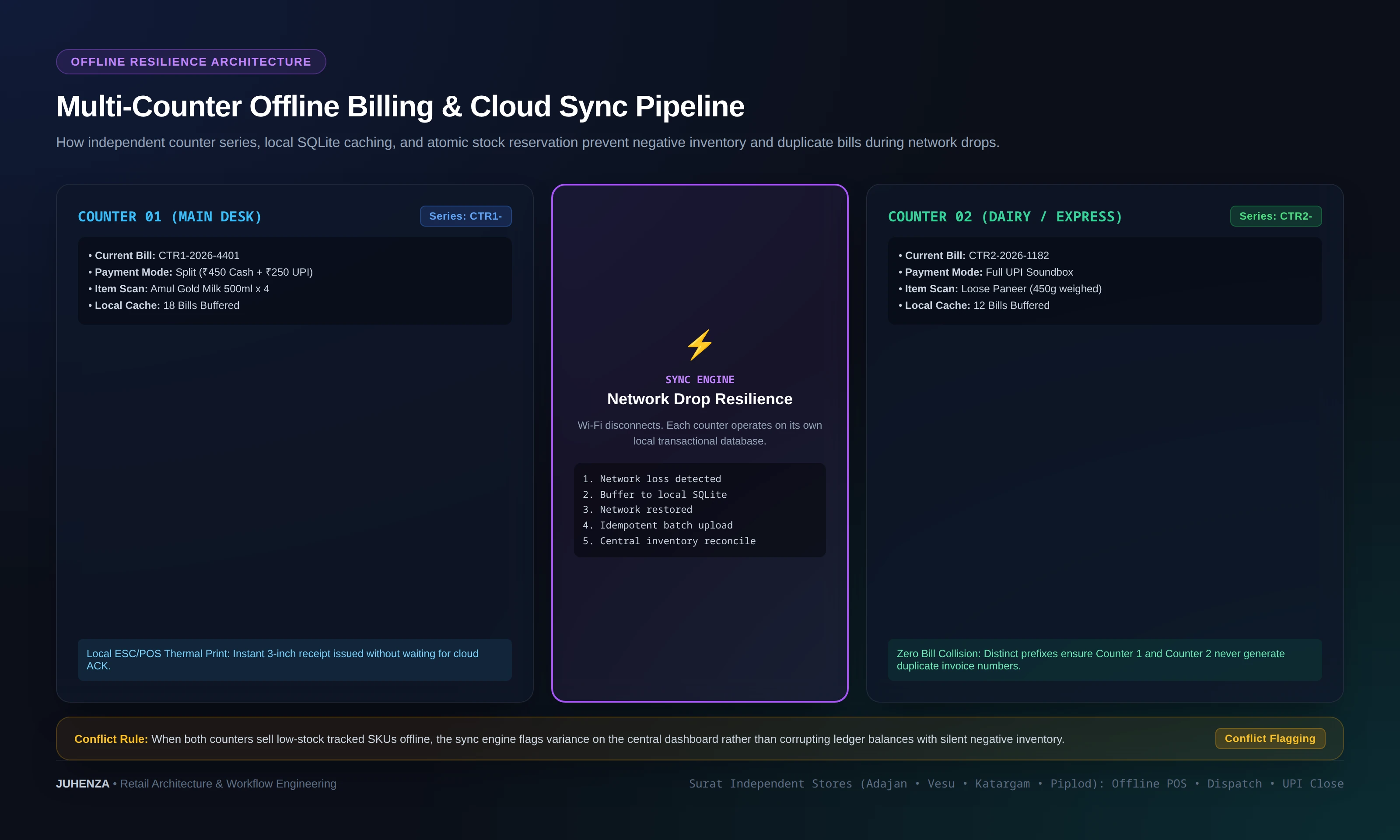 Figure 2: Independent bill series and local caching ensure Counter 1 and Counter 2 never collide during internet outages.
Checklist: offline counter billing
- To do: Zero-latency offline creation: Staff can generate bills without an active internet connection using barcode laser scanners, instant name search, and loose weight entries (grams, kilograms, litres, packets).
- To do: Independent bill number series: Each counter terminal runs its own prefix (e.g.,
CTR1-2026-001andCTR2-2026-001), ensuring two stations never generate duplicate invoice numbers during network outages. - To do: Idempotent local sync queue: Invoices queue locally in an embedded transactional store (such as SQLite or IndexedDB) and push sequentially upon reconnection without creating duplicate entries on server retries.
- To do: Local ESC/POS thermal printing: 2-inch and 3-inch thermal printers fire instantly via USB or local LAN without waiting for a cloud server acknowledgement. SMS or WhatsApp digital bill dispatch queues in the background.
- To do: Atomic stock deduction: Inventory decrements locally at the moment of bill generation, preventing two counters from simultaneously selling the final pack of ghee without a system alert.
- To do: Multi-mode split payments: A single bill can record split payments (e.g., ₹500 cash + ₹350 UPI + ₹150 store credit/khata), capturing each component independently in the financial ledger.
- To do: Granular staff permissions: Strict supervisor authentication required for voids, manual discounts, price overrides, and customer refunds, with every action written to an immutable audit log.
- To do: Automated Z-report generation: The end-of-day register summary breaks down gross revenue by payment tender, counter terminal, cashier shift, and tax slab.
- To do: Demonstrated backup and disaster recovery: Automated daily encrypted database snapshots to local external storage and cloud backups, with documented recovery times under 15 minutes.
- To do: Statutory GST invoicing: Supports B2B and B2C invoice formats with correct HSN/SAC codes and tax rate breakdowns. (Disclaimer: This article provides operational guidance, not formal tax advice. Confirm GST filing requirements with your chartered accountant.)
The offline conflict dilemma
The most difficult challenge in offline retail software is conflict resolution. Suppose Counter 1 and Counter 2 both sell the last remaining 500g block of fresh paneer while the store network is offline.
When connectivity returns, how does the system reconcile? A well-engineered platform alerts the cashier at billing, blocks negative inventory on tracked SKUs, or flags an explicit inventory variance ticket on the manager's dashboard. A fragile system silently drives inventory into negative numbers, corrupting your books.
Always test this before buying: disconnect the Wi-Fi router, bill five diverse items, void one line, apply a 5% manual concession, and reconnect. Inspect the resulting invoice sequence, inventory balance, and day-end report.
2. Delivery dispatch: from packing to doorstep without chaos
For most independent Surat supermarkets, customer delivery orders arrive across three fragmented channels: WhatsApp chat threads, telephone calls, and walk-in counter drops. Without a consolidated dispatch board, orders get misplaced, double-packed, or delivered hours late to residential housing societies.
A resilient dispatch system centralizes all incoming requests into one operational queue, issues standardized packing picklists, and tracks order status until payment settles. It does not force neighborhood customers to download an unfamiliar mobile app when they already prefer WhatsApp.
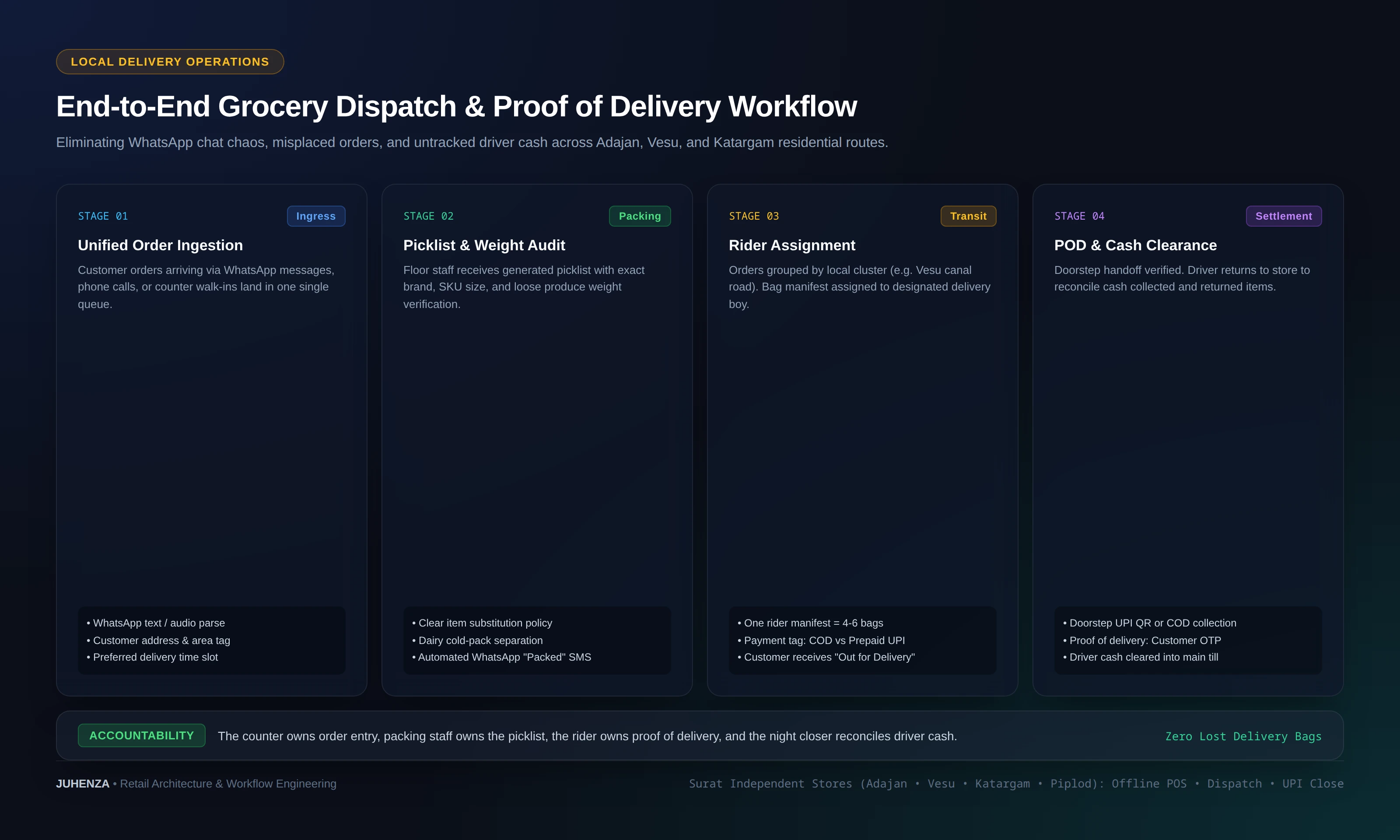 Figure 3: Unifying WhatsApp, phone, and counter delivery orders into a single packing and rider assignment queue.
Checklist: delivery dispatch
- To do: Centralized order ingestion: All delivery orders land on a single dispatch screen, whether initiated via WhatsApp, telephone, front-desk staff, or an online storefront.
- To do: Itemized packing picklists: Packing staff receive clear slips specifying exact brand, variant, weight, and pre-approved substitution rules (e.g., "If 1L Amul Gold is unavailable, substitute two 500ml pouches").
- To do: Explicit workflow state machine: Real-time order status tracking:
Received→Packing→Out for Delivery→Delivered→Returned. - To do: Rider assignment and route grouping: Orders are bundled by geographic residential clusters (e.g., Vesu Canal Road or Adajan Pal) and assigned to specific delivery boys.
- To do: Automated customer notifications: Customers receive automated WhatsApp or SMS alerts when their order is packed and dispatched, complete with estimated arrival time, without staff manually typing updates.
- To do: Payment tender clarity: Delivery manifests clearly distinguish Cash on Delivery (COD), Doorstep UPI QR collection, Prepaid Online, and Monthly Khata accounts so riders collect the exact sum.
- To do: Proof of Delivery (POD): Verification captured at the doorstep via customer OTP, digital signature, or delivery photo confirmation before the order closes.
- To do: Exception handling for failed deliveries: Clear protocols for customer-not-home or rejected items: return-to-shelf, reschedule, or ledger credit.
- To do: Configurable delivery charges: Dynamic delivery fee structures based on order value thresholds (e.g., free delivery above ₹500) and delivery zones.
- To do: Daily rider cash clearance: End-of-day rider settlement reconciliation verifying that all delivered cash matches the front-desk register before riders leave the store.
Clear role ownership is vital: the billing counter owns order creation, floor pickers own picklist accuracy, delivery riders own the doorstep handoff, and the night manager owns cash clearance. Explore our engineering guide on WhatsApp order automation for technical architectures that streamline conversational commerce without third-party aggregator commissions.
3. UPI reconciliation: the 10-minute close that protects margin
UPI reconciliation is the nightly operational discipline verifying that every rupee marked as UPI in your POS was received in your merchant account and credited to your bank.
Relying on a customer's phone screenshot is dangerous; digital payment screenshots are easily fabricated. Relying solely on audio soundbox announcements is equally risky during loud store hours or when soundbox battery/sim issues drop announcements.
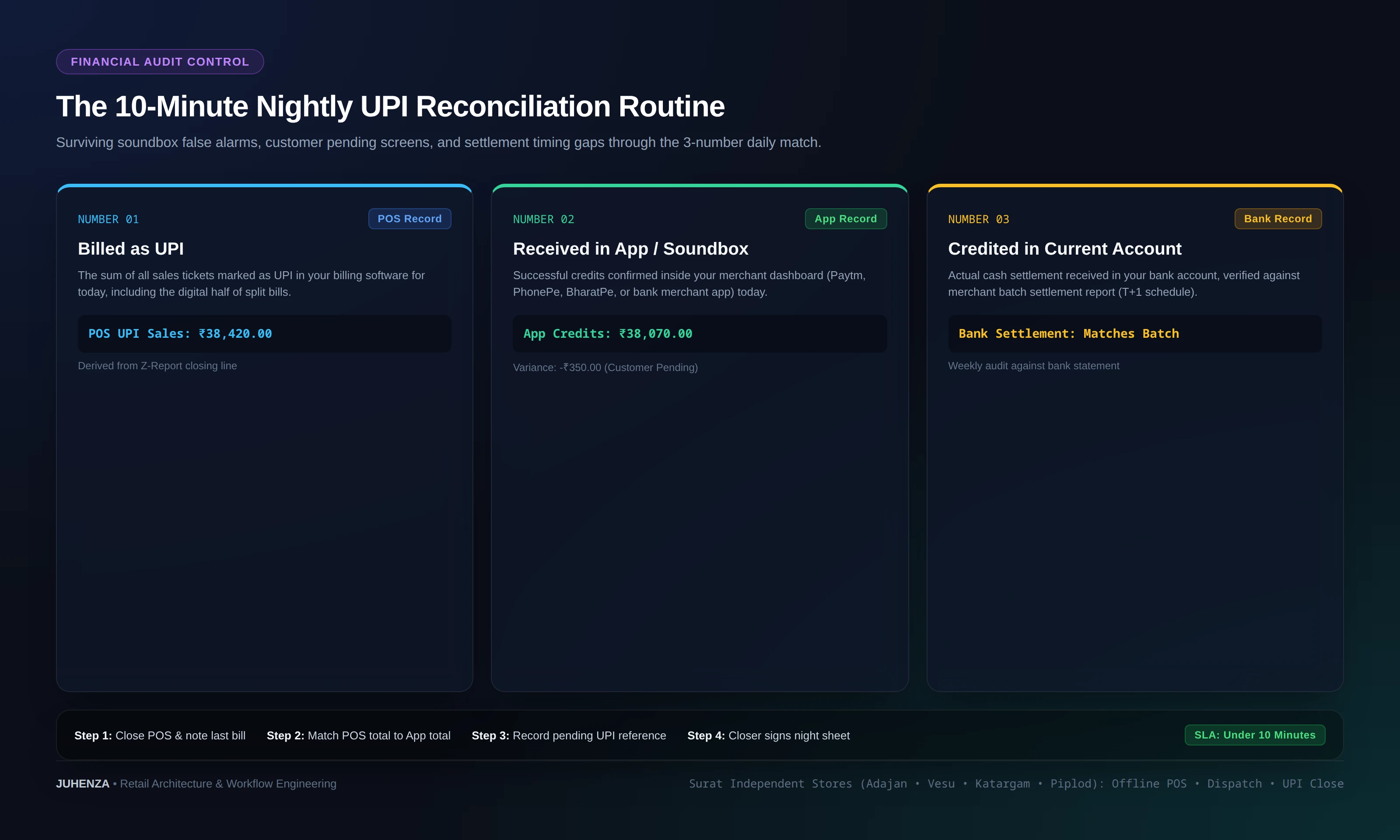 Figure 4: Matching POS records, merchant app notifications, and bank settlements to eliminate daily revenue leakage.
The 3 numbers to compare every night
Every night, store management must compare three numbers in this exact order:
- Billed as UPI in POS: The aggregate sum of all sales tickets, including split bills, marked as paid by UPI in your billing software.
- Received in Merchant App: The verified transaction total displayed in your merchant provider dashboard (Paytm, PhonePe, Google Pay for Business, BharatPe, or bank merchant console) for that specific counter's QR code.
- Credited in Current Account: The net settlement funds deposited into your commercial bank account following standard settlement schedules.
Daily reconciliation matches Billed as UPI against Received in Merchant App. Weekly audits match merchant batch settlements against your Bank Statement.
Checklist: UPI reconciliation
- To do: One dedicated merchant QR per counter: Assign a unique QR code tied to a distinct terminal ID for each billing desk. Never allow staff to accept store payments on personal UPI handles.
- To do: Mandatory tender tagging: Cashiers must select the precise payment tender; split payments must record the exact digital and cash split.
- To do: Physical soundbox / dashboard verification: Store policy dictates that goods are handed over only after soundbox audio broadcast or active merchant app confirmation.
- To do: Quarantine pending payments: If a customer's UPI transaction shows "Pending" at checkout, log the entry on a dedicated Pending Register with the 12-digit UPI Reference / UTR number. Never mark the POS invoice as completed until confirmed.
- To do: Correction via debit/credit note: Discrepancies, refunds, and duplicate charges must be corrected through formal reversal entries rather than manually altering gross daily sales.
- To do: Designated night closer: A named shift supervisor must review the Z-report, reconcile soundbox totals, and physically sign off on the day's variance sheet.
- To do: Resolution of aging pending items: Active follow-up on pending transactions older than 48 hours via merchant bank query.
According to NPCI guidelines, pending UPI transactions can take up to 48 hours to settle or reverse to the payer's account. Maintain strict quarantine procedures to ensure unverified payments do not create unexplained ledger gaps.
Build, buy, or blend: score Surat grocery billing software before you spend
- Buy packaged software when your counter checkout, GST reporting, and stock operations follow standard industry conventions.
- Build custom software when your proprietary delivery dispatch, credit arrangements, or multi-branch supply chains provide a distinct competitive advantage that packaged tools cannot support.
- Blend both by purchasing a reliable packaged billing core and engineering custom dispatch or reconciliation workflows through APIs or webhook exports.
Use this objective evaluation scorecard. Rate each row from 1 (poor fit) to 5 (strong fit) for your specific store:
| Strategic Decision Factor | Buy Packaged (1–5) | Build Custom (1–5) | Store Priority & Weight |
|---|---|---|---|
| Standard Counter Billing & GST | 5 (Plug-and-play standard) | 2 (Expensive to build from scratch) | High (Core daily function) |
| Bespoke Delivery Routes & Multi-Rider Dispatch | 2 (Rigid dispatch boards) | 5 (Tailored to neighborhood routes) | High if delivery is >30% volume |
| Complex Multi-QR UPI Reconciliation | 2 (Basic daily totals) | 4 (Automated multi-account matching) | High if operating 3+ checkout desks |
| WhatsApp Catalogue & Conversational Ordering | 4 (Pre-built WhatsApp bots) | 3 (Custom API integrations) | Medium |
| Immediate Time to Launch | 5 (Live in 48 hours) | 1 (Requires 6–12 weeks development) | High during festival/peak trading |
| Long-Term Software Maintenance Ownership | 2 (Vendor manages bugs/updates) | 5 (Store owns code, servers, updates) | Critical (Requires technical oversight) |
| 3-Year Total Cost of Ownership (TCO) | 4 (Predictable SaaS fee) | 2 (High initial capital expenditure) | High for single-store retailers |
| Data Sovereignty & Customer Database Ownership | 3 (Data hosted on vendor cloud) | 5 (Full ownership of customer list) | High for expanding chains |
Interpreting your store's score
- Buy Packaged if: Your operation runs one or two counters, handles standard retail SKUs, and requires rapid deployment with minimal capital investment.
- Blend (Recommended for Growing Stores) if: Packaged POS handles counter billing and GST reliably, but your WhatsApp order volume or rider dispatch requires a custom dispatch layer built on top of your POS data exports.
- Build Custom if: You operate a multi-branch chain across Surat, maintain proprietary credit lines with institutional buyers, or require a unified platform managing central cold storage, fleet routing, and custom accounting integrations. For an objective assessment of delivery models, review our guide on software development companies vs freelancers.
An illustrative Surat store: how the decision plays out
(The following scenario is an illustrative operational model reflecting typical retail dynamics in Surat, rather than a specific client engagement.)
Consider an independent supermarket and dairy store located in Adajan managing 1,200 active SKUs, four counter cashiers, and two dedicated delivery boys fulfilling approximately 50 daily WhatsApp orders across local apartment complexes.
Before adopting a structured software workflow:
- The store ran billing on a legacy desktop program that crashed whenever broadband disconnected.
- WhatsApp delivery orders were jotted on scraps of paper, resulting in missed items and delayed evening dispatches.
- The nightly UPI close consumed 45 minutes of frantic calculation, frequently leaving unexplained variances between the bank statement and paper receipts.
Following an objective build-versus-buy assessment, the owner adopted a blended approach:
- Purchased an off-the-shelf offline POS: Implemented packaged software on two billing terminals, assigning distinct
CTR1andCTR2prefixes and offline local caching. - Standardized payment capture: Installed one dedicated merchant soundbox per counter and eliminated payments to personal staff UPI handles.
- Engineered a lightweight custom dispatch board: Implemented a unified order queue pulling WhatsApp orders into standardized picklists with customer OTP proof-of-delivery tracking.
- Enforced the 10-minute UPI close: Instituted a mandatory nightly comparison of POS UPI sales against the merchant console report.
Within three weeks, counter queue wait times dropped by 40%, delivery dispatch errors were virtually eliminated, and the nightly financial close was reduced to eight minutes with zero unaccounted revenue leakage.
First-hand experience
(JUHENZA Practitioner Note: In local retail and supermarket automation deployments across Gujarat, store owners frequently assume that switching from paper registers to generic billing apps will instantly eliminate daily cash mismatches. In reality, the breakdown almost always occurs during network outages when offline bill numbers collide, or when customer UPI payments sit in a 48-hour 'Pending' banking state while riders have already handed over groceries. Enforcing distinct counter bill prefixes, offline local queueing, and a strict three-number night close routine resolves over 95% of unaccounted inventory and payment leakage.)
Common mistakes, limitations, and when to get help
Critical Operational Mistakes
- Procuring for vanity features: Selecting software based on complex 3D reporting dashboards while ignoring whether offline barcode scanning works during a power cut.
- Using personal UPI QRs: Allowing cashiers to display personal UPI codes "temporarily" when the merchant soundbox glitches, mixing personal and business funds.
- Accepting customer screenshots: Releasing high-value grocery baskets based solely on a customer displaying a green payment tick on their phone screen.
- Manual invoice tampering: Manually altering invoice totals to force daily registers to balance rather than posting formal adjustment vouchers.
- Deploying all modules simultaneously: Attempting to roll out counter billing, delivery dispatch, barcode tagging, and customer loyalty programs on the same day.
Implementation Limitations
This checklist evaluates operational, architectural, and procedural software requirements. It does not replace formal accounting advice regarding GST tax brackets, input tax credits (ITC), or statutory commercial audit requirements. Always verify payment gateway settlement terms, MDR rates, and WhatsApp Business API message tariffs directly with service providers.
When to Involve a Software Specialist
Engage professional software engineers when your retail business expands to multiple retail locations, requires bidirectional synchronization between POS terminals and centralized ERP inventory, handles high-volume cold-chain dairy logistics, or seeks to build an independent customer-facing mobile application without marketplace commissions. Explore our custom software development practice and mobile app development practice for architectural support.
For businesses evaluating initial online expansion channels, compare your options in our analysis of Bhavnagar shops: website, marketplace or WhatsApp.
Frequently asked questions
Should an independent Surat grocery store buy software or stick to paper registers?
Transition to billing software as soon as daily transactions, delivery orders, or UPI payments exceed the threshold where paper registers cause checkout delays or cash discrepancies. While paper works for tiny single-counter stalls, it cannot manage multi-counter inventory deduction, generate picklists for delivery boys, or reconcile digital payments in minutes.
What is the single most critical feature in grocery billing software?
Offline-first billing with automatic, conflict-free cloud synchronization. If your billing software freezes when the internet drops, checkout counters stall, lines spill out the door, and cashiers inevitably revert to chaotic paper notes. Insist on offline thermal receipt printing, local item search, and distinct counter invoice series.
How should cashiers handle customer UPI payments that show "Pending"?
Never release groceries based on a "Pending" UPI screen. Treat the transaction as unconfirmed, log the customer name, phone number, amount, and 12-digit UTR reference on a Pending Payment Register, and ask for an alternative payment tender (cash or alternative UPI). If the customer leaves, hold the bill open; per NPCI guidelines, pending transactions either clear within 48 hours or auto-reverse to the payer.
Can a single software platform manage counter sales, delivery dispatch, and UPI reconciliation?
Yes, provided the software is designed around a unified transactional ledger. The POS records sales, the dispatch queue organizes fulfillment, and the daily close report aggregates payment tenders. However, reconciliation still requires cross-referencing your POS daily totals with your merchant banking provider dashboard.
When is building custom grocery software justified over buying off-the-shelf tools?
Building custom software makes commercial sense when an established supermarket or retail chain operates unique delivery dispatch workflows, custom credit/khata terms, or multi-branch centralized inventory that off-the-shelf software cannot accommodate without clumsy daily workarounds. It requires an upfront capital budget and a dedicated technical maintenance partner.
How long does it take to transition a store from paper to computerized billing?
A smooth transition typically spans two to three weeks per store. This includes catalog SKU entry and barcode labeling, staff training on split tenders, a 3- to 5-day parallel run where paper and software operate simultaneously, and establishing the 10-minute nightly close routine. Avoid launching software during peak holiday shopping festivals.
Where this fits
This operational guide belongs to JUHENZA's Retail and Business Applications Practice. It complements our architectural frameworks on custom enterprise software, mobile commerce workflows, and financial transaction reconciliation across regional Indian commercial hubs.
Conclusion: one clear next step
Design your operating day before selecting your software. Stabilize offline counter billing first, implement a disciplined dispatch queue for delivery orders second, and enforce a 10-minute nightly UPI reconciliation routine to protect your profit margins.
Next step: If you are planning to modernize your supermarket's digital operations or evaluate whether to purchase or engineer custom dispatch software, Discuss your project with our engineering architects at JUHENZA. Share your counter volume, delivery workflow, and current software stack for an objective technical evaluation.
External references
- National Payments Corporation of India (NPCI) - UPI Settlement Guidelines — Official operating regulations, transaction timeout protocols, and pending payment resolution guidelines for the Unified Payments Interface.