

Next.js vs WordPress Gurugram: What B2B Firms Really Pay Over 3 Years
Next.js vs WordPress Gurugram: compare 3-year build, hosting, plugin and maintenance cost, PageSpeed and lead impact for B2B firms before you rebuild.
Web DevTech

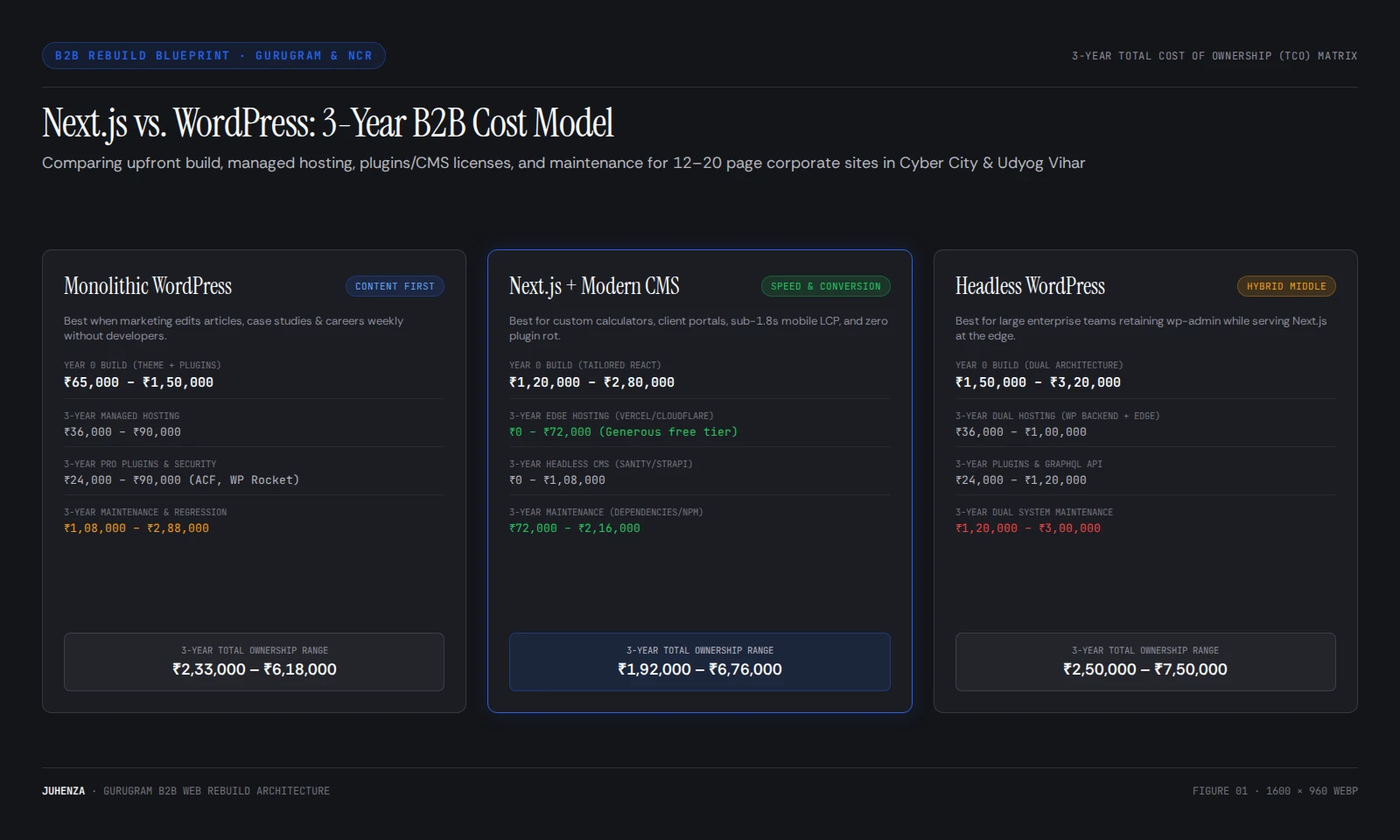
Direct answer: For a typical Gurugram B2B site of 12 to 20 pages with CRM and WhatsApp lead capture, WordPress often starts cheaper but costs more to keep fast and patched, while Next.js often starts higher but costs less in plugin and hosting overhead. Over 3 years the totals overlap heavily (INR 2,33,000–6,18,000 for WordPress vs. INR 1,92,000–6,76,000 for Next.js), so the winner depends on how often non-developers edit, how much custom logic you need, and how disciplined the build is on third-party scripts. Do not choose on build price alone.
Introduction
Your rebuild quote is not your rebuild cost. For Next.js vs WordPress Gurugram decisions, the build is only year zero.
A founder in Cyber City, Udyog Vihar or Golf Course Road usually gets two very different stories. A WordPress agency quotes a fast launch and easy editing. A Next.js agency quotes a fast site and no plugin headaches. Both can be true. Neither quote tells you what years 1 to 3 will cost.
This guide builds one comparable model: build plus hosting plus plugins or CMS plus maintenance plus editing. All totals below are illustrative planning ranges for Gurugram B2B work, not a universal price list. JUHENZA quotes per project after scope is understood.
How to read a 3-year total
Total cost of ownership, or TCO, means every cost to keep the site working and selling for 3 years. Use this formula:
3-year TCO = Build + (Hosting x 3) + (Plugins or CMS x 3) + (Maintenance x 3) + (Editing labour x 3) + (Emergency fixes)
Most quotes include only the first term. Most regrets come from the last three.
Two assumptions shape every number below. First, the site is a B2B lead site, not a store, portal or SaaS product. Second, marketing makes 2 to 4 content changes per month. Change either assumption and the winner can flip. That is why a single "cheaper" verdict is misleading.
The 3-year cost model for Gurugram B2B firms
Build cost in Gurugram
A Gurugram agency guide puts a high-speed Next.js corporate or lead-gen site at INR 95,000 to INR 2,20,000, and a headless CMS build at INR 2,50,000 to INR 5,80,000. WordPress brochure builds in the same market are commonly quoted lower, because a theme, page builder and plugins cover much of the starting work. For a comparable 12 to 20 page B2B site, use these illustrative build ranges:
| Option | Illustrative build range |
|---|---|
| WordPress, custom theme, lean plugins | INR 65,000 - 1,50,000 |
| Next.js, static plus headless CMS | INR 1,20,000 - 2,80,000 |
| Headless WordPress plus Next.js front end | INR 1,50,000 - 3,20,000 |
The Next.js premium is not for the same site. It is for building templates, forms, calculators, schema and CMS wiring by hand instead of assembling plugins. If your site is mostly pages and posts, that premium buys little. If it has calculators, portals, custom RFQ flows or a logged-in area, it buys the part WordPress would struggle to maintain.
Running cost over 3 years
This is where the stacks diverge. The table below is illustrative. It assumes managed hosting, not the cheapest shared hosting, because B2B lead sites cannot afford long downtime.
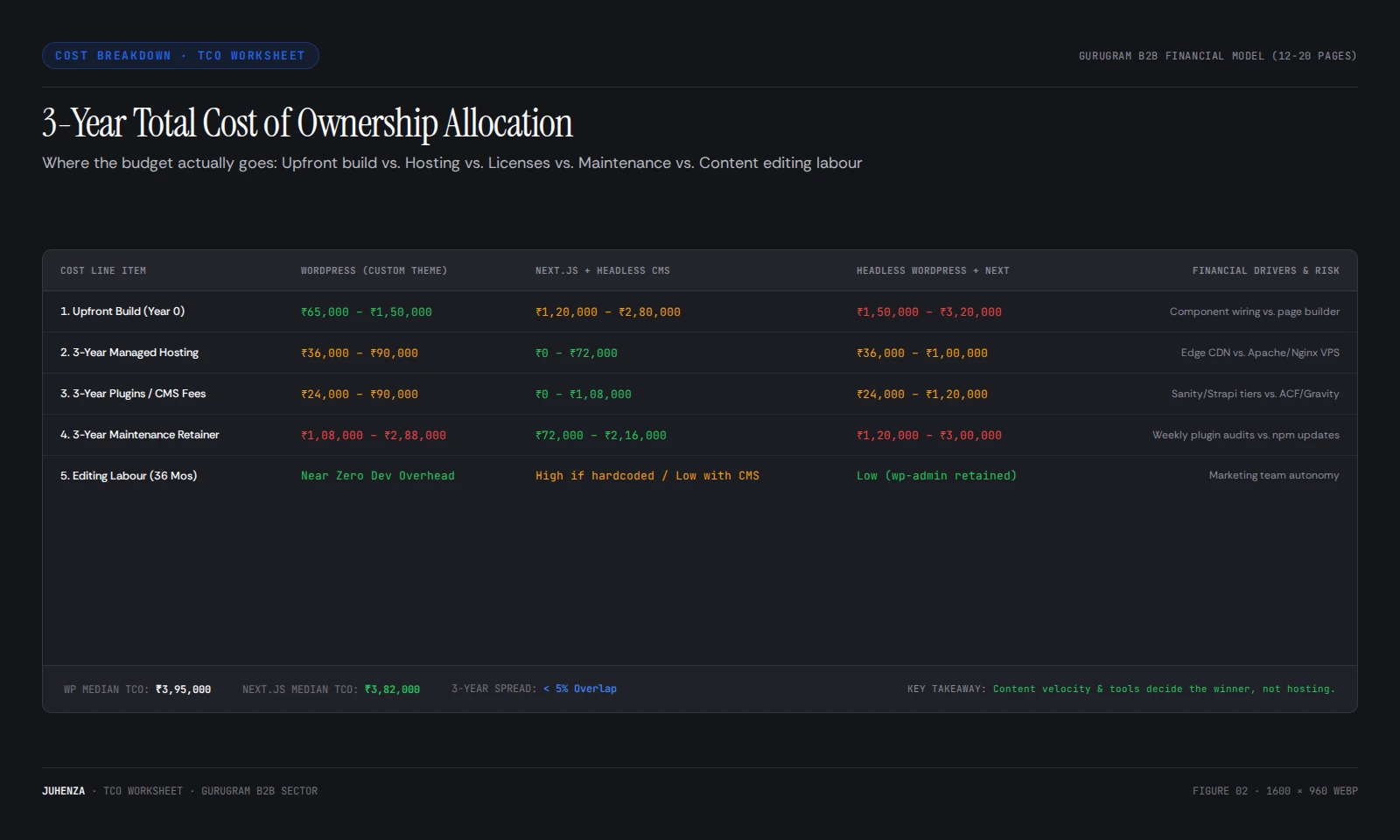
| 3-year cost item | WordPress | Next.js | Headless |
|---|---|---|---|
| Hosting, 3 years | INR 36,000 - 90,000 | INR 0 - 72,000 | INR 36,000 - 1,00,000 |
| Plugins or CMS, 3 years | INR 24,000 - 90,000 | INR 0 - 1,08,000 | INR 24,000 - 1,20,000 |
| Maintenance and fixes, 3 years | INR 1,08,000 - 2,88,000 | INR 72,000 - 2,16,000 | INR 1,20,000 - 3,00,000 |
| Illustrative 3-year total, including build | INR 2,33,000 - 6,18,000 | INR 1,92,000 - 6,76,000 | INR 2,50,000 - 7,50,000 |
Read the overlap, not just the midpoints. WordPress can be cheapest when the plugin stack stays lean and one person owns updates. Next.js can be cheapest when the site needs little cosmetic change and the team avoids heavy third-party scripts. Headless is rarely cheapest. It is chosen for editing plus performance, not for saving money.
What most TCO tables leave out
Three costs decide the real total:
- Editing labour. If marketing can edit in WordPress, a headline change costs minutes. If the same change needs a developer ticket, queue and deploy on Next.js, it costs hours and days. Multiply that by 36 months.
- Rebuild risk. A plugin-heavy WordPress site that was never pruned often needs a rebuild in year 2 or 3. A Next.js site with no CMS and no documentation often needs the same when the original developer leaves.
- Ad waste. A slow landing page does not just lose organic visitors. It raises cost per lead on Google and Meta ads, because fewer clicks become enquiries. That cost never appears in a hosting invoice.
Ask every vendor to price these three lines separately. If a quote cannot, it is not comparable.
PageSpeed: lab scores vs real visitors
What PageSpeed actually measures
PageSpeed Insights gives two kinds of data. Lab data is a simulated test. Field data comes from real Chrome users through the Chrome User Experience Report, or CrUX. For a B2B decision, field data matters more, because your buyers are on mid-range phones, office Wi-Fi and mobile networks in Gurugram, not on a developer laptop.
Google defines good Core Web Vitals as LCP at 2.5 seconds or less, INP at 200 milliseconds or less, and CLS at 0.1 or less, with 75% of real visits meeting the target. LCP is loading: when the largest visible element appears. INP is responsiveness: how fast the page reacts to a tap or click. CLS is visual stability: how much the layout jumps while loading.
The correction most Gurugram guides skip
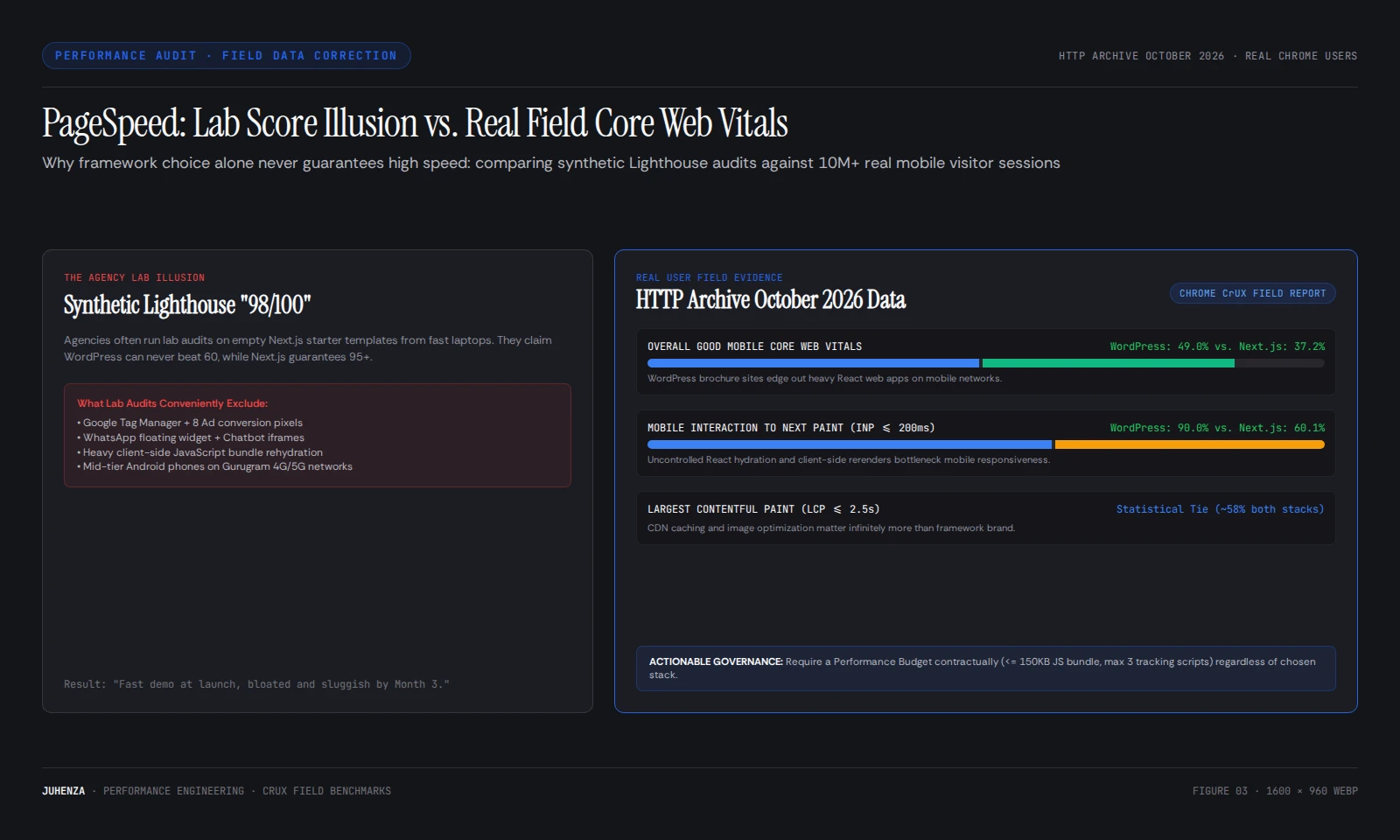
Many agency pages claim Next.js scores 90 to 100 on mobile while WordPress scores 40 to 70. Those are lab scores for lean builds. Field data tells a different story.
In the HTTP Archive Core Web Vitals Technology Report for October 2026, 49.0% of WordPress sites had good mobile Core Web Vitals, compared with 37.2% of Next.js sites. On desktop, Next.js was slightly ahead at 58.4% versus 54.0%. The mobile gap was mostly INP: 90.0% of WordPress sites had good INP on phones, versus 60.1% of Next.js sites. LCP was almost level.
That does not mean WordPress is faster. It means a framework does not make a site fast by itself. Many Next.js sites in the dataset are heavy apps and dashboards with large client JavaScript, while many WordPress sites are simple brochure pages. What it does prove is that a disciplined WordPress build can beat a bloated Next.js build, and a disciplined Next.js build can beat almost anything when third-party scripts are controlled.
What to demand in a proposal
Do not accept "95+ PageSpeed guaranteed" without a test method. Ask for:
- Field targets for LCP, INP and CLS on mobile, separately from desktop
- A performance budget: maximum page weight, maximum third-party script weight, and a list of allowed tags
- Who owns performance after launch, and what happens when marketing adds a chat widget, video or tracking script
A fast launch that slows down in month 3 is not a fast site. It is a fast demo.
Leads: turning speed into enquiries
Speed matters because it protects enquiries, not because a score looks good in a report. Google's mobile research found that as load time rises from 1 second to 3 seconds, bounce probability rises by 32%. From 1 second to 5 seconds, it rises by 90%. Those are directional benchmarks, not a promise for your site. Your traffic mix, offer and form length matter just as much.
Use this worksheet with your own numbers. It is illustrative, not a universal guarantee.
Leads per month = Visits x Form conversion rate
Example: 1,000 visits per month x 2.0% conversion = 20 leads per month.
If a faster, cleaner page lifts conversion by 10% in relative terms, from 2.0% to 2.2%, the same traffic produces 22 leads per month. That is 24 extra leads per year without spending more on ads.
Now price one qualified lead. In typical B2B services, consulting, and SaaS pipelines across Delhi-NCR and Gurugram, an initial qualified sales lead averages between INR 5,000 and INR 25,000 in pipeline opportunity value. If a lead is worth an illustrative INR 10,000 in pipeline value to your sales team, those 24 extra leads represent INR 2,40,000 in annual pipeline value. If a lead is worth INR 25,000, they represent INR 6,00,000. The stack decision should be judged against your lead value, not against hosting cost.
Three lead factors beat stack choice on most B2B sites:
- Form friction. Fewer fields, clear next step, and WhatsApp as an alternative to a long form.
- Proof above the fold. One relevant client outcome, one clear service, one contact path.
- Follow-up speed. A fast reply beats a fast page. If no one owns enquiries within one working day, a rebuild will not fix pipeline.
A rebuild is worth it when it removes friction across all three. A rebuild that only changes the framework will disappoint.
Maintenance and security: what you actually pay for
WordPress maintenance
WordPress maintenance is frequent and visible. Core, theme and plugin updates arrive weekly. Each update can conflict with another plugin, a page builder or a custom snippet. Someone must test, back up, update, and roll back if something breaks.
The risk is concentrated in plugins. Patchstack reported 11,334 new vulnerabilities in the WordPress ecosystem in 2025, with 91% in plugins, 9% in themes, and only six in WordPress core. That does not mean WordPress core is unsafe. It means every plugin is a separate vendor with separate update habits. Fewer plugins, a known update owner, and tested backups reduce the risk far more than any security plugin alone.
Budget for: updates, backups, uptime monitoring, form and CRM checks, and a quarterly plugin prune. If no one is named as owner, assume the work is not happening.
Next.js maintenance
Next.js maintenance is less frequent but more technical. There are no plugin updates, but there are npm dependencies, framework upgrades, CMS upgrades, and hosting changes. A site left untouched for two years is not safe. It is simply outdated in a quieter way.
In December 2025, a critical flaw in React Server Components allowed remote code execution on unpatched Next.js 15 and 16 apps, and the fix was an immediate upgrade. The lesson is general: Next.js removes the plugin treadmill, but it does not remove the need for an upgrade owner.
Budget for: dependency upgrades, framework upgrades, CMS and hosting review, broken-link and form checks, and third-party script review. Also budget for documentation. A Next.js site with no handover is expensive to hand to another agency.
Which is easier for marketing to run?
If non-developers edit weekly, WordPress wins on day-to-day ease. The WordPress admin, or wp-admin, is built for that. Next.js has no content layer of its own. You add a headless CMS such as Sanity, Strapi, Contentful or Payload, which is one more system to set up, pay for and learn.
Count last month's changes before you decide. If it was a handful of changes by one person comfortable asking a developer, the editing gap barely matters. If it was dozens of changes by several people, it decides the whole project. This is the question most TCO tables miss, and the one that causes the most post-launch frustration.
Who should choose which, and when headless wins
Choose WordPress when
- Marketing edits pages, posts or landing pages weekly without developer help
- The site is mostly content: services, insights, case studies, careers
- You need WooCommerce or a plugin ecosystem that already solves your problem
- You have an existing WordPress site with strong rankings and no performance crisis
- Budget and launch speed matter more than custom application logic
Choose Next.js when
- The site has real application logic: calculators, configurators, portals, dashboards, multi-step RFQ flows
- Speed and ad landing-page performance are central to pipeline
- You want a lean codebase with no page-builder bloat
- Your team can own dependency upgrades and a headless CMS
- The site will grow into a product, not just stay a brochure
Choose headless WordPress plus Next.js when
Headless keeps WordPress as the editor and uses Next.js to render the public site. Editors keep wp-admin. Visitors get pages rendered by Next.js and served from a CDN. Front-end plugins stop slowing the public site, because WordPress no longer serves public pages.
It fits content-heavy B2B brands with real traffic and a team that can host and monitor two systems. It is overkill for a 10-page company site. Page builders such as Elementor mostly stop working in headless, because their layouts depend on WordPress rendering the front end. Previews and cache clearing need deliberate setup. Price both systems, not one.
First-hand experience note
Evaluating website rebuilds for B2B industrial, advisory, and tech firms across DLF Cyber City, Udyog Vihar, and Golf Course Road highlights a consistent operational pattern: founders rarely regret the frontend speed of Next.js, but they frequently regret underestimating content velocity.
In a recent rebuild consultation for a 16-page Gurugram corporate advisory firm migrating away from an unmaintained 34-plugin WordPress setup, the initial inclination was an uncoupled, static Next.js build. However, content auditing revealed their marketing associate pushed 3 case studies and 2 thought-leadership briefs weekly. Forcing every title tweak or PDF upload through Git pull requests and developer deployments would have added 14 hours per month in technical overhead—exceeding INR 20,000 monthly in developer hours.
The architecture was resolved with a headless CMS pairing (Next.js App Router frontend on edge CDN + Sanity headless content studio for marketing). This decoupled marketing's publishing cadence from codebase deployments, maintained sub-1.8s mobile LCP, and eliminated plugin security patches while preserving immediate content editing freedom.
A one-meeting decision framework
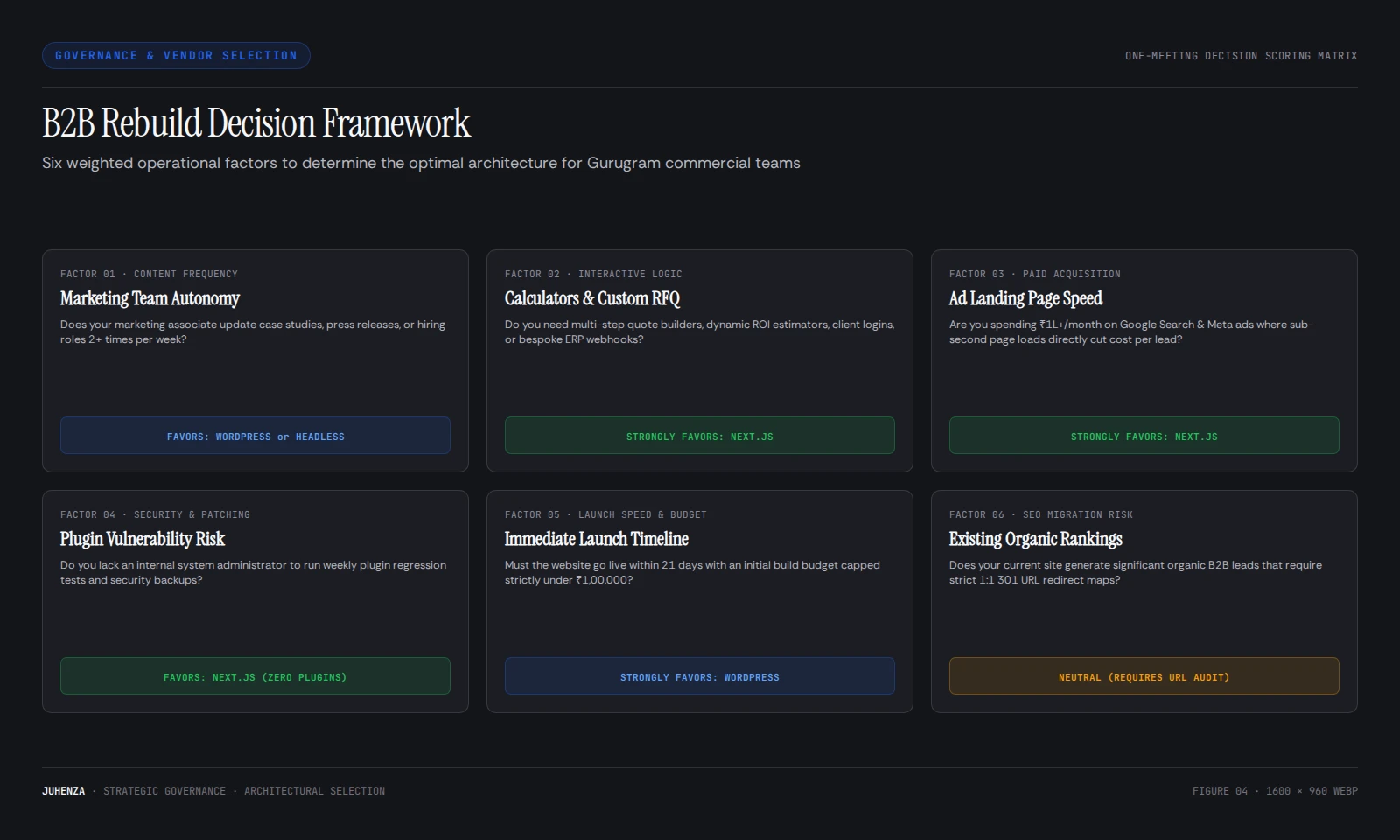
Score each row 1 to 5 for your firm. The higher total wins. If the totals tie, headless is the tie-breaker to test.
| Decision factor | WordPress score | Next.js score |
|---|---|---|
| Non-developers edit weekly | ||
| Custom logic, calculators, portals | ||
| Organic search is a main channel | ||
| Paid ads send traffic to landing pages | ||
| 3-year maintenance owner is named | ||
| Team can own a headless CMS | ||
| Total |
Then answer five questions in writing before signing:
- Who edits, how often, and what happens when they are on leave?
- What is the performance budget, and who can add a third-party script?
- What is included in maintenance, and what counts as an extra?
- Who owns the repository, domain, hosting, CMS, CRM keys and backups?
- What is the migration plan: URL map, 301 redirects, metadata, and rollback?
If a vendor cannot answer those five, the stack does not matter yet.
Common mistakes
- Choosing on build price alone. The cheapest build often has the most expensive years 1 to 3.
- Buying a score, not a system. A lab score without a script budget and an owner will decay.
- Ignoring the editor. A site marketing cannot edit will go stale, however fast it is.
- Migrating without a URL map. Every old URL needs a keep or a 301 redirect. Metadata, headings and internal links must be preserved. Rankings are lost in migration gaps, not in framework changes.
- Adding tools after launch. Chat, video, analytics and ad tags are the usual reason a fast site becomes slow. Approve them against the performance budget first.
FAQ
Is Next.js better for SEO than WordPress?
Not by default. Both can send search engines complete HTML when set up properly. Google ranks the page in front of it, not the framework. Speed helps, but relevant content, clear headings, internal links and a clean URL structure matter more. A lean build on either stack beats a heavy build on the other.
Will migrating from WordPress to Next.js hurt rankings?
Not if migration is disciplined. Keep URLs where possible, map every changed URL with a 301 redirect, preserve titles, meta descriptions, headings and content, and test before DNS cutover. Most ranking drops come from missing redirects, changed content or broken internal links, not from changing frameworks.
How much does a B2B rebuild cost in Gurugram over 3 years?
For a 12 to 20 page B2B lead site, plan on an illustrative 3-year total of INR 2,33,000 to INR 6,18,000 for WordPress and INR 1,92,000 to INR 6,76,000 for Next.js, including build, hosting, plugins or CMS, maintenance and editing. The ranges overlap, so get itemised quotes on the same scope instead of comparing headline build prices.
Which is easier for a Gurugram marketing team to maintain?
WordPress is easier for non-developers who edit weekly, because wp-admin is built for that. Next.js is easier to keep lean, because there are no plugin conflicts, but content changes need a headless CMS or a developer. If editing volume is high, that difference often decides the project.
Is headless WordPress worth it for a small B2B firm?
Usually not for a 10-page site. It is worth testing for content-heavy firms that publish often, need strong editing, and also need fast, controlled delivery. Budget for two systems, not one, and confirm that page-builder layouts will need rebuilding.
When should we involve a specialist?
Involve a specialist before signing if you have a portal, login area, payments, CRM or ERP integration, multi-language needs, or an existing site with strong organic traffic. Migration, performance budgets and integration ownership are cheaper to plan than to fix after launch.
Where this fits
This post sits in Websites and Web Development under Website Platforms and Rebuilds. If you are also weighing who should build the site, read the guide on software development company vs freelancer. It covers scope, continuity and handover, which matter as much as stack choice.
Conclusion
Do not ask which stack is cheaper. Ask which stack is cheaper for your editing volume, your custom logic and your maintenance owner over 3 years.
If marketing edits weekly and the site is mostly content, WordPress is often the practical winner. If the site needs custom logic, fast landing pages and a lean codebase, Next.js is often the better investment. If you need both, test headless before you commit to either.
Send your project brief via the contact page with your current site, your editing volume, and your lead goal. JUHENZA scopes rebuilds around your operational needs, not around a framework preference.
References
- Google web.dev - Core Web Vitals thresholds: LCP, INP, CLS, via web.dev
- HTTP Archive - Core Web Vitals Technology Report, October 2026 field data, via httparchive.org
- Patchstack - WordPress ecosystem vulnerabilities, 2025, via patchstack.com