

Lovable External Hosting Handover: The SaaS Founder's Guide to Code, Backend, and Ownership
A practical Lovable external hosting handover guide for SaaS founders: code export, backend migration, verification, rollback, and ownership transfer.
App DevTech

Direct answer: Lovable external hosting handover is the process of moving a Lovable-built application from Lovable's managed environment to infrastructure you or a third party control. It is not a single export button. A complete handover moves three separate layers: the source code, the backend and data, and the operational responsibility for running the app. Most founders complete the first layer and discover the other two only when production breaks.
This guide provides a structured decision framework, a pre-flight technical inventory checklist, deployment sequences for both Lovable project architectures, and verification gates that separate an operational handover from wishful thinking. It is written for SaaS founders who have validated a Lovable prototype and now need to establish durable production ownership.
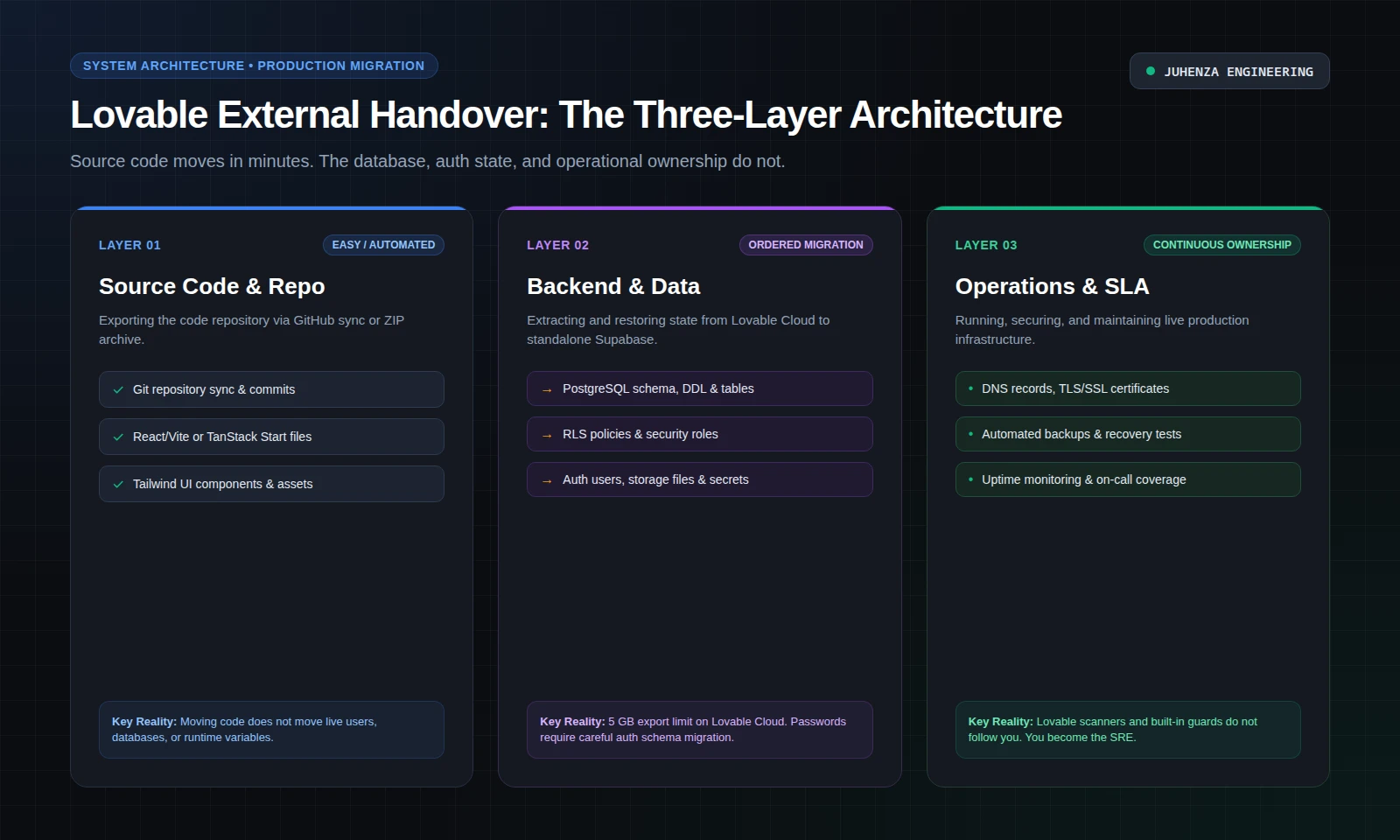 A complete handover moves three distinct layers: source code via Git sync, backend data via Supabase export/restore, and continuous operational ownership.
1. What "handover" actually means: three layers, not one
A Lovable application comprises three distinct assets operating under a single interface: the source code repository, the running system serving active sessions, and the business data that backs it. Exporting code moves only the repository. It does not transfer the live database, authentication tokens, file storage policies, serverless edge functions, API credentials, OAuth redirect URIs, or ongoing operational accountability.
Lovable's architecture makes code export straightforward: you are never locked into their frontend editor, and Git synchronization allows you to push commits directly to your private GitHub repository on any tier. However, the critical question for a scaling SaaS is not whether the exit door is unlocked—it is understanding the exact sequence required to migrate state without corrupting user sessions.
Layer 1 — Code & repository
GitHub synchronization or ZIP archive downloads transfer the frontend and routing code outside of Lovable. On modern Lovable builds, this includes the TanStack Start application files, component libraries, and Nitro configuration. This is the simplest layer to move.
Layer 2 — Backend, data & auth
If your application utilizes Lovable Cloud's managed backend, your PostgreSQL tables, Row Level Security (RLS) policies, authentication user identities, storage assets, and Edge Functions are hosted within Lovable's managed Supabase infrastructure. Deploying your frontend elsewhere does not migrate this backend; it continues to communicate with Lovable Cloud until you explicitly execute a database dump and restore into a standalone Supabase project.
Layer 3 — Production operations
Once you migrate to independent infrastructure, your team inherits monitoring, database backup verification, security patching, TLS renewals, DNS configuration, and uptime incident response. This operational layer is absent from a simple code export and represents the primary cause of downtime when non-technical teams attempt self-hosting.
2. Choose your handover path before you touch a setting
There is no universal migration path. The appropriate approach depends directly on your team's engineering capability, regulatory posture, and product velocity.
| Path | What moves | Best for | Ongoing dependencies | Typical timeline |
|---|---|---|---|---|
| A. Frontend-only move | Source code & frontend hosting; backend remains on Lovable Cloud | Teams requiring custom domains or preview CI/CD while retaining Lovable's AI editing interface | Lovable Cloud database, auth, and backend credits | 1–2 days |
| B. Backend-only move | Database and backend services to standalone Supabase; frontend remains on Lovable | Products subject to regional data residency (EU GDPR, India DPDP, HIPAA) or exceeding database size limits | Lovable frontend hosting and preview environments | 3–5 days |
| C. Full production move | Code, frontend runtime, database, storage, and operations to self-controlled cloud | Revenue-generating SaaS with dedicated engineers requiring total platform independence | Zero Lovable dependencies; full internal operational ownership | 1–2 weeks |
| D. Partner / Agency handover | Repository, hosting, and database access granted under structured governance | Non-technical founders who need production-grade resilience without hiring a full-time CTO | Managed partner SLA, documented runbooks, and defined offboarding terms | 1–2 weeks |
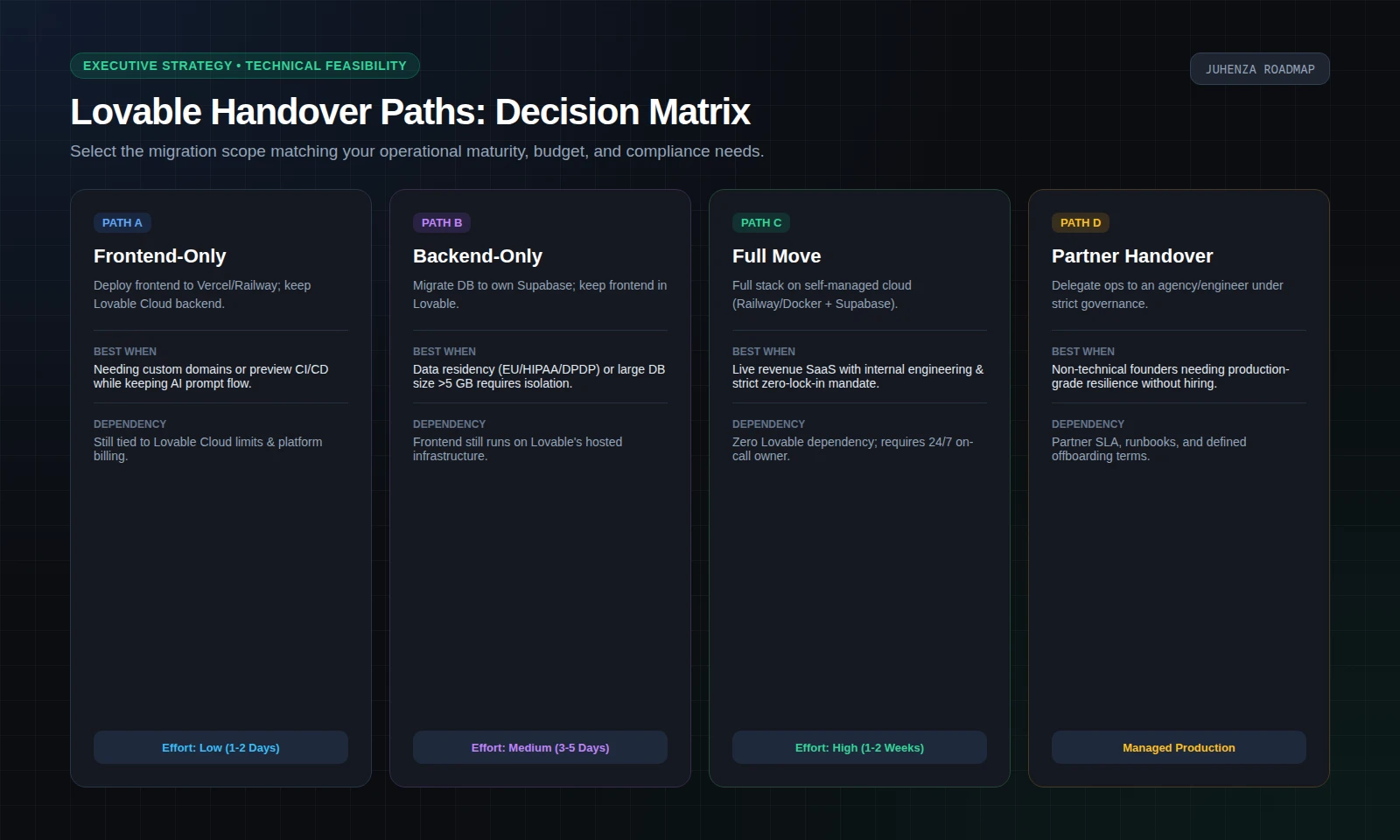 Evaluate the four handover paths by scope, team capability, and operational dependency before altering infrastructure settings.
The foundational rule: do not select Path C solely because it sounds technically rigorous. Adopt Path C only when you can identify who handles 3:00 AM outages, who verifies backup restores weekly, and who patches framework vulnerabilities. If those responsibilities lack clear ownership, our SaaS application development practice recommends starting with Path A or Path D to maintain business momentum.
3. The pre-handover inventory that prevents most failures
Before provisioning external hosting or altering DNS records, audit every technical component your application relies upon. Overlooking a single webhook secret or storage bucket permission causes post-cutover failure.
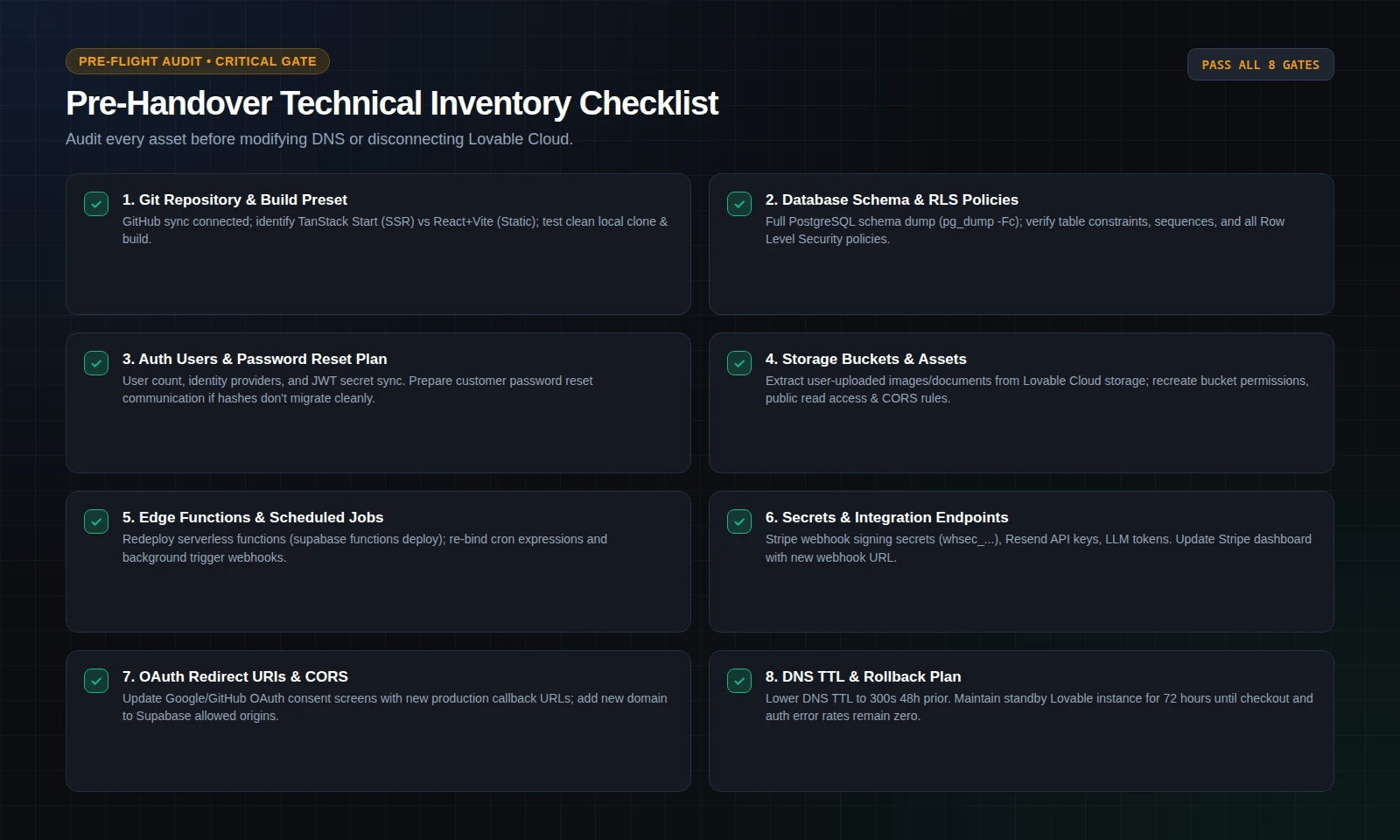 Audit all eight technical layers before initiating database export or modifying DNS records.
| Asset | Critical attributes to verify | Common failure mode |
|---|---|---|
| Repository | Active Git sync, target deployment branch, build scripts, package manager | Treating a point-in-time ZIP snapshot as a continuous deployment source |
| Database | PostgreSQL schema DDL, table relationships, foreign keys, RLS security policies | Restoring table data without activating Row Level Security policies |
| Authentication | User counts, identity providers (OAuth), JWT signing secret, session expiry | Assuming password hashes migrate seamlessly between disparate auth services |
| Storage | Bucket names, public vs. private access, file counts, MIME types, CORS headers | Downloading media assets without preserving exact bucket folder hierarchies |
| Edge Functions | Function names, HTTP triggers, webhook handlers, runtime environment variables | Redeploying functions without configuring necessary third-party API credentials |
| Secrets & Keys | Stripe webhook signing secrets, Resend/SendGrid API keys, AI provider tokens | Hardcoding development credentials into production runtime environments |
| OAuth Providers | Google/GitHub callback URLs, authorized redirect URIs, origins | Leaving OAuth callbacks pointed at lovable.app subdomains |
| Scheduled Tasks | Cron triggers, execution timezones, idempotency safeguards | Forgetting background cron routines that process recurring user billing |
| DNS & Routing | Domain registrar access, TTL values, apex vs. subdomain records, SSL certificates | Cutting DNS records before validating the new target environment |
| Integrations | Stripe webhooks, PostHog/Mixpanel analytics tokens, transactional email templates | Missing webhook registration on external payment gateways |
4. Frontend deployment: TanStack Start vs older React + Vite
Lovable projects utilize two distinct frontend architectures, each requiring a fundamentally different hosting strategy.
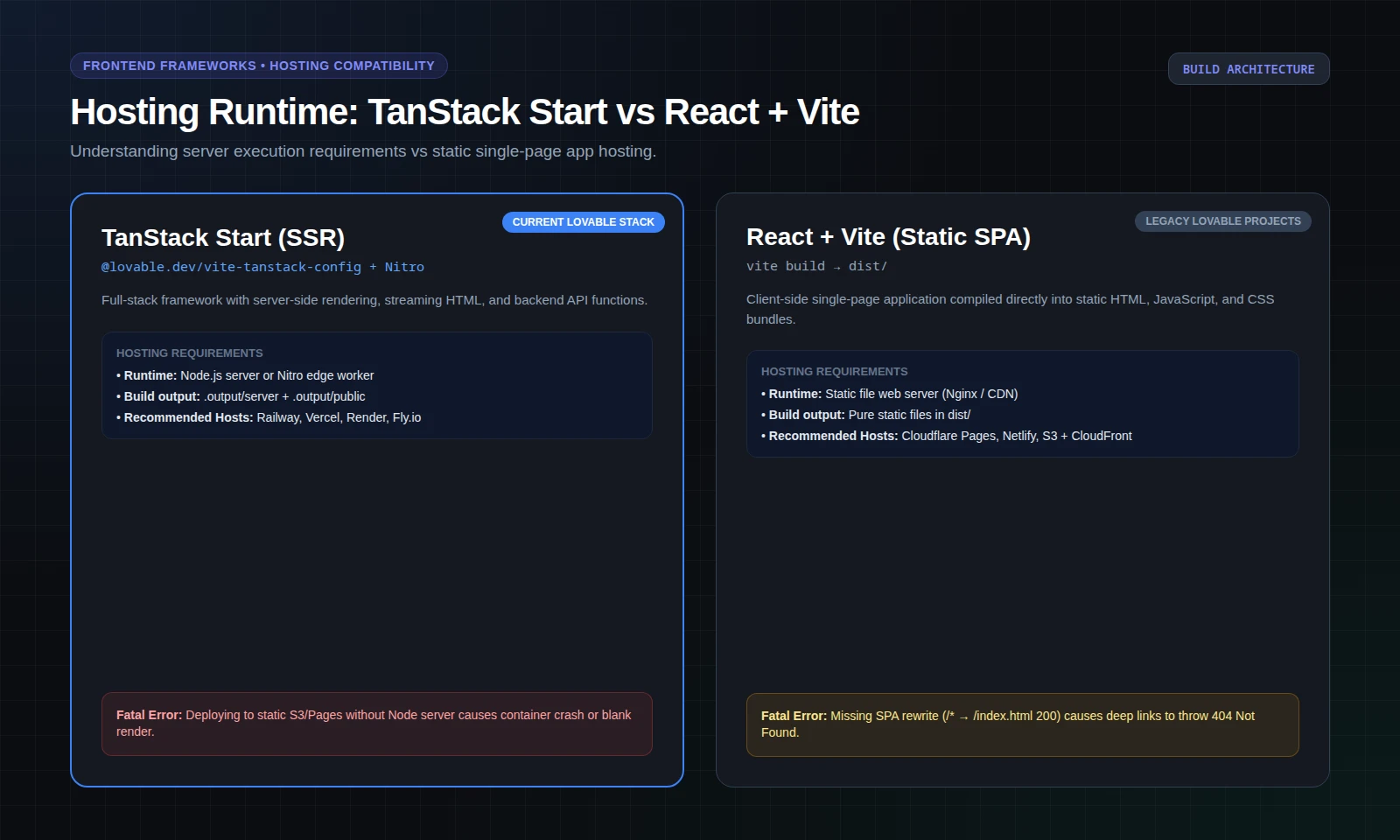 TanStack Start projects require a Node/Nitro server runtime; deploying them to a static CDN without a Node process causes fatal startup crashes.
Modern TanStack Start applications (SSR / Nitro runtime)
Modern Lovable applications leverage TanStack Start with @lovable.dev/vite-tanstack-config and the Nitro server engine. These applications are full-stack: they execute server-side rendering, streaming HTML, server functions, and API endpoints (/api/*).
- Hosting requirement: A platform that executes a Node.js runtime or containerized environment (such as Railway, Render, Fly.io, Vercel, or a Linux VPS running Docker).
- Build output: Generates both
.output/serverand.output/publicbundles. - Critical failure: Attempting to host a TanStack Start build on a purely static file host (such as GitHub Pages or an unconfigured AWS S3 bucket) results in immediate runtime failure because server functions cannot execute.
Older React + Vite applications (Static SPAs)
Earlier Lovable projects compile into client-side single-page applications (SPAs) located in the standard dist/ directory.
- Hosting requirement: Any static web server or CDN (Cloudflare Pages, Netlify, AWS S3 with CloudFront).
- Critical requirement: You must configure a single-page app rewrite rule routing all paths (
/*) toindex.htmlwith an HTTP 200 status code. Without this fallback rule, direct browser visits or page refreshes on sub-routes return 404 Not Found errors.
Universal deployment sequence
- Verify repository clean state: Ensure GitHub synchronization is active and all recent changes are committed to the primary branch.
- Local build validation: Clone the repository locally. Run
bun install(ornpm install) followed bybun run build. Verify that the build completes without missing dependency warnings. - Configure host environment: Add all required environment variables—including
VITE_SUPABASE_URLandVITE_SUPABASE_PUBLISHABLE_KEY—in your hosting provider's dashboard before initiating the first build. - Deploy to preview domain: Always deploy to a generated staging URL first. Never assign your primary production domain until the preview build passes automated smoke tests.
5. Backend migration: Lovable Cloud to your own Supabase
If you select Path B or Path C, decoupling from Lovable Cloud's managed backend requires a methodical database dump and restore sequence.
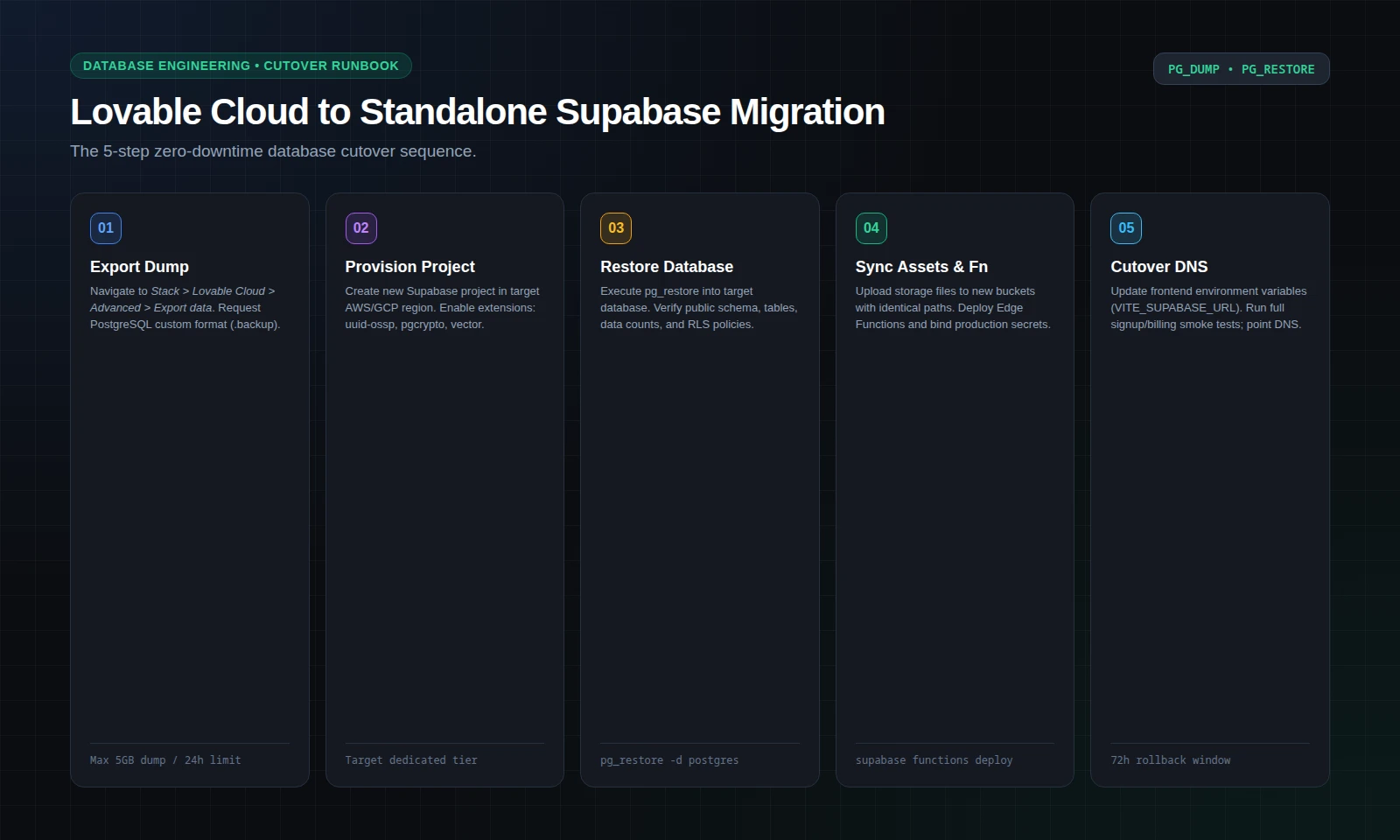 The five-step database migration sequence ensures schema integrity, RLS policy enforcement, and minimal user disruption.
Step 1: Export database from Lovable Cloud
Navigate to Stack > Lovable Cloud > Advanced settings > Export data. Request a PostgreSQL custom-format database export (.backup). Lovable generates a compressed pg_dump archive containing your tables, schemas, extensions, data rows, triggers, and Row Level Security policies.
Operational capacity notice: Lovable Cloud limits database exports to 5 GB dump files (supporting up to 15 GB total database storage), with an export frequency cap of once per 24 hours. Applications approaching these volumes must plan an external Supabase migration before hitting operational ceilings.
Step 2: Provision your dedicated Supabase project
Create a new project in your standalone Supabase account, choosing the AWS or GCP data center region closest to your primary user base. In the Supabase SQL editor, enable required extensions used by your schema (such as uuid-ossp, pgcrypto, or vector).
Step 3: Execute pg_restore
Using the PostgreSQL client tools on your machine or an administrative bastion server, restore the dump into your standalone Supabase instance:
pg_restore -h db.<your-project-ref>.supabase.co \
  -U postgres \
  -d postgres \
  -v --clean --if-exists \
  lovable-backup.backup
Verify table counts, primary key constraints, and confirm that Row Level Security remains enabled across all public tables.
Step 4: Storage assets and Edge Functions
Lovable Cloud's database dump does not include binary assets stored in storage buckets or the source code of deployed Edge Functions.
- Storage migration: Download all assets from Lovable storage buckets and re-upload them to identically named buckets in your standalone Supabase project, matching public/private permissions and CORS settings.
- Edge Functions: Deploy your functions using the Supabase CLI (
supabase functions deploy <function-name>), and set required secrets usingsupabase secrets set.
6. Configuration that breaks first: env vars, OAuth, and SPA routing
Three configuration disconnects account for over 80% of post-handover support tickets:
1. Missing or misnamed environment variables
Lovable automatically provisions connection strings within its internal preview environment. When you migrate to external hosting, your application relies entirely on variables defined in the host settings. Omitting VITE_SUPABASE_URL or VITE_SUPABASE_PUBLISHABLE_KEY causes client-side network exceptions. Ensure your repository maintains a sanitized .env.example file documenting every key required for production.
2. OAuth redirect URIs and callback mismatches
If your SaaS implements social authentication (Google, GitHub, Apple), third-party providers validate every authentication callback against strict URI allowlists. If your new production domain (app.yourcompany.com) is not registered in the identity provider's dashboard, users will receive redirect_uri_mismatch errors. Update both the OAuth provider consoles and Supabase's Authentication > URL Configuration settings with your new domain.
3. Payment webhooks and signature verification
When moving your backend, Stripe webhook notifications will continue hitting your legacy Lovable endpoint unless updated in the Stripe Dashboard. For detailed diagnostics on resolving webhook delivery failures, 401 unauthenticated errors, and database status mismatches, review our guide to fixing Lovable Stripe webhooks and Supabase mismatches.
7. Verification and cutover: gates, smoke tests, and rollback
Never cut production DNS records without clearing verifiable quality gates. Executing cutover without a rollback protocol introduces unnecessary risk.
[Local Build] ──► [Preview Staging] ──► [Auth/Data Smoke] ──► [Billing Webhook] ──► [DNS Cutover] ──► [72h Rollback Window]
Gate 1 Gate 2 Gate 3 Gate 4 Gate 5 Gate 6- Gate 1 — Clean build verification: The application builds cleanly from a fresh git clone in a sterile environment without cached artifacts.
- Gate 2 — Preview environment deployment: The host builds the application and serves static assets and API routes on a temporary staging domain.
- Gate 3 — Authentication and data write smoke test: Register a new user account, sign in from an incognito window, trigger a password reset, and execute a record creation and update. Verify the data appears in the standalone Supabase dashboard.
- Gate 4 — Billing integration check: In Stripe test mode, complete a checkout session and confirm that the webhook endpoint receives the event and updates the user's subscription tier.
- Gate 5 — DNS cutover with reduced TTL: Reduce the Time-to-Live (TTL) on your DNS records to 300 seconds at least 48 hours before cutover. Update your CNAME or A records to point to your new host. If an anomaly arises, reverting the DNS record will propagate within 5 minutes.
- Gate 6 — Post-cutover telemetry: Retain your legacy Lovable Cloud project in a dormant state for 72 hours. Monitor real-time logs, server response times, and auth success rates through cloud and infrastructure engineering tools like Sentry and Datadog.
8. Handing over to a developer or agency without losing control
Handing an application to an external contractor or agency does not require surrendering ownership of your root accounts. Maintain administrative control through principle of least privilege:
- Retain organization ownership: Create a dedicated GitHub Organization and invite external developers as repository contributors. Never host your production codebase under an individual contractor's personal GitHub account.
- Granular cloud permissions: Invite developers to your Supabase and hosting platforms using team member invitations rather than sharing administrative credentials or master database passwords.
- Mandate architecture documentation: Require the incoming engineering team to deliver a documented runbook covering:
- System architecture diagram
- Local environment bootstrap instructions
- Complete
.env.productionvariable specification - Automated database backup and disaster recovery procedures
- Escalation contacts and SLA commitments
- Rehearse an emergency rollback: Before signing off on the handover milestone, require the team to demonstrate a simulated rollback from external hosting back to the fallback environment.
9. Common mistakes, limitations, and when to involve a specialist
Critical mistakes to avoid
- Mistake 1: Conflating code export with infrastructure handover. Downloading source code is an export; verifying data integrity, authentication sessions, and backup schedules is a handover.
- Mistake 2: Attempting simultaneous frontend and database cutovers. Migrate and verify the database first while the frontend remains stable, or vice versa. Simultaneous moves obscure the root cause when issues occur.
- Mistake 3: Deploying commercial SaaS apps on free hosting tiers. Vercel Hobby and similar entry tiers prohibit commercial SaaS traffic and enforce strict serverless execution limits. Revenue-generating platforms require commercial tiers with dedicated support.
- Mistake 4: Discarding the legacy environment immediately. Deleting the Lovable Cloud project immediately after DNS cutover eliminates your fallback option if undetected edge function bugs emerge under production traffic.
When to involve a specialist engineering partner
Engaging a technical consultancy is advisable when:
- Your SaaS has active paying subscribers who cannot tolerate maintenance windows.
- Your database storage approaches Lovable Cloud's 5 GB export ceiling.
- You must comply with regional data governance regulations (HIPAA, SOC 2, DPDP, GDPR).
- Your team lacks in-house DevOps expertise to maintain 24/7 server monitoring, SSL renewals, and automated backup testing.
FAQ
Does moving a Lovable app to external hosting migrate my database automatically?
No. Code export and database migration are entirely decoupled. Exporting your GitHub repository only transfers frontend and routing logic. Your PostgreSQL database, user profiles, storage buckets, and Edge Functions remain on Lovable Cloud until you export a database dump and restore it into an external Supabase instance.
Can I continue using Lovable's AI editor after moving my hosting?
Yes, provided you utilize Path A (Frontend-Only Move) or Path B (Backend-Only Move) with active GitHub synchronization. Lovable will continue committing code updates to your GitHub repository, and your external hosting platform (such as Railway or Vercel) can automatically build and deploy every commit via CI/CD pipelines.
What is the primary difference between hosting TanStack Start and React + Vite?
Modern Lovable applications built with TanStack Start include server-side rendering, server functions, and Nitro backend routines that require a running Node.js or Edge container. Older React + Vite applications compile into purely static assets (dist/) that can be hosted on CDNs or object storage, provided an SPA rewrite rule (/* -> /index.html 200) is configured.
Do user passwords export cleanly from Lovable Cloud?
Lovable Cloud's PostgreSQL backup file includes user records and encrypted password hashes within the Supabase auth schema. When restoring into a standalone Supabase instance, password hashes remain valid. However, if you migrate away from Supabase to a different authentication provider (such as Auth0 or Clerk), password hashes cannot be decrypted and you must prompt users to complete a password reset.
How long does a complete Lovable external hosting handover take?
A frontend-only migration (Path A) typically takes 1 to 2 business days. A full production migration including database restoration, asset transfer, webhook reconfiguration, smoke testing, and DNS propagation (Path C) requires 1 to 2 weeks to execute without risking data loss or unplanned downtime.
Can I hand over my Lovable application to an agency without sharing my master credentials?
Yes. Never share root account passwords or your master Supabase database password. Invite developers as repository collaborators in your GitHub organization and grant them scoped access in your hosting dashboard. You should always remain the sole owner of your domain registrar, Stripe account, and primary cloud billing profiles.
Where this fits
This guide sits within JUHENZA's architectural library under AI App Development & Platform Migration > Lovable Production Readiness. It bridges the gap between rapid prototype generation and institutional-grade software engineering.
If you are currently evaluating build frameworks for a new venture, begin with our broader analysis of SaaS application development. If your Lovable SaaS is already generating revenue and requires an zero-downtime infrastructure migration, book a technical scoping consultation with JUHENZA to review your pre-handover inventory.
Conclusion
A successful Lovable external hosting handover is achieved not by clicking an export button, but by executing an ordered migration across code, backend data, and operational responsibility. Inventory every asset before modifying settings, test thoroughly in staging preview environments, and maintain an active rollback window.
If you need senior architectural oversight to execute your migration without disruption, book a technical scoping consultation and our engineering team will audit your stack against our 8-gate readiness framework.