

Direct answer: Most Lovable payment failures are not Stripe bugs. They are configuration and mapping failures between three systems: the Stripe webhook endpoint, the Supabase Edge Function that receives it, and the database row your app reads to grant access. A correct Lovable Stripe webhook fix means fixing delivery, signature verification, and the subscription-state write — in that order.
A customer pays. Stripe shows “paid.” The money settles. Then they refresh your app and it still says Free plan.
This is one of the most common and most expensive failure modes in SaaS apps built with Lovable, Supabase, and Stripe. It is expensive because the customer has already trusted you with money, and the app has not delivered the access they paid for. It is common because AI-generated payment flows often pass the happy path once in preview and then break the moment real users, real webhooks, and production URLs arrive.
The good news: the causes are finite and diagnosable. This guide gives you a three-layer diagnostic, the exact fixes for each layer, and a framework for deciding when to stop debugging and bring in a specialist.
Why Lovable payment flows break in production
Lovable’s preview environment hides the seams that production exposes. In preview, the Supabase URL, the Stripe webhook endpoint, and the OAuth redirect URLs may all be test-mode or development values. When you publish to a real domain, those values do not automatically follow.
Three seams account for most payment failures:
- The webhook endpoint is still registered against the preview URL. Stripe sends events to an address that no longer exists, or to a test-mode endpoint that is not receiving live traffic.
- The Supabase Edge Function rejects Stripe with a 401. Supabase’s platform-level JWT verification runs before your code and expects a Supabase user token. Stripe does not have one. It signs requests with a
Stripe-Signatureheader instead. - The webhook returns 200 but the app still says free. The function ran, but it wrote to the wrong table, wrote the wrong status value, or wrote a row that the pricing gate does not read. The database says
active; the gate readsprofiles.roleand still seesfree.
These are not three independent bugs. They are three layers of the same pipeline. Fixing one layer without checking the next produces false confidence.
The three-layer diagnostic framework
Use this order. Do not skip ahead.
| Layer | Question | Where to look |
|---|---|---|
| 1. Stripe delivery | Is Stripe sending the event to the right endpoint, and is the delivery succeeding? | Stripe Dashboard → Developers → Webhooks → Event deliveries |
| 2. Supabase Edge Function | Did the function run, and did it accept the request? | Supabase Dashboard → Edge Functions → Logs |
| 3. Access gate | Does the row the UI reads match Stripe’s subscription state? | Supabase Table Editor → the exact table and column the pricing page uses |
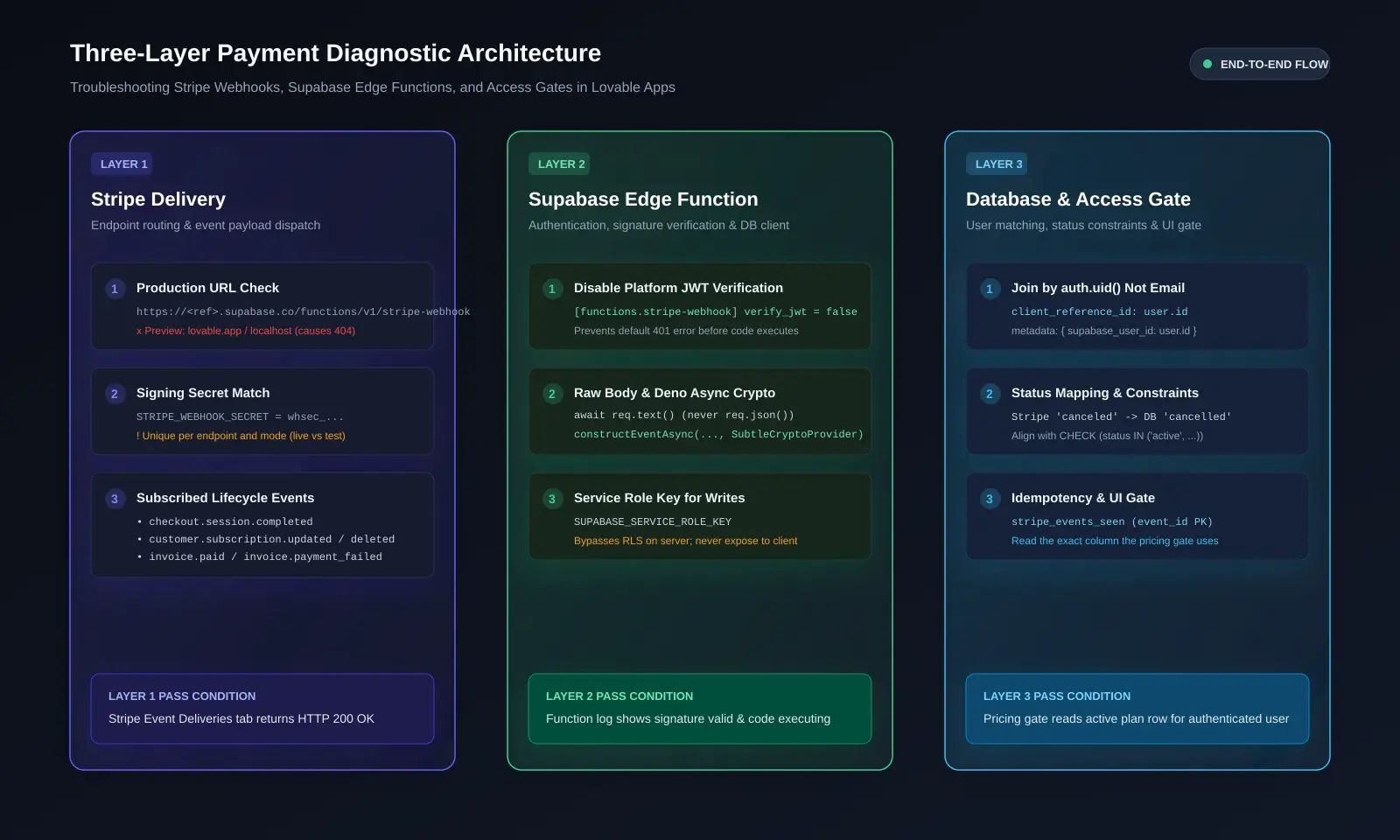 Diagnose in order. Most failures are visible at Layer 1 or Layer 2 before the app code runs.
Most debugging fails because the developer starts at Layer 3 (the app code) when the failure is at Layer 1 (the endpoint URL) or Layer 2 (the 401). Start at the top.
Layer 1 — Fix the Stripe webhook endpoint
Confirm the endpoint is production, not preview
Open Stripe Dashboard → Developers → Webhooks. You should see an endpoint whose URL is your production domain, not a lovable.app preview URL and not a localhost address.
If the only endpoint is a preview URL, create a new endpoint pointing to your production Edge Function URL. The typical shape is:
https://<project-ref>.supabase.co/functions/v1/stripe-webhook
Then remove the preview endpoint from live mode. Leaving it active can cause duplicate or misrouted deliveries.
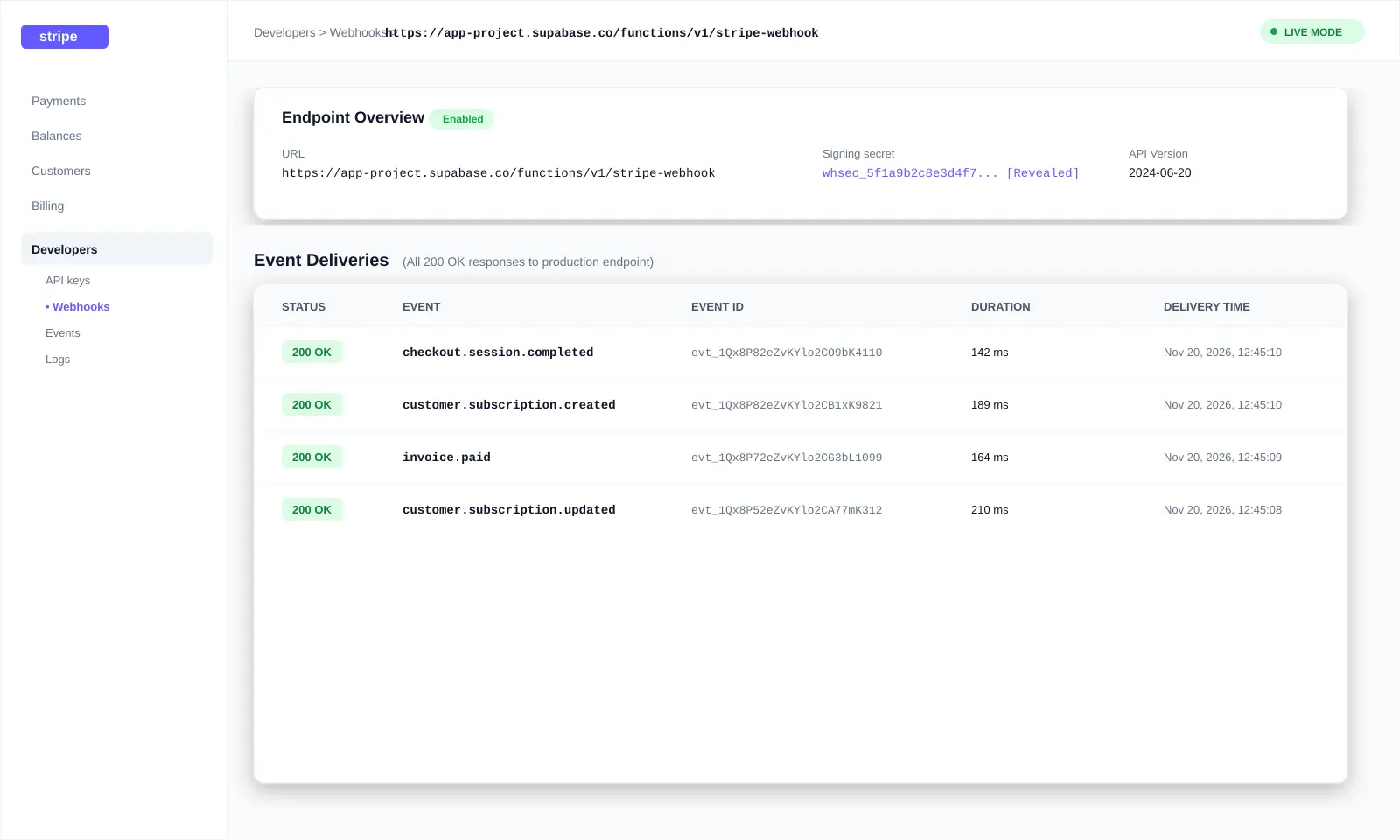 A 200 here is necessary but not sufficient. Check the Supabase log and the database row next.
Subscribe to the right events
At minimum, subscribe to:
checkout.session.completedcustomer.subscription.createdcustomer.subscription.updatedcustomer.subscription.deletedinvoice.paidinvoice.payment_failed
If you only listen for checkout.session.completed, you will miss renewals, failed payments, and cancellations. The customer will keep access after cancelling, or lose access after a successful renewal, depending on which event you ignored.
Copy the signing secret for that exact endpoint
Every Stripe webhook endpoint has its own whsec_... signing secret. The secret for your test endpoint is not the same as the secret for your live endpoint, and neither is the same as the Stripe CLI secret.
In the endpoint settings, click Reveal secret, copy it, and store it in your Supabase Edge Function secrets as STRIPE_WEBHOOK_SECRET. Then redeploy the function so the new secret is available.
Layer 1 pass condition: Stripe’s Event deliveries tab shows a 200 response for a test event sent to the production endpoint.
Layer 2 — Fix Supabase Edge Function access and signatures
Turn off JWT verification for the webhook function only
Supabase Edge Functions run a platform check called verify_jwt before your function code executes. It expects an Authorization: Bearer <Supabase JWT> header. Stripe does not send one. It sends a Stripe-Signature header. The platform rejects Stripe with a 401, and your function logs stay empty because your code never ran.
The fix is to disable JWT verification for the Stripe webhook function and only that function. Do not disable it globally.
The most durable method is a config.toml entry in your repository:
[functions.stripe-webhook]
verify_jwt = false
Then redeploy:
supabase functions deploy stripe-webhookYou can also use the deploy flag --no-verify-jwt, but the flag applies only to that deploy. If a later deploy runs without it and config.toml does not say false, the 401s return.
Verify the raw body with constructEventAsync
Turning off JWT means anyone who knows your function URL can POST to it. The Stripe signature check is now your only lock. Two rules matter on Supabase Edge Functions:
- Read the raw body with
await req.text(). Never callreq.json()first. Re-serialized JSON no longer matches the signature. - Use
constructEventAsyncwith aSubtleCryptoProvider. Edge Functions run on Deno, where the synchronousconstructEventthrows because Deno’s crypto is asynchronous.
import Stripe from "npm:stripe@^23";
const stripe = new Stripe(Deno.env.get("STRIPE_SECRET_KEY")!, {
apiVersion: "2024-06-20",
});
const cryptoProvider = Stripe.createSubtleCryptoProvider();
const body = await req.text();
const sig = req.headers.get("Stripe-Signature")!;
let event;
try {
event = await stripe.webhooks.constructEventAsync(
body,
sig,
Deno.env.get("STRIPE_WEBHOOK_SECRET")!,
undefined,
cryptoProvider,
);
} catch (err) {
return new Response(`Webhook signature verification failed: ${err.message}`, {
status: 400,
});
}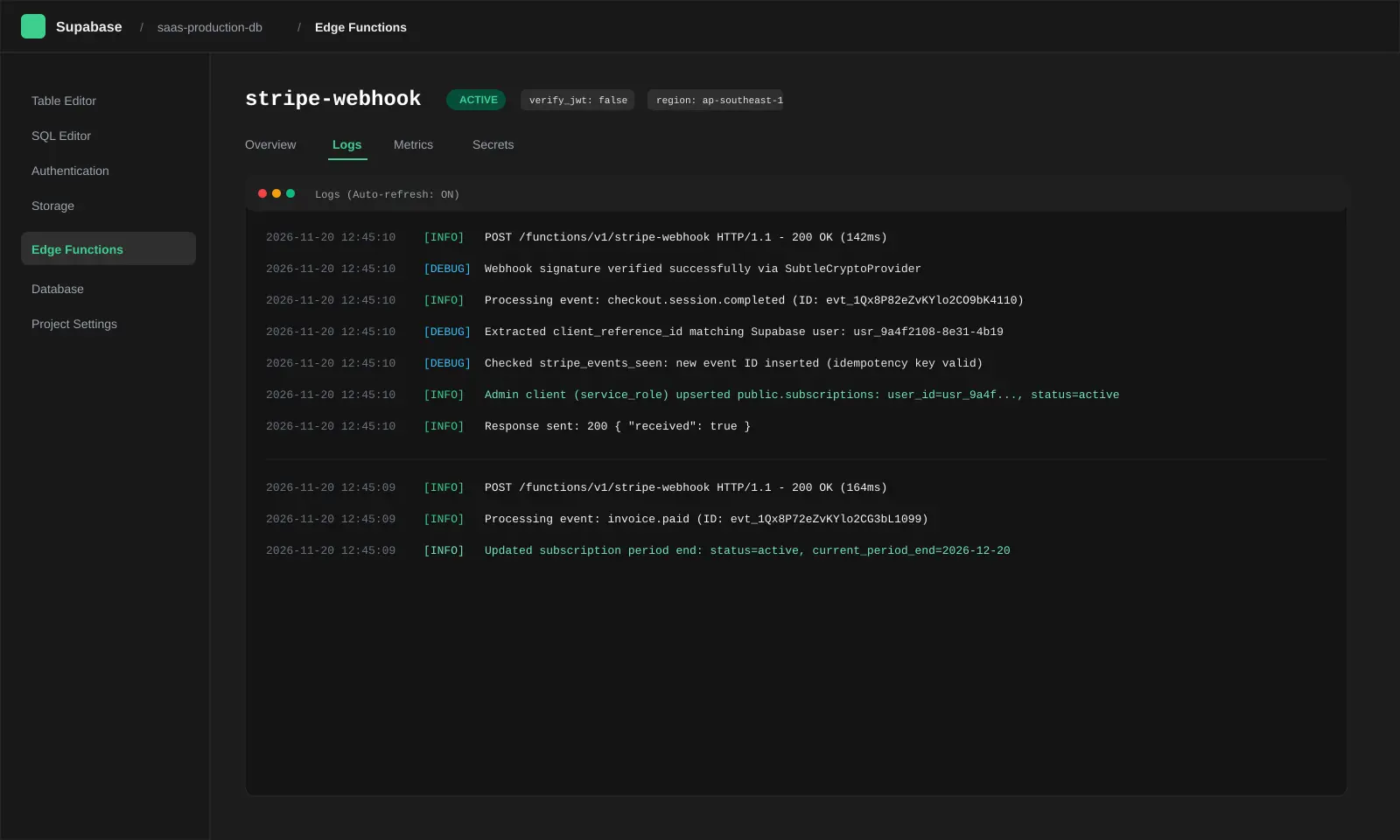 If the log is empty, the platform rejected the request before your code ran.
Use the service role key for database writes
The webhook request has no logged-in Supabase user. If your handler uses the anon key, Row Level Security will block the update. The handler must use the service role key to bypass RLS for the subscription write.
const supabaseAdmin = createClient(
  Deno.env.get("SUPABASE_URL")!,
  Deno.env.get("SUPABASE_SERVICE_ROLE_KEY")!,
);
The service role key gives full admin access to your database. It must never reach the browser. Keep it in Supabase Edge Function secrets, not in any client-side environment variable prefixed with VITE_ or NEXT_PUBLIC_.
Layer 2 pass condition: Stripe’s delivery log shows a 200, and the Supabase Edge Function logs show your handler running and reaching the database write.
Layer 3 — Fix subscription-state mapping
Write the Supabase user ID to the Stripe session
The root cause of many “paid but still free” cases is that Stripe and your database are joined by the wrong identifier — often email. If the customer signs in with a different email from the one on the Stripe customer, the webhook writes a subscription row that the app cannot match to the authenticated user.
The fix is to put the Supabase auth.uid() on the Checkout Session when you create it, using client_reference_id or metadata.supabase_user_id. Then the webhook can write the subscription to the exact user who paid, regardless of email.
const session = await stripe.checkout.sessions.create({
  mode: "subscription",
  line_items: [{ price: priceId, quantity: 1 }],
  client_reference_id: user.id,
  metadata: { supabase_user_id: user.id },
  success_url: `${origin}/success`,
  cancel_url: `${origin}/pricing`,
});
Handle every lifecycle event, not just checkout
A single checkout.session.completed handler is not enough. Stripe sends different events for renewals, failed payments, plan changes, and cancellations. Your handler should map each event to a database state change:
| Stripe event | What it means | Database action |
|---|---|---|
checkout.session.completed | First successful checkout | Set status to active, store customer and subscription IDs |
customer.subscription.updated | Plan change, renewal, or status change | Mirror the new status (active, past_due, trialing) |
customer.subscription.deleted | Subscription ended | Set status to canceled (or keep access until period end if your policy allows) |
invoice.paid | Renewal succeeded | Confirm active; extend period if needed |
invoice.payment_failed | Renewal failed | Set past_due; trigger dunning communication |
Map Stripe statuses to your database constraint values
Stripe uses statuses such as active, trialing, past_due, canceled, unpaid, and incomplete. Your database CHECK constraint may use different spellings — for example, cancelled with two Ls, or a custom expired value. If the webhook writes canceled but the constraint expects cancelled, the update fails, the handler returns an error, and Stripe retries.
Write a small mapping function and test it against every Stripe status:
function mapStripeStatus(status: string): string {
  const map: Record<string, string> = {
    active: "active",
    trialing: "trialing",
    past_due: "past_due",
    canceled: "cancelled",
    unpaid: "past_due",
    incomplete: "incomplete",
    incomplete_expired: "cancelled",
  };
  return map[status] ?? "inactive";
}
Make the handler idempotent
Stripe can retry the same event for up to three days. Without idempotency, a retry can create duplicate subscription rows or overwrite a newer state with an older one.
Create a stripe_events_seen table with a primary key on the Stripe event ID. Before processing, attempt to insert the event ID. If the insert fails because the ID already exists, return 200 and skip the work.
create table stripe_events_seen (
event_id text primary key,
processed_at timestamptz default now()
);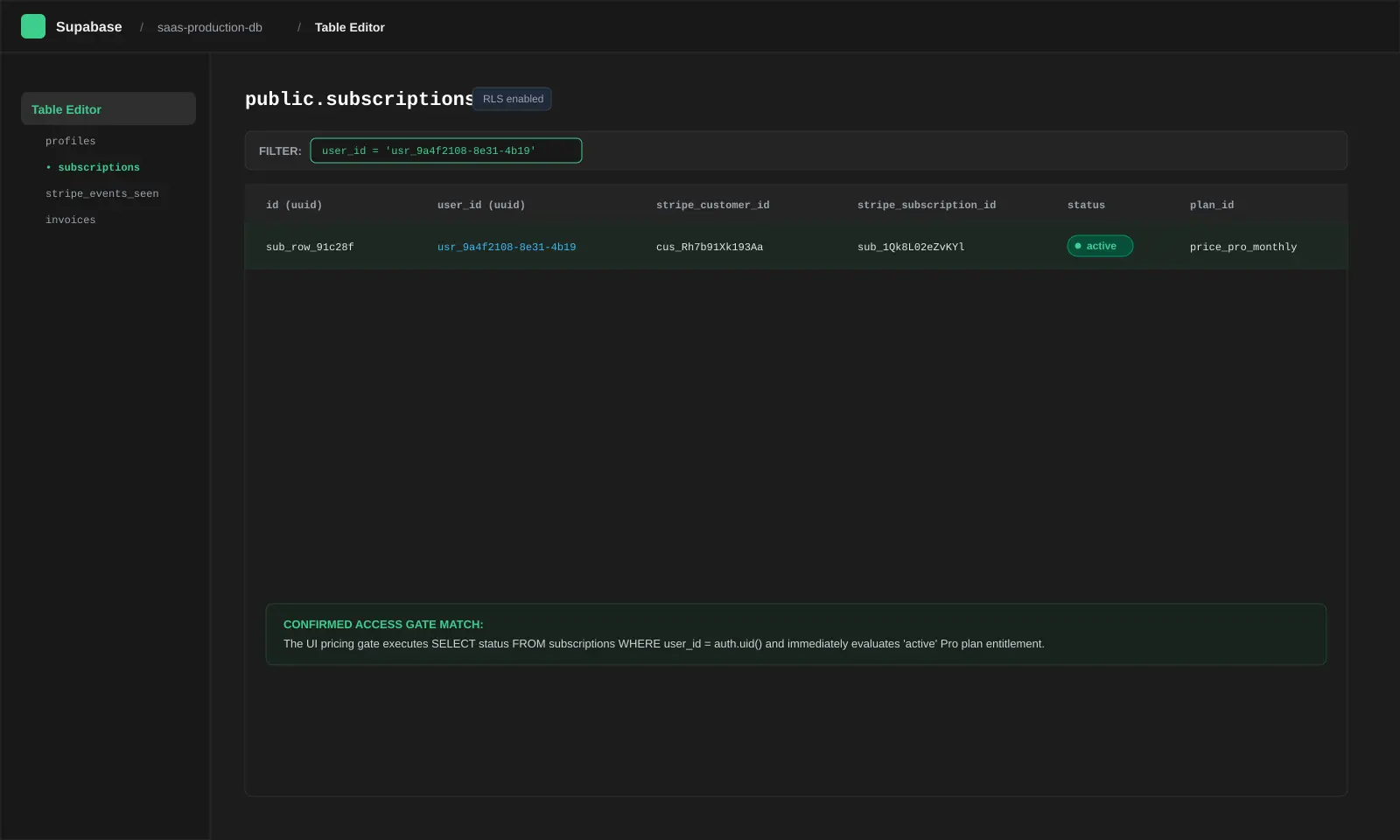 The row the UI reads must match Stripe’s subscription state.
Layer 3 pass condition: After a test checkout, the exact row the pricing page reads shows active or trialing, and it is linked to the authenticated user’s ID. After a cancellation test, the same row shows cancelled or the access policy you intended.
A practical diagnostic sequence (illustrative)
This sequence is an illustrative framework, not a verified client case.
Stripe delivery log: Open the failed payment’s event deliveries. Note the HTTP status.
- 400: Signature problem. Check the raw body and the
whsec_secret for that exact endpoint. - 401: JWT problem. Turn off
verify_jwtfor the webhook function only. - 500: Your handler threw. Check Supabase Edge Function logs.
- 200 but app still free: Go to Layer 3.
- 400: Signature problem. Check the raw body and the
Supabase Edge Function log: Confirm the function ran. If the log is empty, the request never reached your code — the platform rejected it at Layer 1 or Layer 2.
Database row: Read the exact table and column the pricing gate uses. Compare it to the Stripe subscription status. If they disagree, the join or the mapping is wrong.
End-to-end test: Use the Stripe CLI to trigger a test event against the production URL. Confirm the database row flips. Then trigger a cancellation and confirm it flips back.
Common mistakes and security traps
- Trusting the success page. Stripe does not guarantee that the customer reaches the success URL. Unlocking access only on the success redirect is unreliable and forgeable. The webhook is the source of truth.
- Turning off JWT and skipping the signature check.
verify_jwt = falseis acceptable only because the Stripe signature check remains. Without it, anyone can POST a fakecheckout.session.completedand grant themselves paid access. - Putting the service role key in client-side code. The service role key bypasses RLS. It must stay in server-side secrets only.
- Writing to a different table than the gate reads. If the webhook upserts
subscriptionsbut the pricing page readsprofiles.is_pro, the write is theatre. Read the same columns the UI reads. - Assuming test mode proves live mode. Live mode needs its own webhook endpoint, its own signing secret, and its own price IDs. A test-mode success does not carry over.
When to fix it yourself vs involve a specialist
Fix it yourself if:
- The Stripe delivery log shows a clear 400 or 401 with a specific error string.
- You can edit
config.tomland redeploy the Edge Function. - You can read the database row the pricing gate uses and compare it to Stripe.
- The fix is one of the three layers above and you can test it with the Stripe CLI.
Involve a specialist if:
- The webhook returns 200 but the access gate still disagrees, and you cannot trace which table or column the gate reads.
- You need to add idempotency, status mapping, and lifecycle handling together, and the code was generated without those safeguards.
- You are handling live payments and cannot risk a broken deploy during debugging.
- You need RLS policies, triggers, or a schema change to protect billing columns from client-side tampering.
This is the point where JUHENZA’s application development services and integration and consulting work is relevant. We scope the payment flow, the database schema, and the access gate before changing production code. We do not claim a certification or a guaranteed outcome; we agree the acceptance checks first.
FAQ
Why does Stripe show “paid” but my Lovable app still says “free”?
Because the charge and the access decision are separate systems. Stripe knows the payment succeeded. Your app reads a row in Supabase to decide access. If the webhook never wrote that row, or wrote it to a different table or user ID than the gate reads, the app stays on free.
What does a 401 mean on a Supabase Stripe webhook?
A 401 usually means Supabase’s platform-level JWT verification rejected the request before your function ran. Stripe does not have a Supabase user token. Turn off verify_jwt for the webhook function only, and keep the Stripe signature check in your code.
Why does constructEvent fail in a Supabase Edge Function?
Supabase Edge Functions run on Deno, where crypto is asynchronous. The synchronous stripe.webhooks.constructEvent throws because it expects synchronous crypto. Use stripe.webhooks.constructEventAsync with Stripe.createSubtleCryptoProvider().
Do I need the service role key in the webhook?
Yes, for the database write. The webhook request has no authenticated Supabase user, so the anon key plus RLS will block the update. Use the service role key on the server only, and never expose it to the browser.
Should I unlock access from the success page instead of the webhook?
No. Stripe does not guarantee that the customer reaches the success page, and a success-page update can be forged. The webhook is the reliable, verifiable source of truth.
How do I test the fix without charging a real card?
Use the Stripe CLI to trigger test events against your production endpoint, or use Stripe test mode with test cards. Confirm the database row changes after checkout.session.completed and after customer.subscription.deleted.
Do I need Stripe Entitlements?
Only if your access model is feature-based rather than plan-based. If you gate features by entitlement, listen for entitlements.active_entitlement_summary.updated. If you gate by subscription status, the subscription lifecycle events are sufficient.
Why does the webhook return 200 but the app still says free?
A 200 only means your function returned successfully. It does not prove the access gate changed. Read the exact table and column the pricing page uses. If that row does not match Stripe, the join or the write is wrong.
Where this fits
This post sits under Software Development > SaaS & Payments Integration. If you are planning the broader build, read AI Workflow Automation: How to Automate Business Workflows Using AI and APIs for the API-and-webhook patterns that make payment flows reliable, and review our application development services for the scope and acceptance-check approach we use on SaaS builds. For deployment and monitoring after launch, see managed application services.
Conclusion
A broken Lovable payment flow is rarely one bug. It is a delivery problem, an authentication problem, or a mapping problem — and sometimes all three. Diagnose in order: Stripe delivery log, Supabase function log, database row. Fix the layer that is actually failing, then verify end to end with a test event.
If the fix requires schema changes, RLS hardening, or lifecycle handling you do not want to ship manually, send us the project brief. Describe the payment flow, the error you are seeing, and the database row the app reads. We will tell you what we can verify and what needs a specialist review before any production change.
References
- Lovable, “Connect your own Stripe account,” Lovable Documentation. Official Docs
- Stripe, “Verify webhook signatures,” Stripe Documentation. Official Docs
- Supabase, “Edge Function configuration — JWT verification,” Supabase Documentation. Official Docs