

Jaipur Handicraft Exporters: From Excel Order Sheet to Shipment-Ready ERP
From Excel order sheets to shipment-ready ERP for Jaipur handicraft exporters, artisan job-work, inspection, packing and RoDTEP/drawback reconciliation.
TechApp Dev

Direct answer: Shipment-ready ERP for Jaipur handicraft exporters means one order record that carries the item, artisan job-work, inspection result, packing, shipping bill, and incentive claim without re-typing. Excel breaks because each team keeps its own version, inspection stays in photos and chats, and RoDTEP and drawback claims are reconciled weeks later from mismatched sheets. The fix is gated workflow: no packing without passed inspection, no shipment without matched packing, and no incentive claim without matched shipping bill and payment.
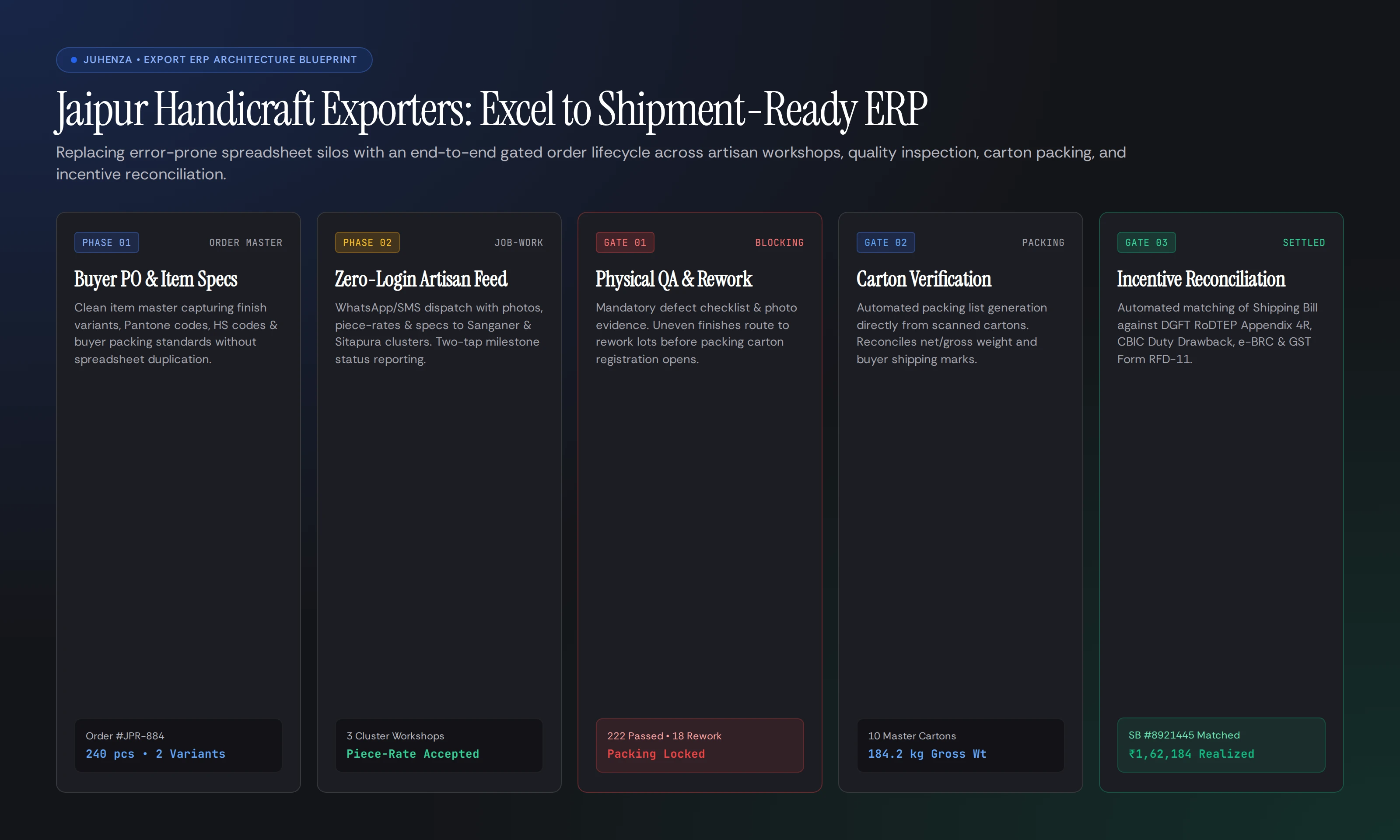
ERP for Jaipur handicraft exporters is not about replacing a spreadsheet with a fancier spreadsheet. It is about making the order record the single place where truth is decided. In Sanganer, Sitapura, Bagru, and the old-city workshops, one buyer order can split across five artisans, three finishes, and two packing lots. If that split lives in Excel, WhatsApp, and one merchandiser's memory, the shipment will carry the risk.
This guide shows the full path: from order sheet to artisan assignment, inspection gate, packing, shipment documents, and incentive reconciliation. It is written for export houses that already ship and feel the strain, not for beginners choosing their first accounting tool.
Why Excel Breaks at 20 Buyers
Excel works when one person tracks five buyers. It fails when twenty buyers, forty open orders, and a dozen artisans must agree on one version. The failure is not laziness. It is structure. A sheet cannot alert when a milestone slips, lock one current version, link photos to an item, and calculate true order profit at the same time.
The common break points are familiar. Two people edit copies on the same day. A formula from an old season still drives costing. A buyer changes finish by chat, and only one sheet gets updated. Packing uses last week's version. Accounts then invoices from a third version. Each re-typing is a chance to lose margin and miss a shipment date.
A useful test is simple. Ask how long it takes to answer: which orders are late, which artisan holds them, what is inspected, what is packed, and what is still unclaimed in incentives? If the answer needs three calls and two sheets, the system is already costing money. That is why vetting a software vendor should start with workflow evidence, not a demo.
What Shipment-Ready Really Means
Shipment-ready does not mean the order is entered. It means the order has passed three gates and the evidence is attached to the record.
| Gate | Pass rule | Evidence required |
|---|---|---|
| Production complete | Accepted pieces equal ordered pieces, by variant | Artisan completion, counts, photos |
| Inspection passed | Inspection result is passed, not pending | Checklist, photos, rework record if any |
| Packing matched | Packed cartons match inspected pieces and buyer packing spec | Packing list, carton count, weights |
If any gate is missing, the order is not shipment-ready. That rule sounds strict, but it prevents the most common export failure: shipping what was made, not what was approved. A shipment that leaves with a pending inspection becomes a buyer dispute, a return, or a discount that erases the order margin.
Shipment-ready also means finance can close the loop. The invoice, packing list, shipping bill, and payment record must reference the same order and the same item lines. When they do, incentive reconciliation becomes a check, not a reconstruction.
The Data Model That Replaces the Order Sheet
The order sheet is a flat list. An export ERP needs a linked model. Start with four masters, then link every transaction to them.
Item master: One record per product and variant, with photo, dimensions, material, finish, HS code, packing spec, and buyer-specific notes. Variants matter in handicrafts. A brass vase in antique finish is not the same item as the same vase in matte black. If variants are not separate, costing and inspection will blur.
Buyer master: Buyer, ship-to, bill-to, currency, payment terms, inspection requirements, packing and marking rules, and prior rejection reasons. Buyer rules should travel with the order, not live in a merchandiser's head.
Artisan and vendor master: Skill, location, capacity, typical lead time, piece-rate, payment terms, and quality history. This is not a rating system. It is a planning record that helps assign the right work to the right hands.
Order record: Buyer order, line items, quantities by variant, delivery date, price, and status. Every later record, from job-work to packing to shipping bill, must point back to this order.
This model is the reason custom software development often beats another spreadsheet template. The value is not the screen. It is the rule that one order cannot have three conflicting truths.
Artisan and Job-Work Without Forcing Logins
Artisans will not log into an ERP. That is not resistance. It is reality. Many work from small workshops, share phones, and work in Hindi. A system that demands daily logins will be bypassed, and the bypass will become the real system.
Design for low-friction updates instead. Give each job-work assignment a simple link or message with order, item photo, quantity, finish, due date, and piece-rate. Let the artisan or field staff reply with started, in progress, ready for inspection, or delivered. Keep the ERP as the record, and the message as the input channel.
Payment should follow accepted pieces, not promised pieces. The workflow is: assign, produce, inspect, accept, then pay for accepted quantity. If rework is needed, the rework record must show who holds the pieces, what failed, and what changed. That single rule removes most payment disputes. It also gives the export house a true cost per accepted piece, which is the number that decides whether an order was profitable.
For houses that already coordinate orders on chat, WhatsApp order automation can be the bridge. The goal is not to replace conversation. It is to make conversation update the order record.
Inspection and Packing as Gates, Not Checkboxes
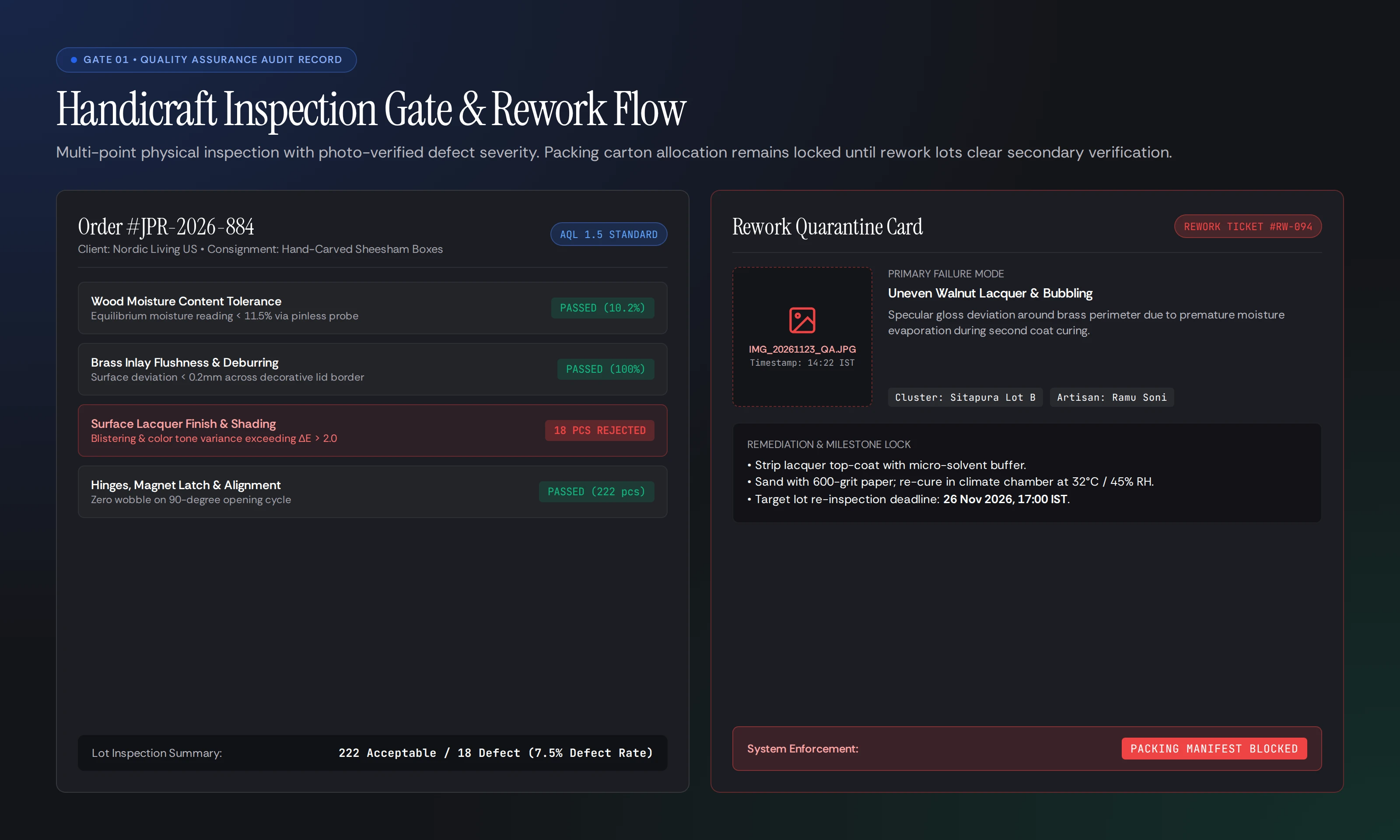
Inspection in handicrafts is visual, tactile, and buyer-specific. A checklist must reflect that. Generic pass or fail is not enough. The checklist should name the defect, the severity, and the action.
Use three outcomes: pass, rework, reject. Pass moves pieces to packing. Rework returns pieces with a reason and a new due date. Reject removes pieces from the order and triggers a remake or a buyer conversation. Each outcome needs a photo. A photo taken at inspection is cheaper than a photo requested after a buyer complaint.
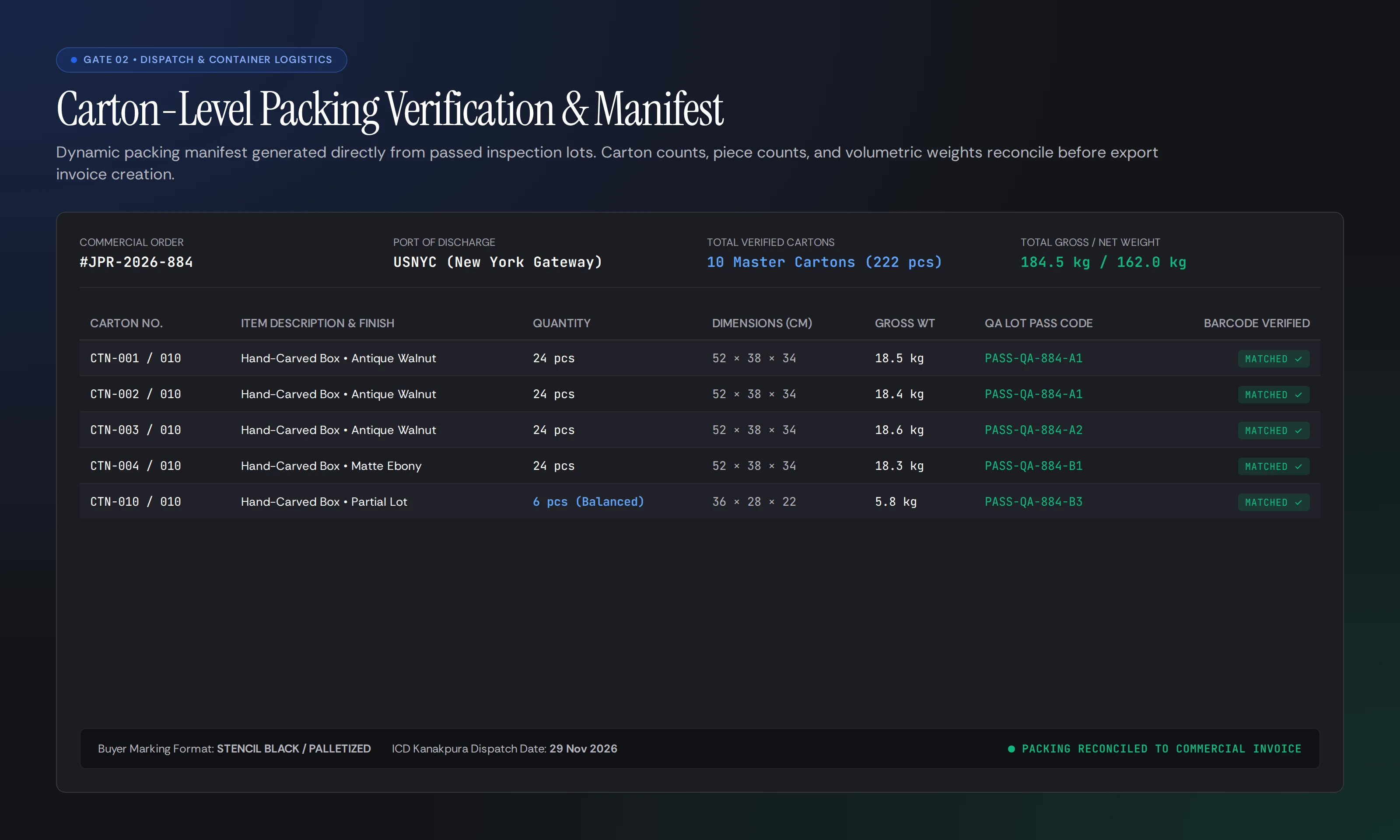
Packing is the second gate. Packing must match inspected pieces, buyer packing spec, carton count, and marking. If packing uses a different variant or a different finish, the system must block it. The packing list is then not a document typed after loading. It is generated from packed cartons.
That link matters for e-way bill mismatches. When invoice, packing, and dispatch records disagree, the error is found before dispatch, not after the truck leaves. The same discipline applies to export packing: the carton that is packed is the carton that is invoiced and shipped.
Incentive Reconciliation: RoDTEP, Drawback, e-BRC, and GST
This is where many Jaipur export houses lose money quietly. Incentives are not a bonus. They are part of the order margin. If they are reconciled late or from wrong data, claims slip, rates are misapplied, or documents do not match.
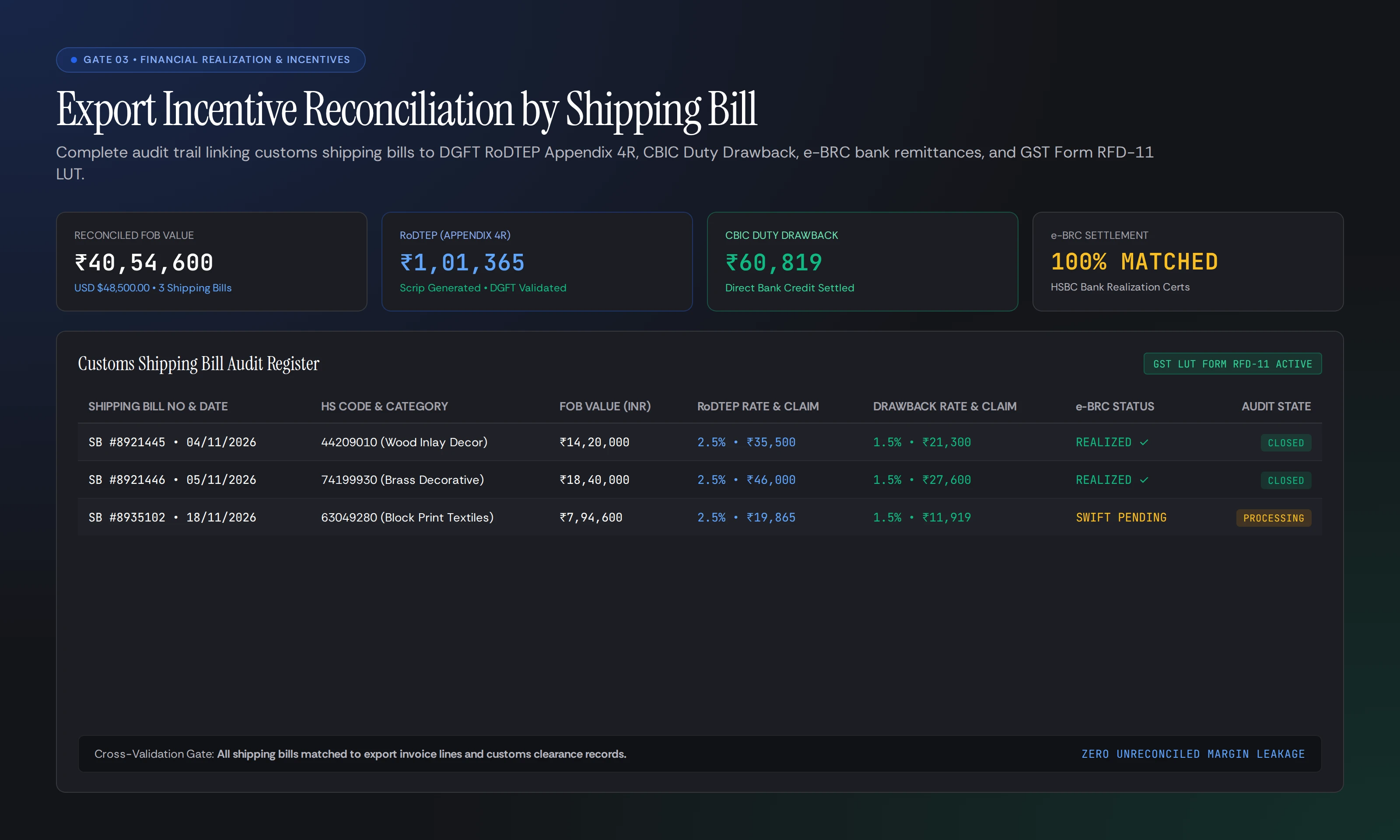
Keep three reconciliations separate, then tie them to one shipping bill.
RoDTEP: Remission of Duties and Taxes on Exported Products. RoDTEP remits embedded duties and taxes that are not refunded through GST or drawback. Rates vary by HS code in DGFT Appendix 4R for domestic tariff area exports and Appendix 4RE for Advance Authorisation, Export Oriented Unit, and Special Economic Zone exports. Do not use a single percent for all handicrafts. Check the rate for the exact HS code and the export date. DGFT publishes Appendix 4R and 4RE updates, and rates and caps change, so the ERP should store the rate used, the shipping bill, and the claim status together.
Duty drawback: Duty drawback rebates customs and excise duties on inputs used for exported goods. CBIC administers the scheme, and the claim rests on the shipping bill declaration. The ERP must keep the shipping bill number, date, FOB value, drawback rate, and amount claimed in one place. If the invoice value changes after the shipping bill, the mismatch must surface before the claim is filed.
e-BRC and payment: The electronic Bank Realisation Certificate, e-BRC, links payment to the export. The ERP should match invoice to shipping bill to e-BRC to bank receipt. If the realised amount differs from the invoice, flag it. If payment is late, flag it. Under Foreign Exchange Management Act (FEMA) rules, export proceeds have a realisation window, and GST Letter of Undertaking (LUT) treatment connects to that window. This post is general information, not legal or tax advice. Confirm timelines and filings with a qualified chartered accountant.
GST LUT: A Letter of Undertaking in Form GST RFD-11 under Rule 96A of the Central Goods and Services Tax Rules allows export invoicing without Integrated Goods and Services Tax (IGST) where the conditions are met. The ERP should store LUT validity, invoice endorsement, and the link to the shipping bill. If LUT lapses or the invoice is not endorsed correctly, the error should block shipment documents, not be found at refund time.
A simple reconciliation table per shipping bill prevents most losses:
| Shipping bill | Invoice and FOB | RoDTEP claimed | Drawback claimed | e-BRC matched | Status |
|---|---|---|---|---|---|
| Number and date | Amount and currency | Rate, amount, claim ID | Rate, amount, claim ID | Yes, partial, or no | Open or closed |
Build, Configure, or Buy
There is no universal winner. The right choice depends on how standard the workflow is and how much control the export house needs over gates, variants, and incentives.
| Option | When it fits | Watch out for |
|---|---|---|
| Off-the-shelf ERP | Standard items, few variants, simple packing, no custom incentive workflow | Variant and inspection gates may be too generic, incentive module may be shallow |
| Configured ERP | Standard core, some custom fields and workflows, need for faster go-live | Configuration can still need rework for artisan updates and packing gates |
| Custom ERP | Many variants, buyer-specific inspection, complex packing, incentive reconciliation as core need | Needs clear scope, acceptance checks, and a maintenance plan |
Score each vendor on the same five gates: domain fit, artisan adoption, inspection and packing gates, incentive reconciliation, and delivery evidence. Use an automation ROI calculator only after the baseline is measured. A saving claim without a baseline is a guess. Ask for a live trace: one order from entry to packing to shipping bill to incentive claim, using anonymized real records.
Migrate Without Stopping Shipments
Migration fails when it tries to replace everything on one weekend. A safer path runs old and new systems together until the new system proves it can carry the load.
Phase 1: Item master and open orders. Clean the item master with photos and variants. Import only open orders. Close or archive dead orders. This phase alone often reveals duplicate items and wrong HS codes.
Phase 2: Job-work and inspection. Run artisan updates and inspection in the new system while Excel remains the backup. Measure whether inspection photos and rework records are complete.
Phase 3: Packing and documents. Generate packing lists and invoices from the new system. Compare them to the old sheets line by line for two shipment cycles.
Phase 4: Incentive reconciliation. Reconcile RoDTEP, drawback, and e-BRC in the new system for the same shipments. Do not close the phase until every shipping bill matches.
Phase 5: Cutover. Freeze Excel as the system of record only after parallel run passes. Keep read-only access for history, but stop new entries.
Acceptance checks for cutover: no order ships without a passed inspection, no packing list is typed by hand, no shipping bill lacks an invoice link, and no incentive claim lacks a shipping bill link. If any check fails, stay in parallel run.
First-Hand Experience
Working with handicraft and artisanal exporters in the Jaipur cluster—particularly operations spanning block-printing units in Sanganer and casting/finishing facilities in Sitapura—reveals a predictable breaking point. Export houses typically attempt to solve coordination friction by imposing rigid desktop ERP portals onto decentralized job-workers, which fails within three weeks.
In a field workflow deployed for a mid-scale home decor exporter managing 45 active artisan workshops across wooden block printing and brass inlay, the team decoupled the data capture layer from the core ERP engine:
- Zero-login job-work issuance: Artisans receive a dedicated WhatsApp notification containing the production order thumbnail, batch quantity, Pantone reference, piece-rate, and expected completion date.
- Milestone status callbacks: Field quality coordinators trigger two-tap updates ("Dispatched to Polishing", "Ready for Lot Inspection") from their mobile devices, immediately updating the centralized order state without manual spreadsheet entry.
- Blocking gate enforcement: Packing cartons cannot be registered in the warehouse unless the QA supervisor has uploaded high-resolution defect verification photos for the batch. In the first 90 days of parallel operation, this single gate eliminated buyer-side chargebacks resulting from finish mismatches, while reducing shipping bill to RoDTEP ledger reconciliation time from 22 days down to under 4 hours.
Illustrative Example: One Order, Three Artisans, One Shipment
Illustrative scenario, not a verified JUHENZA client case.
A Jaipur export house receives an order for 240 hand-painted wooden boxes in two finishes, for one buyer in the United States. The order splits across three artisans: two for painting, one for lacquer and finishing. Each artisan gets a job-work assignment with photo, finish, quantity, and due date.
Inspection finds 18 boxes with uneven finish. Those 18 go to rework with photos and a new due date. The remaining 222 pass and move to packing. Packing generates two carton sets by finish, with weights and markings per the buyer spec. The shipping bill, invoice, and packing list all reference the same order and item lines. RoDTEP and drawback are recorded against that shipping bill, and e-BRC matching starts when payment arrives.
The lesson is not that the ERP made the work faster. It is that the rework was visible before packing, and the incentive claim did not depend on someone remembering which boxes shipped.
Common Mistakes, Limitations, and When to Involve a Specialist
Mistakes: Starting with features instead of gates, letting artisans bypass the system, treating inspection as a checkbox, typing packing lists after loading, reconciling incentives at quarter-end, and comparing vendor quotes without identical scope.
Limitations: An ERP does not fix wrong HS codes, buyer disputes, or artisan capacity. It makes them visible. It also does not guarantee incentive approval. Rates, caps, and filing rules change, and the system must be updated when they do. A system that is not maintained will drift back to sheets within months.
Specialists: Involve a chartered accountant for GST LUT, RoDTEP, drawback, and e-BRC filings. Involve a customs broker or freight forwarder for shipping bill and packing compliance. Involve a lawyer for contracts, data protection, and ownership of code and data. This post is general workflow guidance, not legal or tax advice.
Frequently Asked Questions
When should a Jaipur handicraft export house move from Excel to ERP?
Move when open orders, artisans, and buyers no longer fit in one version of the truth. Signs include late shipments without a clear owner, packing from an old sheet, inspection in chats, and incentive claims reconciled weeks late. If answering which orders are late and what is packed takes calls and multiple files, the move is overdue.
How do we track artisans if they will not use an ERP?
Do not ask artisans to log in daily. Send a simple assignment with photo, quantity, finish, due date, and piece-rate, and let them reply by message or through field staff. Keep the ERP as the record and the message as the input. Payment should follow accepted pieces after inspection, not promised pieces before it.
What should block a shipment in a handicraft ERP?
Three gates should block shipment: production not complete by variant, inspection not passed, and packing not matched to inspected pieces and buyer spec. If any gate is open, the order is not shipment-ready. That rule prevents shipping what was made instead of what was approved.
How should RoDTEP and drawback be reconciled?
Reconcile each shipping bill separately. Record HS code, FOB value, RoDTEP rate and claim, drawback rate and claim, and e-BRC match status on the same record. Do not use one percent for all handicrafts. Check the DGFT Appendix 4R or 4RE rate for the exact HS code and export date, and confirm filings with a chartered accountant.
Can we keep Tally or our accounting software with a new ERP?
Often yes, if ownership is clear. One system should own the order, stock, and shipment record, and the accounting system should own the ledger. Define which system creates the invoice, which system posts it, and how duplicates are prevented. Test the sync with a full order, not a demo record.
How long does migration take?
Timing depends on item-master cleanup, artisan adoption, and parallel run discipline. A small export house with clean masters can run a parallel cycle in weeks. A house with many variants and buyer-specific packing needs longer. Do not cut over until packing lists, shipping bills, and incentive records match for two full shipment cycles.
Where This Fits
This post sits in Custom Software > Manufacturing and Export ERP (to be created) > this blog. For vendor selection, read the manufacturing vetting checklist. For dispatch checks, read the e-way bill mismatches guide. Both sit in the same silo and help the reader move from decision to safe operation.
Next Step
If your order sheet, WhatsApp updates, and incentive sheets no longer agree, bring one real order to a scoping conversation. Share your project brief with JUHENZA and describe the order, the artisans, the inspection rules, and the incentive claims you need to reconcile. Scope, acceptance checks, and boundaries are agreed before any price.
References
- Directorate General of Foreign Trade, Appendix 4R and Appendix 4RE changes. https://content.dgft.gov.in/Changes+to+be+made+in+Appendix+4R+and+Appendix+4RE.pdf
- Central Board of Indirect Taxes and Customs, Duty Drawback. https://mumbaicustomszone1.gov.in/writereaddata/images/Duty-Drawback.pdf
- Export Promotion Council for Handicrafts. https://epch.in/