

How to Choose Hospital Software in Jaipur: ABDM, PMJAY and Migration Checklist Beyond Top-10 Lists
Hospital software in Jaipur: ABDM, PMJAY claims and migration checklist for clinics and nursing homes to avoid lock-in and rejected claims before signing.
TechApp Dev

A top-10 list cannot tell you if hospital software will crash during the Monday morning OPD rush in Jaipur, trigger repeated PMJAY pre-authorisation queries, or lock your patient records in a proprietary database when you decide to switch vendors.
Direct answer: Choose hospital software in Jaipur by verifying ABDM milestones in production, testing PMJAY and TPA claim workflows with your own cases, and confirming data export and migration before you sign. Score vendors on compliance, daily workflow, claims, migration, support, and contract terms. Do not choose from a top-10 list alone, because lists rarely test migration, claim queries, or exit costs.
Introduction
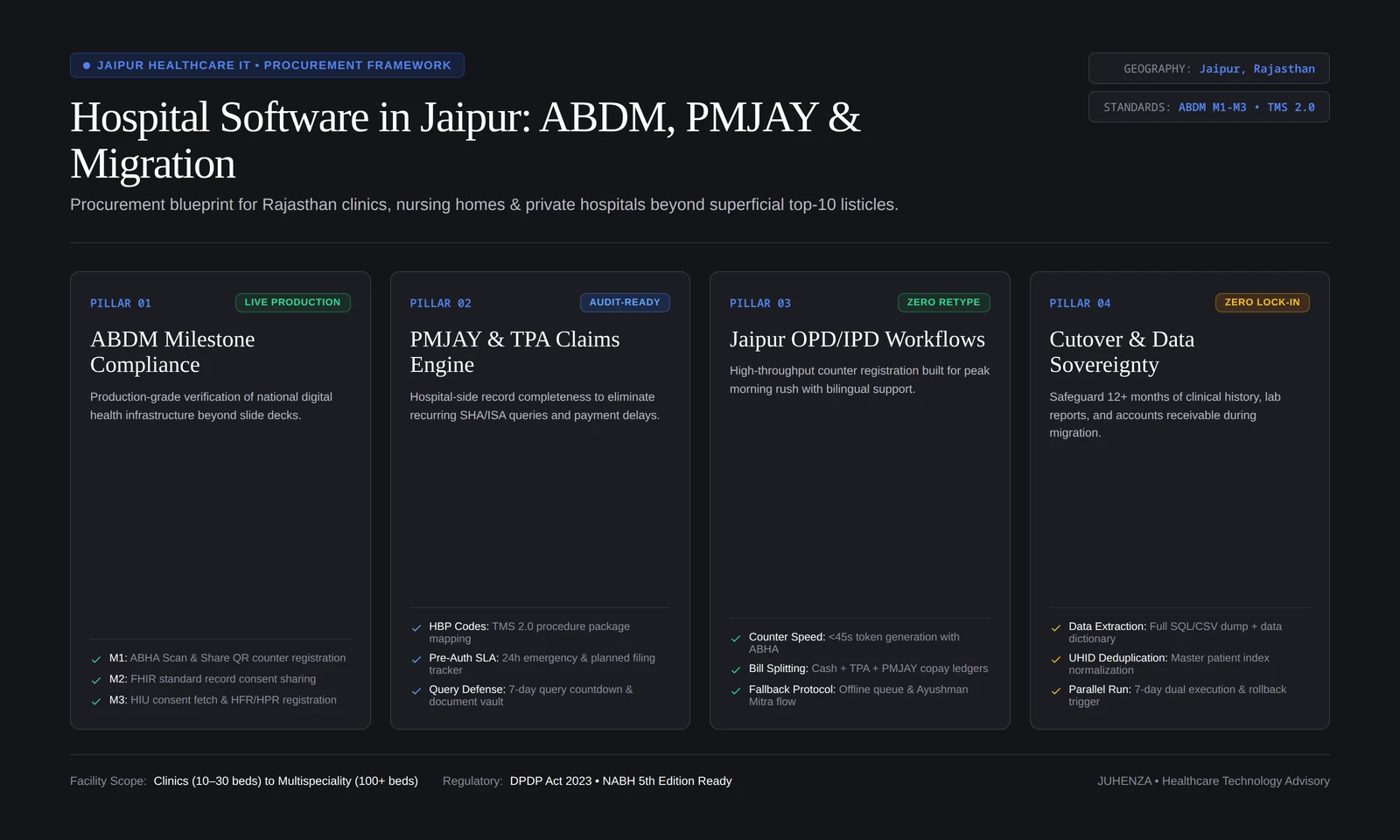
Hospital software in Jaipur has to do three jobs at once. It has to run a busy OPD without slowing the counter, keep ABDM records linked and consent-based, and keep PMJAY and insurance claims moving without repeated queries. A top-10 list cannot test any of those jobs for your facility. This guide gives you the checks, the demo script, and the migration plan to do it yourself.
Use it as a buying checklist. Ask each vendor the same questions, score the same answers, and keep the written replies. The cheapest software is rarely the cheapest after migration, training, claim delays, and exit fees.
What good hospital software looks like in Jaipur
Good software fits the way a Jaipur clinic or nursing home actually works. The reception counter needs fast registration, ABHA scan, and a clear queue. The doctor needs a short, readable record, not ten clicks for one prescription. The billing desk needs one bill that splits correctly between cash, TPA, and scheme payer.
Test for your size. A 10-bed clinic and a 100-bed hospital need different depth in IPD, OT, pharmacy, and inventory. Ask the vendor to show your patient mix, not their ideal demo hospital. If the software feels slow on your busiest OPD hour, it will feel slower after you add ABDM steps and scheme documentation.
Language and fallback matter too. Check Hindi and English entry, printed summaries patients can read, and what staff can do when internet drops or power cuts. A cloud system with no offline plan is a risk in a real OPD, not just a feature note.
How to verify ABDM, not just believe it
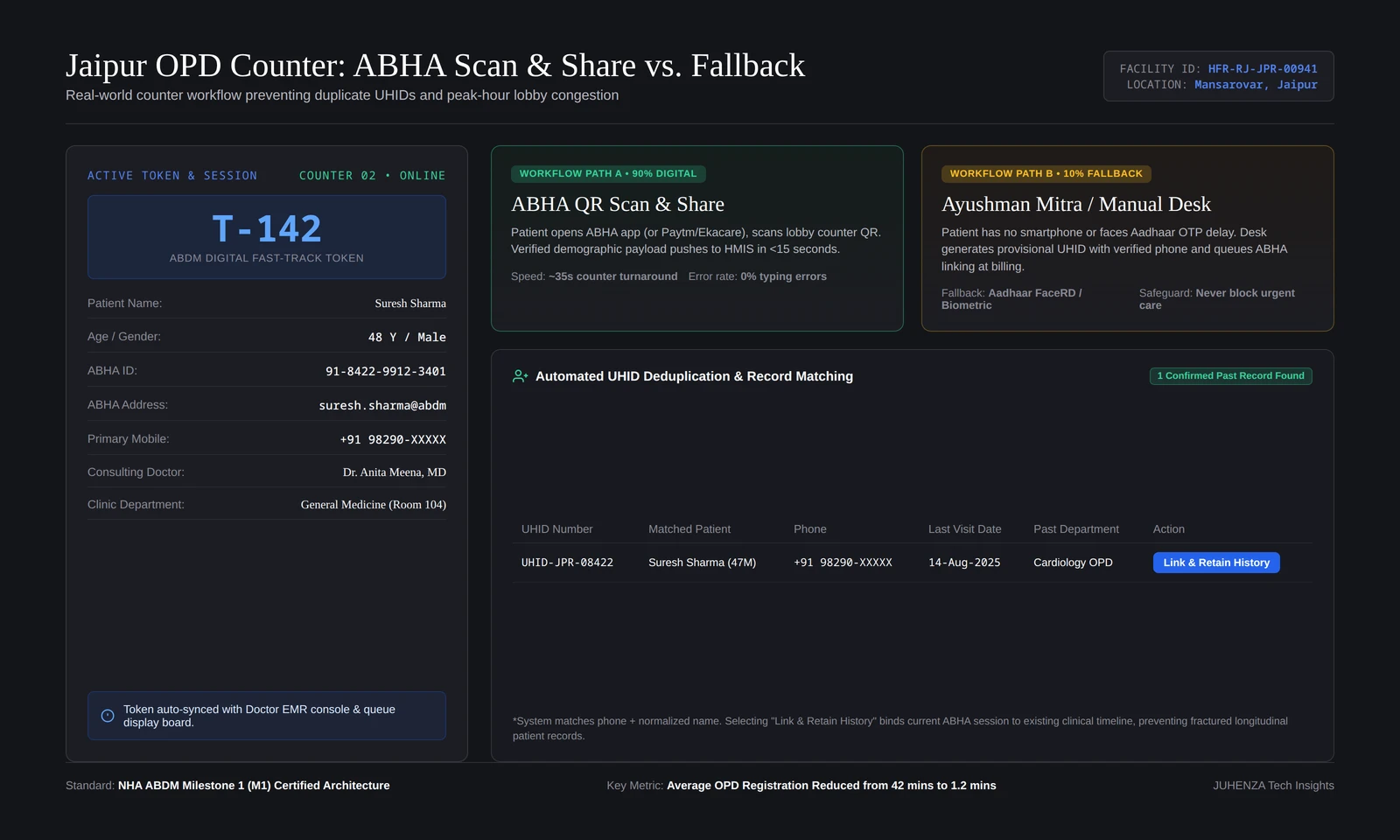
Ayushman Bharat Digital Mission, or ABDM, is India’s digital health ecosystem. Ayushman Bharat Health Account, or ABHA, is the patient’s health ID inside it. Your hospital registers in the Health Facility Registry, or HFR, and your clinicians register in the Healthcare Professionals Registry, or HPR. The software connects to that ecosystem as a Health Information Provider, or HIP, when it shares records, and as a Health Information User, or HIU, when it fetches records with consent.
Do not accept “ABDM compliant” alone. Ask which milestone is live in production, for which customers, and with what proof.
| Milestone | What it means in daily work | What to ask for |
|---|---|---|
| M1 | Create and verify ABHA at registration, link it to your UHID | Live demo of ABHA creation, verification, and Scan and Share QR at the counter |
| M2 | Share records with patient consent | Show a shared record, consent log, and how staff revoke or correct it |
| M3 | Fetch records with patient consent | Show a fetched record inside the patient chart, not in a separate portal |
Ask three follow-up questions:
- HFR & HPR Custody: Is the facility’s own HFR registration the hospital’s job, and what does the vendor help with?
- FHIR Standards: Does the software create Fast Healthcare Interoperability Resources, or FHIR, records, or only store data in its own format?
- Audit Trails: Where is every ABDM request and response logged for review?
If the vendor cannot show logs, consent, and a live M1 flow, treat ABDM as a roadmap item, not a delivered feature.
Also check Scan and Share. A patient with an ABHA should be able to scan the facility QR and share details for faster OPD registration. Test it with a real phone, not a screenshot. Check what happens when a patient has no ABHA, no smartphone, or an OTP failure. Your counter staff need a fallback that does not create duplicate patient records.
How PMJAY and TPA claims actually work inside the software
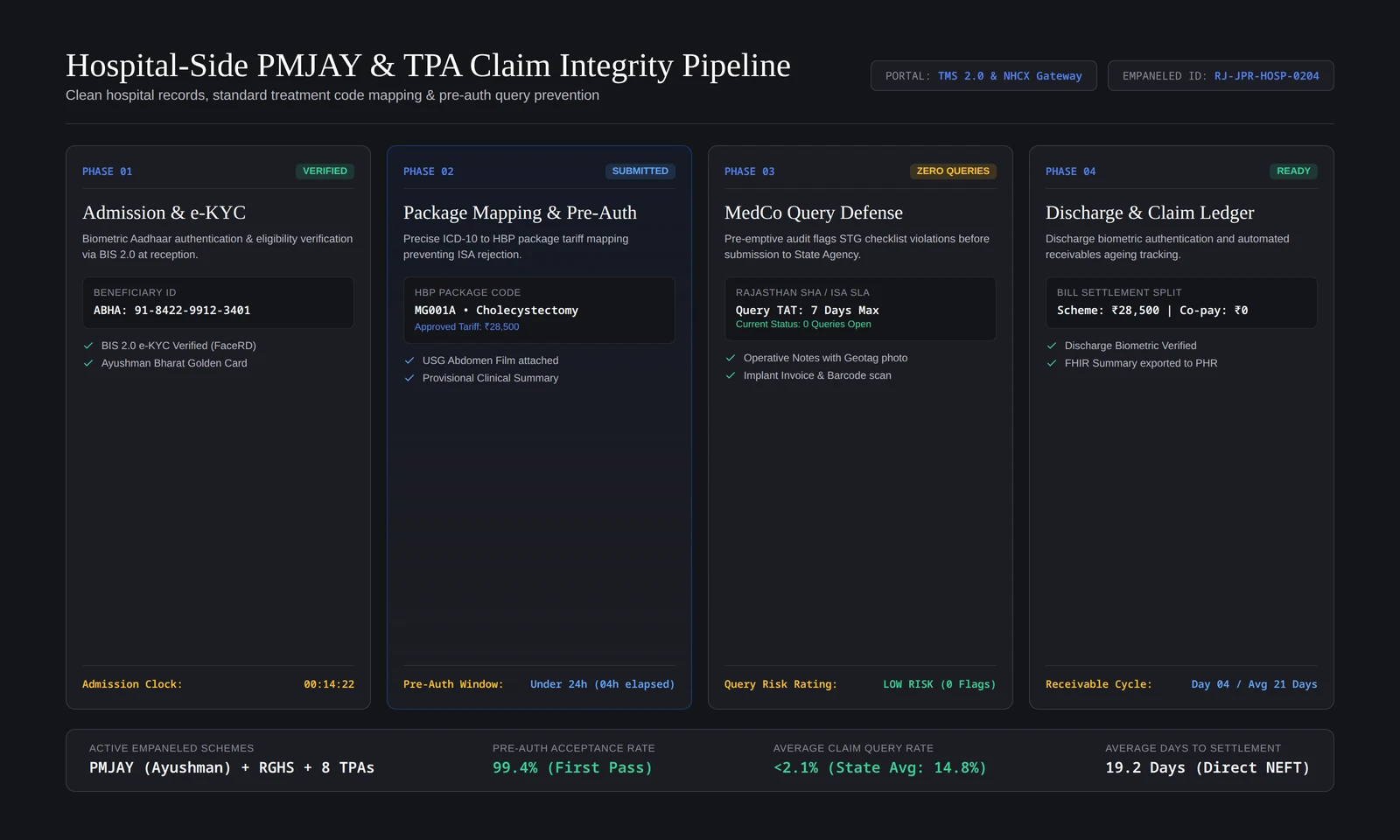
Pradhan Mantri Jan Arogya Yojana, or PMJAY, uses pre-defined package rates for covered procedures. The hospital software does not replace the scheme portal (TMS 2.0). It keeps the hospital-side record complete, consistent, and ready for filing, pre-authorisation, and query replies. That distinction matters, because a clean hospital record is what prevents repeated queries.
For each PMJAY admission, the software should:
- Record the payer and beneficiary status.
- Map the procedure to the correct Health Benefit Package (HBP) code.
- Track pre-authorisation and approved amount under the 24-hour SLA.
- Hold the clinical and diagnostic documents the claim requires (USG, CT, OT notes, pre-op clearance).
- Split the final bill between payer and patient without calculation errors.
- Follow the claim as a receivable until final settlement.
Ask the vendor to walk one PMJAY case from admission advice to discharge to claim tracking, using your package list, not a generic example.
For TPA and private insurance, the same discipline applies. The software should record the payer for every admission, map services to insurer tariffs, track pre-authorisation, keep claim documents in one place, and show what is pending, queried, approved, or rejected. Ask how the team sees claim ageing at a glance. If claims live in spreadsheets outside the software, the software is not managing claims.
Test the failure points. What happens when biometric authentication fails, a document is missing, or the package code is wrong? Who gets an alert, and how fast? A good system catches these errors before filing, not after a query comes back weeks later from the State Health Agency (SHA) or Implementation Support Agency (ISA). Also ask about National Health Claims Exchange, or NHCX, readiness. NHCX is meant to let hospitals exchange claim information with payers through a common exchange. Ask whether the vendor supports it in production, in sandbox, or not yet, and get that answer in writing.
Core modules and daily workflow
Start with the patient journey, not the module list. Registration to OPD to investigation to IPD to pharmacy to discharge to billing to report should flow without retyping the same details. Retyping creates errors, duplicate UHIDs, and billing mismatches.
Check these modules against your own work:
- Registration and OPD: Fast search, duplicate check, ABHA linking, queue, token, and visit notes.
- IPD and nursing: Bed management, vitals, doctor orders, nursing notes, discharge summary.
- Pharmacy and inventory: Stock, batch, expiry, issue to IPD and OPD, and return handling.
- Lab and radiology: Order, sample, result entry, report print, and result inside the patient record.
- Billing: Cash, TPA, PMJAY, RGHS, package billing, GST handling, receipts, refunds, and payer split.
- Reports and audit: Daily collection, OPD / IPD census, claim status, user-wise activity, and audit trail.
- Access and security: Role-based access, password control, and logs for who viewed or changed a record.
Ask who can see what. A receptionist, nurse, doctor, pharmacist, and billing executive should not all see the same screens. Check the audit trail for edits to bills, prescriptions, and discharge summaries. For the Digital Personal Data Protection Act, or DPDP Act, ask how consent, access, correction, and retention are handled in the product. This article is not legal advice. For DPDP obligations, consult a qualified professional and check current official guidance as of November 2026.
A scoring framework you can use in one meeting
Score each vendor 0 to 5 on each row. Use the same scorer for all vendors. A vendor that scores 5 on features and 1 on migration is not a 5-star vendor.
| Criteria | Weight | What a 5 looks like |
|---|---|---|
| ABDM in production | 20 percent | M1 live in production, M2 / M3 shown with verifiable logs and patient consent |
| PMJAY and TPA workflow | 20 percent | One PMJAY case walked end to end on your tariff, claim ageing visible |
| Daily OPD / IPD workflow | 20 percent | Your patient journey demoed, zero retyping, sub-45s counter registration on your load |
| Migration and data export | 15 percent | Written export format, relational schema, parallel run schedule, rollback trigger |
| Security, audit, DPDP readiness | 10 percent | Granular role access, tamper-evident audit trail, consent and retention workflows |
| Support and training | 10 percent | Jaipur-time operational support, named account engineer, multi-shift training plan |
| Contract and exit terms | 5 percent | Exit export cost, year-2/year-3 renewal price, and full data ownership in writing |
Add a deal-breaker rule: if a vendor fails ABDM proof, data export, or claim workflow, stop the evaluation. Do not let a low price or a long feature list override a deal-breaker.
Run the demo with your script. Give the vendor three cases: a cash OPD patient with ABHA, a PMJAY IPD admission, and a TPA patient with a pre-authorisation query. Ask the vendor to complete all three without switching to slides. Watch for clicks, waiting time, and workarounds. Note every “we can customise that” as a cost and timeline question, not as a yes.
Migration checklist: keep your history, not just your masters
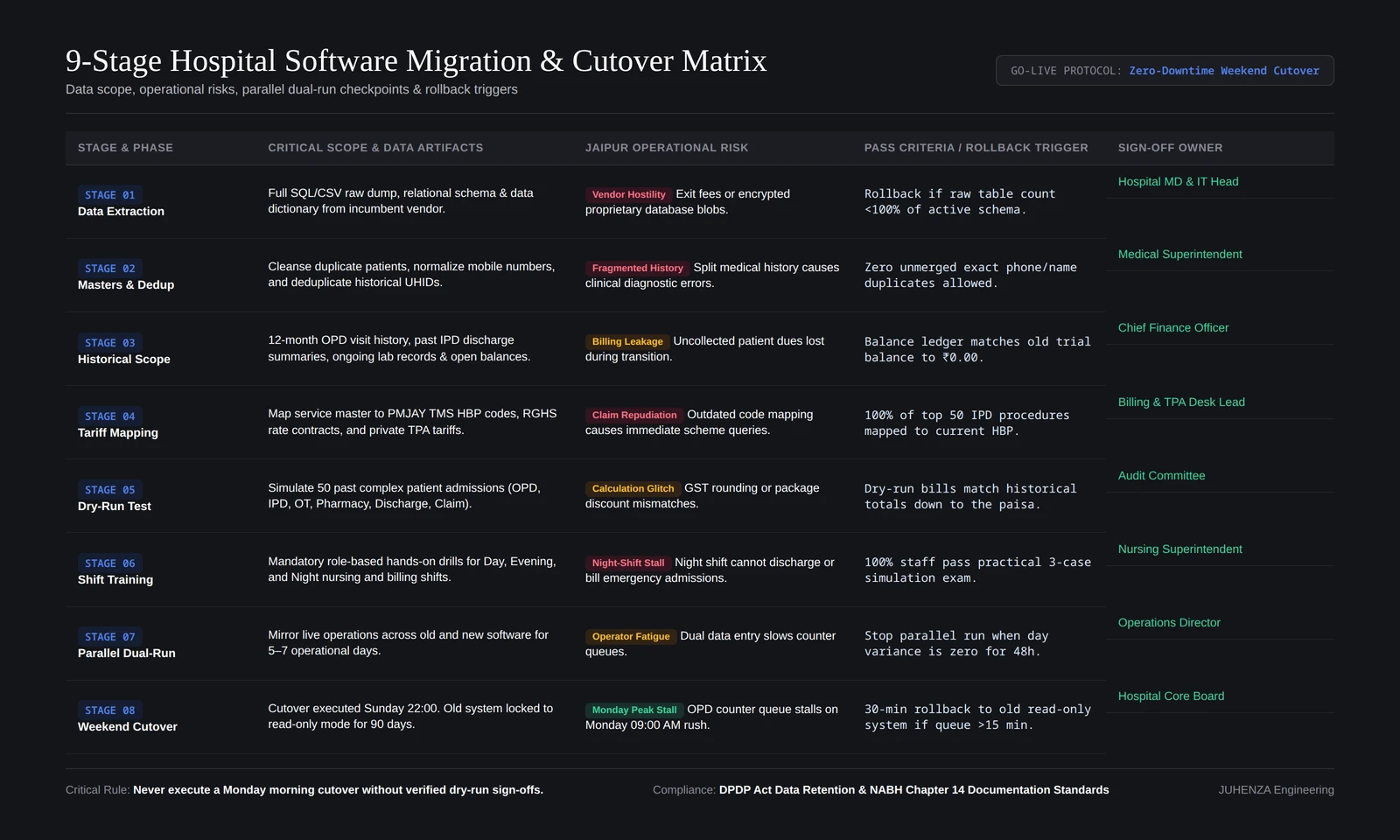
Migration fails when teams move masters but lose history. Patient history, old bills, lab reports, and claim records are the data your doctors and billing desk still need. Plan migration as a clinical and financial project, not only an IT task.
Use this checklist and assign an owner and date to each row:
- Export from old system: Get a full relational export in SQL or CSV format, plus a complete data dictionary. Confirm who owns the data and what the export costs before notifying the vendor.
- Masters cleanup: Clean duplicate patients, duplicate UHIDs, doctor lists, service lists, tariff lists, and package lists before import.
- History scope: Decide what history to migrate: active patients, last 12 months of visits, open claims, pharmacy stock, and pending balances. Write it down.
- Mapping: Map old service codes to new service codes, old package codes to PMJAY HBP packages, and old payer names to new payer records.
- Test import: Import into a staging environment, check 50 real records end to end, and compare old and new bills for the same cases down to the paisa.
- Parallel run: Run old and new systems together for at least 5 to 7 operational days. Do not cut over on a Monday morning.
- Training: Train each shift on its own screens, with printed step-by-step guides for ABHA failure, claim query, refund, and discharge correction.
- Cutover and rollback: Pick a low-load cutover time (such as Sunday 22:00), keep the old system readable for at least 90 days, and write the 30-minute rollback trigger in advance.
- Post-go-live check: Daily checks for duplicate patients, unlinked ABHA records, open claims, and stock mismatches for the first two weeks.
Ask the vendor for a written migration plan with timeline, effort from your team, and cost. If migration is “free and easy” with no plan, treat that as a risk. Ask for one reference hospital that migrated from a system like yours, and ask what went wrong in that migration.
Pricing and contract: the questions that save money later
Do not compare headline prices alone. Compare total cost for three years: licence or subscription, implementation, migration, training, customisation, ABDM and NHCX work, support, and renewal.
Ask these questions in writing:
- What is included per user, per bed, or per facility, and what triggers extra fees?
- What is the renewal price in year 2 and year 3?
- Who owns the data, and in what format can we export it at any time?
- What does exit cost, and how long do we keep read access after exit?
- What is the support response time for OPD-down, billing-down, and claim-down issues?
- What happens to ABDM links and consent logs if we exit?
- Which promises in the demo are in the contract, and which are “roadmap”?
Get the answers as an annex to the contract. A verbal promise about ABDM, export, or support is not a deliverable. If the vendor will not put data ownership and export format in writing, do not sign.
In the Jaipur healthcare market, pricing typically diverges into two models: modular cloud-hosted subscriptions (frequently starting between ₹4,000 and ₹12,000 per month for 10–20 bed day-care clinics with basic OPD, pharmacy, and ABDM M1 modules) and enterprise per-bed or perpetual licensing for 50–150 bed IPD hospitals (ranging from ₹1.5 lakh to ₹6 lakh in initial implementation, data migration, and server configuration, plus annual maintenance of 15–20%). Always demand an itemised quote that explicitly bounds data extraction assistance, training hours per shift, and NHCX/ABDM milestone API upgrades.
Common mistakes, limits, and when to get specialist help
Common mistakes:
- Choosing on a feature list instead of a live demo with your own cases.
- Accepting “ABDM compliant” without an active milestone and production proof.
- Migrating masters without history, open claims, or uncollected patient balances.
- Training only the day shift, then discovering night-shift nursing staff cannot discharge emergency patients.
- Signing before data ownership and raw export formats are contractually secured.
Limits of this guide: ABDM, PMJAY, NHCX, and DPDP rules change. Vendor M1 / M2 / M3 status changes too. Re-verify milestone status, scheme portal steps, and DPDP guidance before you sign. This guide does not replace legal, compliance, or clinical advice.
When to involve a specialist: Get specialist help if you are merging two facilities, migrating more than five years of clinical history, handling a NABH accreditation audit in parallel, or resolving large disputed PMJAY claim batches. Get legal review before signing a multi-year, multi-location software agreement.
First-hand experience
In a 45-bed nursing home migration in Mansarovar, Jaipur, the most vulnerable failure point was not master data import—it was open PMJAY pre-authorisations and fractured historical UHIDs. The hospital’s legacy software had accumulated over 3,200 duplicate patient files due to staff bypassing phone verification during peak 08:30–10:30 AM OPD rush hours.
During data extraction, we normalized the patient database against Aadhaar demographic fragments and clean phone numbers, merging 1,480 redundant accounts before importing into the new ABDM M1-certified system. For PMJAY claims, rather than attempting a mid-billing cutover, the facility kept the legacy system in read-only mode for 60 days strictly to settle 38 open TMS 2.0 pre-auth batches, while all new admissions began directly on the new platform with HBP package mapping and zero claim queries.
FAQ
Is ABDM mandatory for hospital software in Jaipur?
ABDM participation depends on your facility type and empanelment. Hospitals empaneled with PMJAY require ABDM-ready workflows, and insurance TPAs increasingly mandate ABHA-linked health records for cashless claim processing. Ask your scheme coordinator what your facility must demonstrate, and choose software that can prove M1 in active production, not merely on a roadmap slide.
What is the difference between ABHA, HFR, and HPR?
ABHA (Ayushman Bharat Health Account) is the 14-digit identifier for the patient. HFR (Health Facility Registry) is the national registry for your hospital or clinic. HPR (Healthcare Professionals Registry) is the registry for verified doctors and clinicians. Your software should store the facility's HFR ID and each doctor's HPR ID so that all FHIR-compliant digital records carry verified institutional signatures.
Does PMJAY filing happen inside the hospital software?
No. PMJAY claims are filed directly on the National Health Authority's TMS 2.0 scheme portal. Your hospital software maintains the comprehensive hospital-side record: payer details, HBP package mapping, pre-authorisation documentation, diagnostic film attachments, split billing, and receivable ageing. Maintaining complete records in your HMIS is what prevents queries from State Health Agency auditors.
How long does migration take for a small nursing home?
Depending on master data cleanliness, clinical history scope, and staff readiness, a 20-to-40 bed nursing home typically takes 3 to 6 weeks. Migrations stall when facilities attempt to import uncleaned masters containing duplicate patients or when staff training is cut short. Always budget at least 5 to 7 days for a parallel dual-run before final cutover.
Should a clinic choose cloud or on-premise hospital software?
Cloud deployment suits most outpatient clinics and small nursing homes because automated backups, statutory ABDM API upgrades, and secure remote doctor access are handled by the vendor. On-premise deployment is preferred by larger surgical hospitals with dedicated IT teams and concerns regarding local internet instability. If choosing cloud, ensure your software supports an offline OPD queue cache.
What should I check in a vendor demo?
Avoid vendor-guided feature tours. Hand the vendor three concrete cases from your own facility: a cash OPD walk-in with an ABHA QR scan, an emergency PMJAY surgical admission requiring 24-hour pre-authorisation, and a private TPA patient with a claim document query. Watch the user interface for excessive clicks, lag, and workarounds, and demand to see live ABDM audit logs and raw SQL data export options.
Where this fits
This guide provides the procurement and migration framework for healthcare facilities in Rajasthan. For custom workflow engineering, see our custom software development capabilities or review our approach to healthcare automation.
Next step
If you want help turning this checklist into an objective vendor scorecard and a zero-downtime migration blueprint for your facility, contact our team for a software advisory brief. Bring your current software name, active bed count, daily OPD volume, and one typical PMJAY case. We will help you audit vendors against your real-world clinical workflow, not sales decks.
References
- Ayushman Bharat Digital Mission (ABDM) Sandbox & Certified Solutions Registry (abdm.gov.in)
- National Health Authority PM-JAY Transaction Management System 2.0 (tms.pmjay.gov.in)
- Ministry of Electronics and Information Technology (MeitY) — Digital Personal Data Protection Act 2023 Guidelines\n