

GoHighLevel n8n Reliability: Stop Losing Leads Quietly
GoHighLevel n8n reliability fails quietly: missed webhooks, duplicates, failed retries. Learn the ownership split and error handling that keep leads safe.
AITech

A lead paid attention once. Your automation has to notice every time.
GoHighLevel n8n reliability means every lead event reaches n8n once, produces one correct update in GoHighLevel, and surfaces failures to a human operator within minutes. It depends on four architectural controls: one system of record per entity, idempotent write-backs, bounded retries, and a dead-letter queue with real-time alerting. Without those controls, webhooks fail silently while GoHighLevel still appears normal.
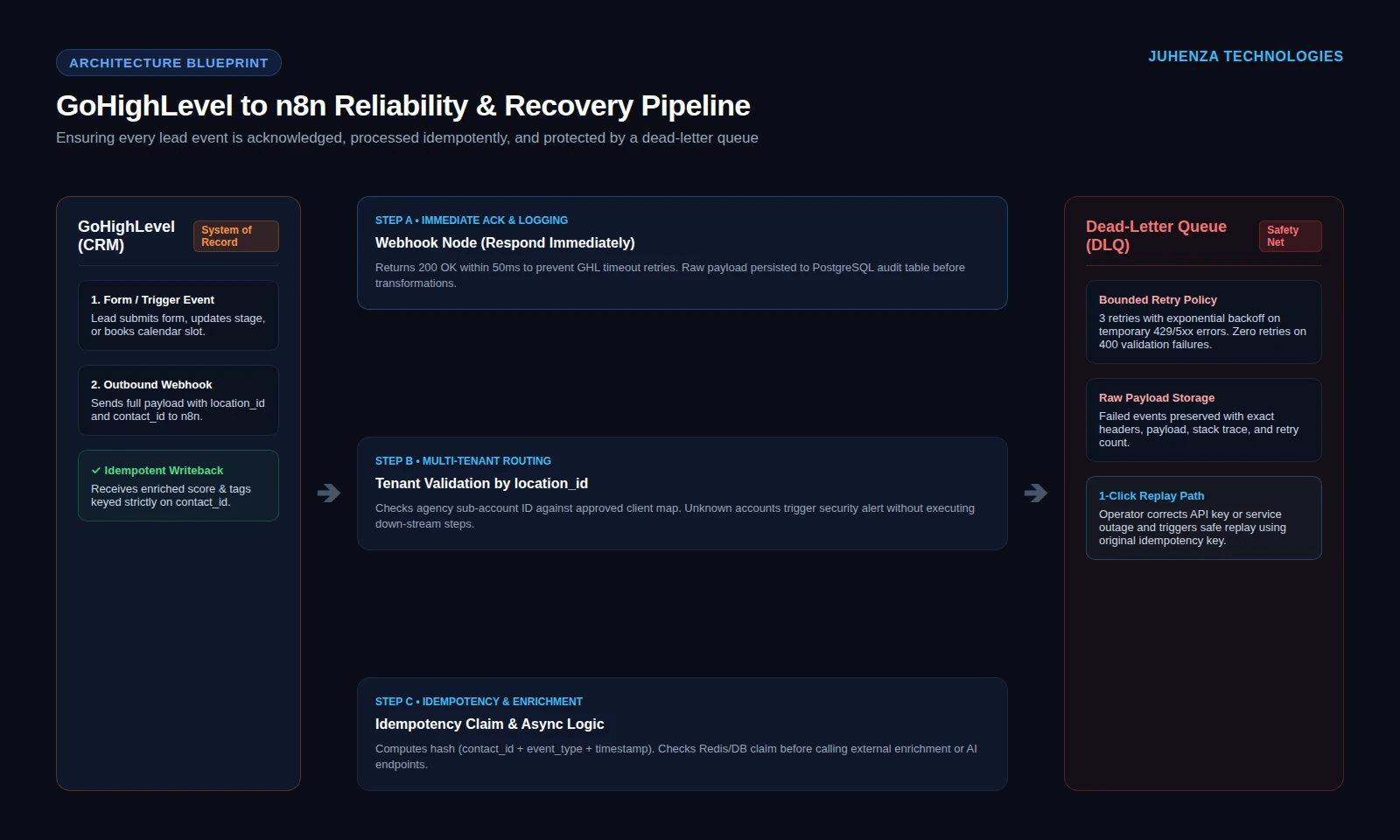 Figure 1: One event, one correct write, and one visible failure path with dead-letter recovery.
That last part is the core operational risk. GoHighLevel n8n reliability is not about whether the workflow runs when you click "Test step" during setup. It is about what happens when a webhook is dropped, a payload schema drifts, a rate limit hits, or an automatic retry runs twice. If no one sees the failure, the agency finds out from an angry client, not from internal telemetry. This guide gives you a clear ownership split, five silent failure modes with first-check diagnostics, six reliability controls that prevent silent lead loss, and a diagnostic scoring checklist to run before scaling sub-accounts.
What reliability actually means
Reliability is not uptime alone. A workflow can report 100% server uptime and still drop qualified leads. It can answer an incoming webhook, return HTTP 200, and never complete the contact update. It can run twice on a retry and create two duplicate contacts, two conflicting tasks, or duplicate SMS sequences. It can look busy in execution logs while the revenue-critical handoff silently evaporates.
Use four strict tests for GoHighLevel n8n reliability:
- Delivery: Did the event reach n8n and get persisted in a raw audit store before processing?
- Exactly-once effect: Did it produce exactly one correct write, even if the webhook arrived two or three times?
- Visibility: Did a transient failure alert a named team member with the raw payload attached within minutes?
- Recovery: Can you replay the failed event after a downstream outage without creating duplicate records or re-triggering customer messages?
If any test fails, the system is fragile—even if it worked yesterday. A simple setup guide is not enough; you need a failure-tolerant architecture. For a structured look at pricing operational review time and maintenance against automation savings, refer to the AI automation ROI calculator.
The ownership split: who owns what
Most unreliable setups share one root cause: two systems can change the same data field, and nobody decided which system wins. The fix is an explicit ownership split established before building.
GoHighLevel owns contact state, conversation state, pipeline state, calendar booking state, and customer-facing messaging threads. It is the system of record. If a human sales rep and an automated script disagree about a deal stage, GoHighLevel is the source of truth.
n8n owns orchestration across external systems. It owns data enrichment, conditional branching, external API calls (e.g., Clearbit, ERPs, proprietary databases), retry mechanics, error routing, and the decision to write back. It should never become a secondary CRM or hold the sole copy of a customer attribute that belongs in GoHighLevel.
| Data Domain | Single Owner | Architectural Reason |
|---|---|---|
| Contact master, tags, pipeline stage, task, calendar | GoHighLevel | Customer record and sales rep workspace live here |
| Lead scoring, enrichment, external API calls | n8n | Requires complex logic, branching, and secret management |
| Retry policy, alerting, dead-letter queue (DLQ) | n8n | Failure triage requires unified middleware control |
| Final customer-facing SMS, email, or WhatsApp message | GoHighLevel | Preserves the conversation history in one unified client thread |
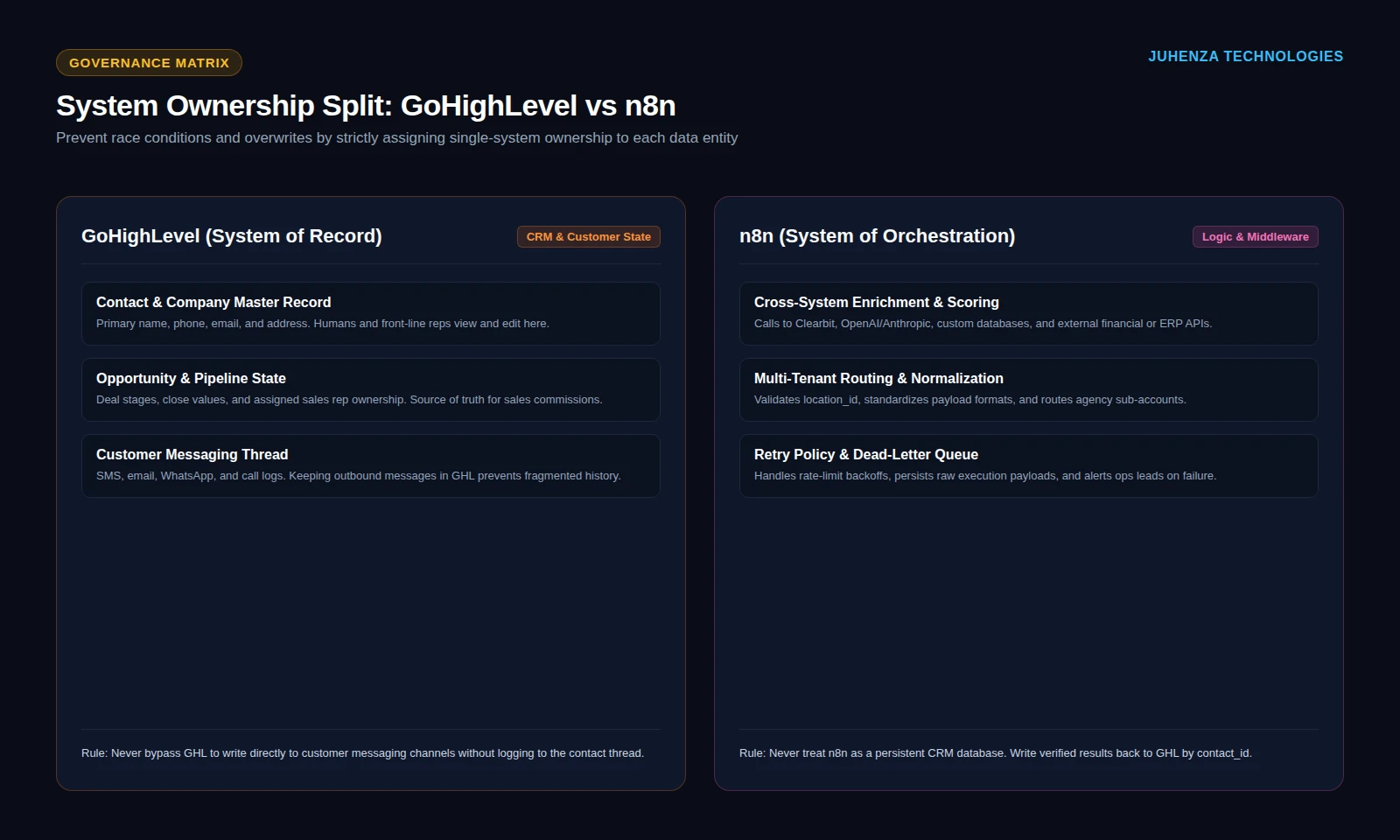 Figure 2: Prevent race conditions and overwrites by establishing single-system ownership.
Use this foundational rule: if an action only touches GoHighLevel records, build it natively in GoHighLevel. If an action reads or writes an outside system, requires custom code, or involves complex multi-step branching, orchestrate it in n8n. If both systems could plausibly own the step, assign it to one and document it. A split system without explicit ownership guarantees eventual data corruption.
Five failure modes that lose leads quietly
1. The webhook never arrives
The most common silent failure mode is simple: the GoHighLevel workflow points to an expired test webhook URL, the n8n workflow was left inactive, the webhook URL changed during deployment, or a cloud reverse proxy blocked the request. GoHighLevel continues to show the contact advancing through workflow stages normally because the webhook trigger is decoupled from CRM state.
First checks: Confirm the production webhook URL inside the GoHighLevel workflow settings. Verify that the n8n workflow toggle is switched to "Active". Send a real test contact through the live form rather than relying on the "Test Step" interface, using realistic multi-field data that matches your production mapping schema.
2. The payload changes shape
A Contact Created payload has a different JSON structure than an Opportunity Stage Changed or Form Submitted payload. If your n8n workflow expects specific nested keys, an unexpected trigger event or modified custom field will deliver undefined variables, causing downstream nodes to error or overwrite existing CRM fields with blank strings.
First checks: Log the raw JSON payload immediately upon arrival before any transformations. Validate required fields (contact_id, email, location_id) using an n8n Code or IF node, and short-circuit execution with an alert when required schema keys are missing. Preserving the raw payload turns a multi-hour data forensics nightmare into a five-minute fix.
3. The retry creates a duplicate
Retries are essential for resilience, but unbounded retries without idempotency cause duplicate writes. If an n8n node updates GoHighLevel and the HTTP acknowledgment drops due to network latency, an automatic retry will execute the write-back a second time—creating duplicate contacts, duplicate opportunities, or triggering duplicate SMS welcome campaigns.
First checks: Use upsert operations rather than raw creation endpoints whenever GoHighLevel supports it. Key all updates strictly by contact_id rather than email or phone numbers, as phone numbers and emails are frequently re-used across test submissions and multi-contact accounts.
4. Two writers fight over the same field
GoHighLevel native automations and n8n workflows often attempt to update the same tag, custom field, or pipeline stage simultaneously. The last write wins, creating nondeterministic race conditions. This is particularly prevalent when agency account snapshots are cloned across multiple sub-accounts while legacy trigger rules remain active.
First checks: Audit every automation rule touching the affected custom field. Remove duplicate triggers and document the authoritative writer directly in the workflow notes. If dual writers are strictly required, append an authoritative timestamp and source metadata field (e.g., updated_by: n8n_enrichment_v2) to trace write provenance.
5. The failure has no owner
An n8n workflow can fail mid-execution while GoHighLevel reports complete success. If no error workflow is configured, no alert is dispatched to Slack or email, and no dead-letter queue records the failed event, the lead simply vanishes from the pipeline. This is the failure mode agency clients detect before the internal team does.
First checks: Verify that every production n8n workflow has an attached Error Workflow. Ensure error notifications dispatch immediately to an actively monitored team channel with the execution ID, contact_id, and raw payload attached. An error that does not produce a visible ticket is a lost client deal.
The reliability stack: six controls that prevent silent loss
Control 1: Answer the webhook fast, then do slow work
Configure the n8n Webhook node with Response Mode: When Last Node Finishes turned OFF, selecting Immediately instead. Return HTTP 200 within 50 milliseconds. Long-running enrichment, AI completions, or database queries executed inside a synchronous webhook response cause GoHighLevel's HTTP client to time out (typically after 5 seconds), prompting GoHighLevel to fire redundant retries while the first execution is still running.
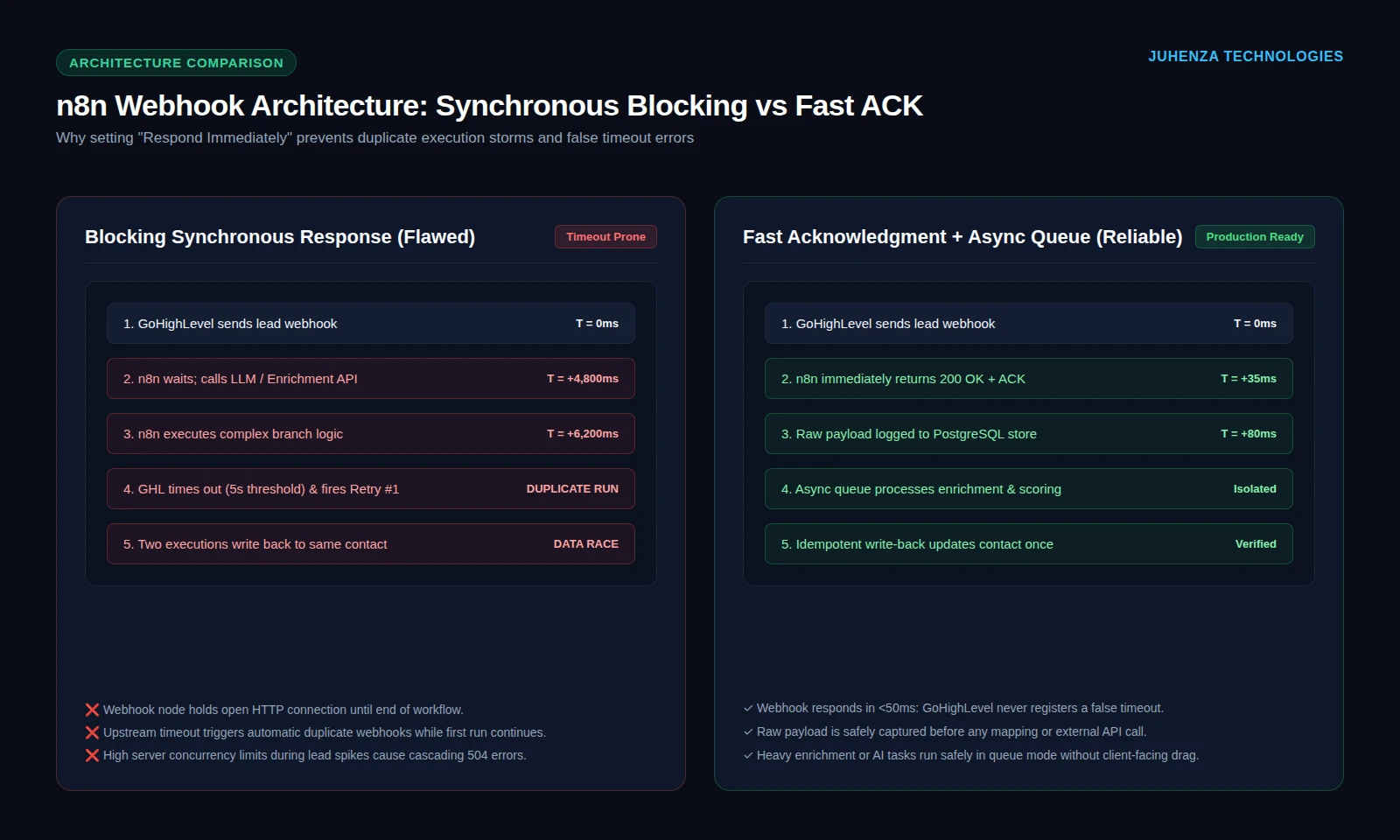 Figure 3: Answer incoming webhooks immediately, then perform slow enrichment and writes asynchronously.
Control 2: Log the raw event before you transform it
Store the pristine incoming payload, event_type, location_id, contact_id, and arrival timestamp in a dedicated audit database table before running any mapping or filtering nodes. If a downstream schema mapping fails, you can replay the original event without requiring the customer or client to resubmit the web form.
Control 3: Route by location ID early
For agencies managing multi-account snapshots, location_id is your tenant boundary. Branch on location_id at the very first step of the workflow. Validate the ID against an allowed list of client sub-accounts. Immediately reject and alert on unrecognized tenant IDs. Placing tenant filtering deep within a workflow creates severe security and data-leak risks if nodes are reordered.
Control 4: Make every write idempotent
An operation is idempotent if executing it multiple times produces the exact same outcome as executing it once. Derive a deterministic idempotency key from the event itself (e.g., hash(contact_id + event_name + event_timestamp)). Store this key in Redis or your database with a temporary lock. Check the key before executing side effects: claim the key first, execute the write, and then commit. If a duplicate execution arrives with the same key, return success immediately without re-executing external API calls or customer messages.
This pattern mirrors the webhook safeguards detailed in our Stripe webhook fix guide: record the event ID, acknowledge receipt, skip duplicate execution, and protect downstream data stores from redundant writes.
Control 5: Retry only temporary errors, with strict limits
Configure retry policies to distinguish between transient failures (network timeouts, HTTP 429 rate limits, HTTP 503 service outages) and permanent errors (HTTP 400 bad requests, validation failures, HTTP 401/403 authorization errors). Retrying permanent errors consumes API quotas and clogs worker queues without any hope of success.
Set bounded retries: 3 to 5 attempts maximum, using exponential backoff with jitter (e.g., wait 2s, 4s, 8s, 16s). Once the retry budget is exhausted, immediately divert the execution to the dead-letter queue.
Control 6: Add a dead-letter queue, error workflow, and replay path
A dead-letter queue (DLQ) is an operational recovery mechanism, not merely an error log. It must contain the complete raw payload, target location_id, contact_id, error stack trace, retry counter, and an assigned owner.
Build three coordinated components:
- Error Trigger Workflow: An n8n workflow configured as the global error handler that ingests failed executions and inserts records into the DLQ.
- Actionable Alert: An automated webhook dispatch to Slack, Teams, or PagerDuty containing direct links to the failed n8n execution and the affected GoHighLevel contact record.
- Deterministic Replay Utility: A secondary workflow that reads an event from the DLQ, re-runs it using the original idempotency key, and archives the error once successfully processed.
Reliability scoring checklist
Score each production workflow from 0 to 2 points across each dimension. Any workflow scoring below 10 points represents an active operational risk.
| Reliability Dimension | 0 Points (Vulnerable) | 1 Point (Partial) | 2 Points (Hardened) |
|---|---|---|---|
| Fast Webhook Response | Slow processing blocks HTTP response | Responds fast, but drops raw payload | Returns 200 OK in <50ms, persists raw payload |
| Raw Event Audit Log | No raw event storage | Logs only after data mapping | Persists pristine JSON before any logic executes |
| Tenant Isolation | No location_id check | Filters late in workflow | Validates at Step 1; alerts on unknown tenants |
| Idempotent Writes | Creates duplicates on retry | Uses basic upsert without claim check | Derived hash key, claim-first, safe replay |
| Bounded Retry Policy | Unlimited retries or zero retries | Retries without backoff | 3-5 tries, exponential backoff, stops on 4xx |
| Dead-Letter Queue (DLQ) | Failed events discarded | Logged to file, no assigned owner | Dedicated DLQ table + Slack alert + 1-click replay |
| Error Workflow Alerting | Silent failure in executions list | Alert fires without payload context | Instant alert with contact ID & error stack trace |
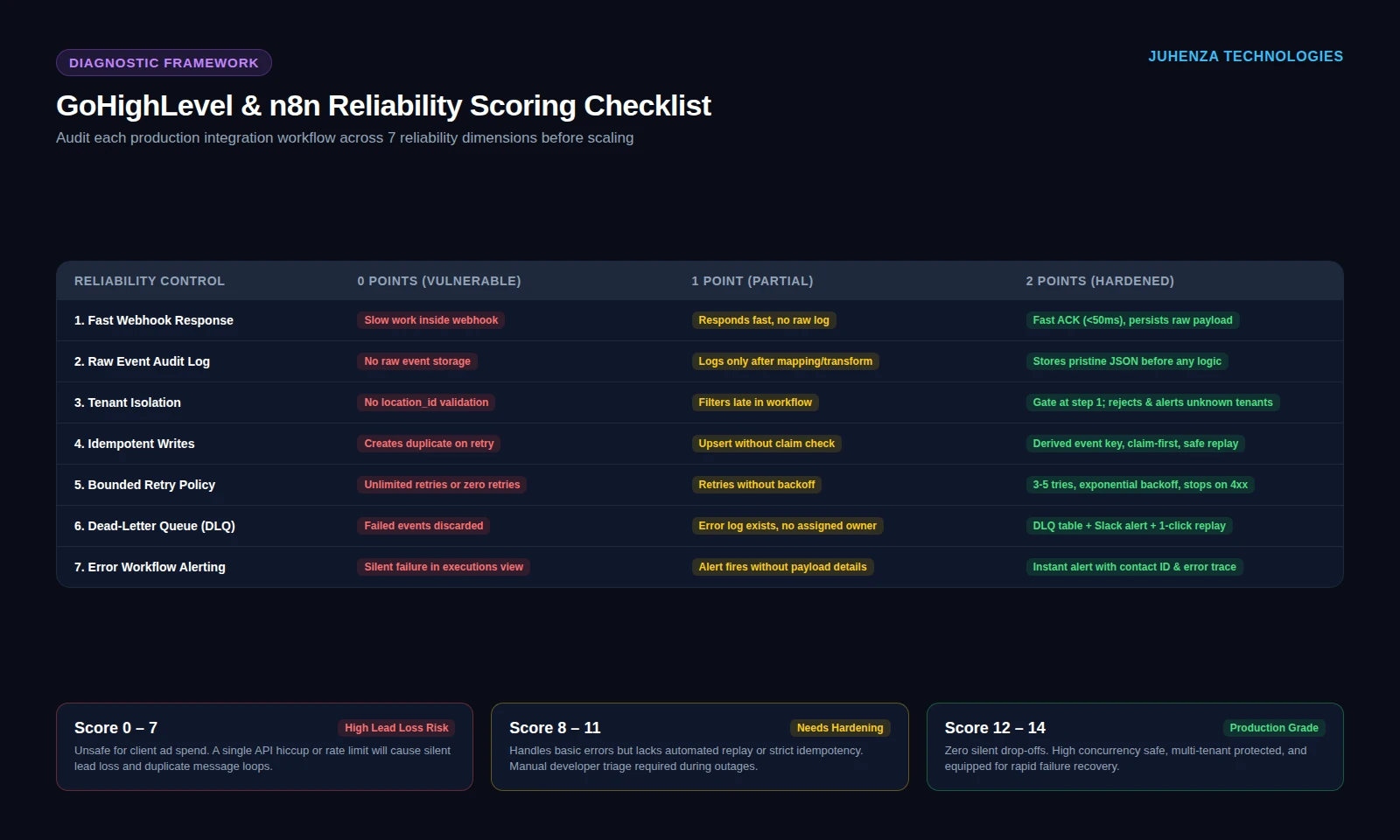 Figure 4: Score each production workflow before scaling across clients: scores below 10 need hardening.
Self-hosted n8n or n8n Cloud
Hosting is an architectural reliability decision, not merely a software subscription comparison. n8n Cloud eliminates server maintenance, operating system patches, database backups, and scaling overhead. Self-hosted n8n provides absolute sovereignty over data residency, webhook concurrency limits, and private network VPC access—but transfers full operational responsibility to your engineering team.
For most marketing agencies, n8n Cloud represents the safest operational default when execution volume is moderate and clients have standard compliance requirements. Self-hosting becomes necessary when monthly execution volumes exceed hundreds of thousands of runs, when client contracts demand strict on-premise or sovereign cloud data residency, or when workflows interface with internal VPC databases.
If you choose to self-host for production:
- Never use SQLite in production: Deploy n8n on a dedicated PostgreSQL database cluster with automated point-in-time recovery.
- Use Queue Mode: Run n8n in queue mode with Redis and dedicated background worker processes to decouple webhook ingestion from heavy data transformations.
- Enforce TLS and Reverse Proxies: Place n8n behind an enterprise reverse proxy (e.g., Traefik, Caddy, or NGINX) with strict rate limiting.
- Rotate Integration Credentials: GoHighLevel Private Integration Tokens and OAuth2 access tokens must be monitored for scope drift and expiry. Never rely on deprecated v1 API keys.
For agencies incorporating large language models or autonomous agents into client workflows, apply strict boundary controls. Read our guide on AI agents for business operations to configure permission cards and human-in-the-loop gates before automated workflows execute external actions.
An illustrative example: one lead, one correct outcome
Consider an illustrative agency managing five GoHighLevel sub-accounts for commercial real estate firms in Dubai and the US. A prospective buyer submits an inquiry form. GoHighLevel fires a webhook to n8n.
The n8n Webhook node responds immediately with HTTP 200 within 40ms, writes the raw JSON payload to PostgreSQL, extracts the location_id, and matches it against the approved agency tenant registry. It calculates an idempotency key (re_inquiry_contact_88392_20261123), queries external market data APIs to enrich property preferences, calculates an automated buyer score, and executes an upsert to GoHighLevel keyed strictly on contact_id. Once updated, GoHighLevel's native engine assigns the sales rep and initiates the SMS conversation.
Now consider the failure scenario: the external property valuation API suffers a 504 gateway timeout. The n8n workflow executes three exponential retries. When the third attempt fails, the error handler routes the event to the dead-letter queue and posts a structured alert in the agency's #ops-alerts Slack channel with the contact ID, raw property details, and stack trace. The sales rep in GoHighLevel can still view the contact, while an automation engineer rectifies the API connection and triggers a single-click replay from the DLQ. The lead score populates without duplicate contacts, without duplicate tasks, and without dropped pipeline value.
(JUHENZA Practitioner Note: In client integration audits across agency CRM deployments, silent failures almost never occur in happy-path form submissions during setup. They trigger during burst traffic or schema drift—such as when a third-party webhook payload drops a postal code field or an external enrichment provider returns a 429 rate limit. By persisting the raw event payload before mapping and implementing a dead-letter replay queue, mean time to recovery drops from hours of manual database triage to under 5 minutes without lost client pipeline value.)
Common mistakes, limitations, and when to involve a specialist
Common mistakes to avoid
- Leaving test webhook URLs active in production GoHighLevel workflows.
- Duplicating agency account snapshots without deactivating legacy automation triggers.
- Retrying permanent HTTP 400 validation failures.
- Querying and updating GoHighLevel records by email address instead of immutable
contact_id. - Transforming or filtering payloads before persisting the raw incoming event.
- Introducing AI agent nodes into workflows before basic idempotency and logging are established.
- Assuming an HTTP 200 response from an external endpoint confirms database write consistency.
Limitations
This guide provides an architectural blueprint; it does not supersede official vendor documentation. API rate limits, webhook concurrency allowances, and OAuth2 scopes are subject to vendor updates. Always cross-reference your integration requirements with the official n8n documentation and GoHighLevel developer documentation.
When to involve an integration specialist
Engage an enterprise integration specialist when you operate dozens of multi-tenant sub-accounts, require bi-directional synchronization between GoHighLevel and custom ERP/data warehouses, process sensitive regulatory or financial data, or encounter persistent silent drop-offs across mission-critical sales pipelines. Explore our custom software and integration consulting services for hands-on architectural support.
Frequently Asked Questions
Why did my GoHighLevel webhook stop reaching n8n?
Start by verifying the endpoint URL and workflow status. Ensure the GoHighLevel workflow is configured with your production n8n webhook URL rather than a temporary test URL. Verify that the n8n workflow is switched to "Active". Finally, submit a test contact through your live form and compare GoHighLevel's execution log with n8n's execution history to identify network or authentication errors.
Should I use the native n8n HighLevel node or the HTTP Request node?
Use the native HighLevel node for standard CRM operations including contact creation, tag assignment, opportunity updates, and calendar bookings. Use the HTTP Request node when interfacing with newly released v2 endpoints, custom webhooks, or endpoints not yet wrapped by the native node. Store all API tokens in n8n's encrypted credential manager rather than hardcoding them in node parameters.
Should I authenticate using OAuth2 or a Private Integration Token?
Use OAuth2 when building multi-tenant marketplace applications or distributing workflows across client accounts. Use Private Integration Tokens (PIT) for single-tenant internal integrations within a dedicated sub-account. Migrate away from deprecated v1 API keys immediately, and ensure your integration scopes match the specific endpoints your workflow invokes.
Can n8n completely replace GoHighLevel native workflows?
No. Maintain CRM state, contact assignment, pipeline rules, and customer-facing communication channels natively in GoHighLevel. Reserve n8n for cross-system middleware orchestration, data enrichment, external database synchronization, and complex API transformations. Migrating basic CRM logic into n8n creates unnecessary architectural complexity and double-maintenance overhead.
How do I prevent n8n retries from creating duplicate GoHighLevel contacts?
Implement deterministic idempotency. Construct an idempotency key combining contact_id, event type, and source timestamp. Prioritize upsert operations over creation endpoints, check for existing records prior to writing, and claim execution keys in a cache layer prior to executing side effects. Replay failed events using the identical idempotency key to prevent duplicate creation.
What data fields must a dead-letter queue store?
A production DLQ must persist the complete raw incoming JSON payload, event type, GoHighLevel location_id, contact_id, error message, stack trace, timestamp, retry counter, and an assigned triage owner. It must also provide an executable replay mechanism that reprocesses the payload using the original event key.
Is self-hosting n8n more reliable than n8n Cloud?
Not inherently. Self-hosting grants complete sovereignty over infrastructure, data residency, and execution limits, but places the burden of uptime, database maintenance, Redis clustering, and security patches squarely on your team. For organizations without dedicated DevOps personnel, n8n Cloud delivers higher operational reliability out of the box.
Conclusion
System reliability is not an accident—it is an intentional architectural discipline. Decide which system owns each data entity, enforce idempotent write operations, bound your retry policies, and equip every production workflow with a dead-letter queue and instant alerting.
If your agency needs a robust, failure-tolerant GoHighLevel and n8n integration architecture engineered with complete acceptance testing and operational documentation, Discuss your project with JUHENZA's integration practice.